



August 09, 2018
Here is
The method applies to:
VXDIAGmulti toolBenz & BMW
Xentry/DAS registration steps:
Video Demo:
Install the computer driver
Then register Mercedes software
(two MB software is registered in the same way)
Open local disk C:
Open KEY application
Click on the lock icon
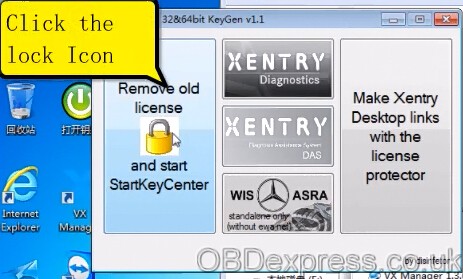

Copy the device data and save data in a new .txt

Click on XENTRY Diagnostics

Copy the hardware id to

Change the expiration date to 2030

Click on "Fill the info above and click here to generate
Copy
Go to Starkey center
Enter Starkey and save it

Close Starkey center
Open local disk C:
Open KEY

Open VX Manager

Open Mercedes Pass Thur (Xentry diagnostics)


Now you can select a model to have a diagnostic test or do coding/programming
Posted by: OBDexpress.co.uk at
01:53 AM
| No Comments
| Add Comment
Post contains 150 words, total size 12 kb.
35 queries taking 0.0804 seconds, 115 records returned.
Powered by Minx 1.1.6c-pink.

