



June 30, 2017
Here is the introduction ofXtuner CVD-9 Truck OBD DiagnosticAdapter.

Xtuner CVD-9 is a high-end and new style commercial vehicle diagnostic adapter developed by TDIntel Based on Android system.
The BluetoothXTUNERCVD-9 is the China’ first
Top 5 reasons to getXtunerCVD-9:
1.The Adapter is constructed of industrial grade materials, will withstand abuse, and is weather resistant.
2.Brands Covered: Allison, Bendix, Caterpillar, Cummins, Detroit Diesel, Freight-liner, Fuller, Haldex, International, John Deere, Mack, Mack
3.Vehicle Model and engine type auto detected.
4.OE Level Fault Code Information: Display 99% of Heavy-Duty fault codes with detailed OEM level component and trailer descriptions.
5.Fault Management: Clears faults and diagnoses all vehicle components in a single, easy to use application.
XTUNERCVD Specification(Now just have CVD-9):
|
Interface |
OBD HD-9 |
OBD HD-6 |
|
Protocol |
|
J1708 |
|
Year |
Early 2000’s to Present |
Mid 1990’s
|
|
Bluetooth |
2.1 Classic |
2.1 Classic |
|
Operate System |
Android& Windows |
Android& Windows |
Xtuner CVD-9Workable Brands:
Allison, Bendix, Caterpillar, Cummins, Detroit Diesel, Freightliner, Fuller, Haldex, International, John Deere, Mack, Mack
Xtuner CVD-9 Features:
The vehicle model and engine type can be detected automatically.
OE Level Fault Code Information: display 99% of Heavy-Duty fault codes with detailed descriptions on the OEM level component
Fault Management: to clear faults and diagnose all vehicle components in a single, easy to use application.
XTUNERCVD Operation Display:


Posted by: OBDexpress.co.uk at
09:09 AM
| No Comments
| Add Comment
Post contains 285 words, total size 32 kb.
June 29, 2017
How to change km via OBD for Opel cars?
Here is theCarl Barte use useOpcomfirmware v1.45change


" data-blogger-escaped-style="border: 0px; font-family: inherit; font-size: inherit; font-stretch: inherit; font-style: inherit; font-variant: inherit; font-weight: inherit; height: auto; line-height: inherit; margin: 0px; max-width: 100%; padding: 0px; vertical-align: baseline;" data-orig-src="http://blog.obdexpress.co.uk/wp-content/uploads/2017/06/opcom-fw-1.45-change-mileage-9.jpg" height="440" src="https://images-blogger-opensocial.googleusercontent.com/gadgets/proxy?url=http%3A%2F%2Fblog.obdexpress.co.uk%2Fwp-content%2Fuploads%2F2017%2F06%2Fopcom-fw-1.45-change-mileage-9.jpg&container=blogger&gadget=a&rewriteMime=image%2F*" width="431" />


I just posted what Carl Barter did with his Opcom.
Someone told me that Agila hasnecprocessor,
But to change km to Opel,ipreferDigiprog 3now.I did it on most Opel cars, almost without issues.
Opel
Opel
Opel Astra J2011:
Opelastrah2006 :m35080 :work
Opel
Opel
Opel Corsa:
Opel Corsa c
Read and out new mileage in. When press tick, hold trip button andofometerwill flash. Whendigisays check value, release button and disconnect battery for 10sec;
This is Digiprog 3 Opel car list:(
Insignia new version
Astra new version
Digiprog3 v4.91
Zafira CDiag
Mokka Diag
Astra 99 C56
Digiprog v4.79
Insignia Diag
Digiprog 3 v4.77
Astra BSI 24C16
Digiprog 3 v4.76
Insignia 25160
Digiprog 3 v4.75
Astra 25160
Digiprog 3 v4.74
MJD 95320 2 new versions
Digiprog 3 v4.70
Movano 2010 C76
Vivaro 2010 C76
Digiprog 3 v4.54
Opel ECU MJD 95320
(Astra/Meriva 1.3JTD)
Digiprog 3 v4.45
Opel Astra ECU 95160
Digiprog 3 v4.43
Opel Signum
Digiprog 3 v4.41
OPEL ZAFIRA ECU BOSCH 95640
OPEL VECTRA ECU BOSCH 95160
Digiprog 3 v4.34
Opel GT V2, Tigra Diag
Digiprog 3 v4.26
Opel GT
Digiprog3 v4.22
Opel Zafira new version
Digiprog iii v3.86
Opel Corsa 35080
Digiprog iii v3.57
Opel Vivaro 66
Digiprog iii v3.44
Opel Astra New version
Digiprog iii v3.42
Opel Movano Sagem NEC78K
Digiprog iii v3.35
Opel Morano
DP3 V2.10
Opel Speedster
DP3 V2.06
Buell Lightning Opel Meriva
DP3 V1.89
Opel Movano 2004
DP3 V1.83
Opel Astra Modell 2004
DP3 V1.54
Opel Zafira
DP3 V1.03
Opel Vectra Modell 2003
Posted by: OBDexpress.co.uk at
07:23 AM
| No Comments
| Add Comment
Post contains 341 words, total size 51 kb.
June 28, 2017
This
Here you go ...
Step 1: Download APP and install

Or:
Step 2:
Connect VDM to the car, go to ‘Settings’ to search WIFI and find the SSID is UCANDAS, connect it successfully, shown as below.

Step 3:
Run UCANDAS, click the icon ‘Register’, input your basic information.
Please be informed: after register, the diagnostic program downloaded via the APP only runs with this VDM, not with other VDM.


Step 4:
Unplug VDM from the car and connect network connection, choose ‘Update’, then ‘Language’, download the diagnostic program you

Step 5:
Now you are able to test your car.

Ps:
VDM 2 Car model
Acura

Source:http://blog.obdexpress.co.uk/2017/06/28/ucandas-for-android-to-diagnose-car-easy/
https://www.amazon.com/dp/B071GTGPZ6
Posted by: OBDexpress.co.uk at
03:08 AM
| No Comments
| Add Comment
Post contains 193 words, total size 25 kb.
June 27, 2017
This is 2017UCANDAS VDM 2 WIFIdiagnostic system vs. UCANDAS VDM.

UCANDAS VDMprice:€199.00
UCANDAS VDM2 price:€104.99
UCANDAS VDM2 WiFi vs UCANDAS VDM:
2017 UCANDAS VDM 2 is the newer version of UCANDAS VDM;
VDM 2 wifi is muchmorecheaper than the old VDM, around €90 saved!
UCANDAS VDM 2 communicates withAndroidonly viaWiFibut cannot support Windows systems as VDM does;
BothVDM and VDM 2 sharethe same UCANDAS car list and functions!
UCANDAS software 3.9downloadforUCANDAS VDM 2wifi version:
UCANDAS android 5.2downloadfor VDM Bluetooth version:
UCANDAS software 3.82 freedownloadfor VDM:
VDMUCANDAS update:
Free update via the official site:http://www.UCANDAS.com/download.html
UCANDAS android software language:
English,German, Finnish, French, Hungarian, Italian, Japanese, Korean, Dutch, Polish,Portuguese Portugal, Romanian, Russian, Swedish, Spanish, Turkish, Chinese Simplified, Chinese Traditional, Czech, Arabic

UCANDAS diagnostic:
Autodiagnosticsare the heart of the system, the main function required by technicians for efficient servicing. It is also the area where UCANDAS has focused its extensive know-how. The UCANDASautodiagnosticsenvironment providesdirectlyaccess to individual functions, such as reading parameters and system status, reading errors, activation of individual components to check operation, and setting and calibration functions, etc.

* Functions confirmed: Quick Test, Read ECU Info., Read DTCs, Erase DTCs, Clear learning value, Data Stream,Actuations, Read freeze frame data, Read/Write VIN, Basic Reset, Control unit adaptations, Throttle adaptations, Air bleeding, Level calibration, TheftalarmReset, Key programming, Oil change, Idle speed learning, IdlespeedAdjustment, Ignition timing adjustment, Camshaft timing control learning, Maintenance functions, ECU Initial startup, ECU initialization, etc.
* Systems worked: ME-Motor electronics, CDI-Common Rail Diesel Injection, ETC-Electronic transmission control, ESM-Electronic selector module, SBC- Sensotronic Brake Control, ESP-Electronic stability program, BAS-Brake assist, Suspension, TPC-Tire pressure monitor, Airbag, CGW-Centralgateway, EIS-Electronic ignition switch, OCP-Overhead control panel, UCP-Upper control panel,XALWA-Xenon headlamp, HRA-Headlamp range control, ATA-Anti-theft alarm system, IC-Instrument cluster,ASSYST-Active Service System, SCM-Steering column module, EPS-Electrical power steering, PTS- Parktronic system, EPB-Electric parking brake, COMAND/AUDIO, CD/DVD, TV tuner, CTEL-Cellular telephone, DCM-Door control module, ESA driver-Electric seat adjustment driver, ESA passenger-Electric seat adjustment passenger, AAC-Air conditioning, WSS-Weight sensor system, SVMCM-Special vehicle multifunction control module, etc.
UCANDAS VDM 2 car list:
Vcm2 wifi supports vehicles made in Europe, America, Asia and Australia withISO 9141-2, K/L line, SAE-J1850 VPW, SAE-J1850 PWM, CAN ISO 11898, ISO15765-4 protocols.
|
Region |
Makes |
|
AISA |
ACURA, HONDA, TOYOTA, LEXUS, NISSAN,IFINITI, MITSUBISHI, SUBARU, SUZUKI, ISUZU,MAZDA,DAIHATSU,HYUNDAI, KIA, PROTON, PERODUA |
|
EUROPE |
MERCEDES-BENZ,SAMRT, BMW, MINI, AUDI, VW, SKODA, SEAT, VOLVO, OPEL, VAUXHALL,PEUGOET, CITROEN,EURFORD, PORSCHE, JAGUAR, LANDROVER, FIAT, LANCIA, SAAB, RENAULT,ALFA,BENTLEY |
|
AMERICA |
GM,AMFORD,CHRYSLER,JEEP,SCION |
|
AUSTRALIA |
AUSFORD, HOLDEN |
|
CHINESE |
CHERY, GEELY,GWM,LIFAN |
|
OTHERS |
OBD-II |

UCANDAS review:
Several weeks ago, a car ownerdriveme a BMW2014,and found it’s not compatible with myautocom. Then tested other more car models after 2014; it can’t work neither. Asked a friend working in a repairing garage, he recommended me VDMUCANDAS.
As he suggested, theoriginal UCANDAS VDM V3.8diagnosis system is advertised better thanautocom, it claims one-year free update at official website, and works with newest cars up to 2014
This is the genuine VDMUCANDAS package, arrived this week, cost €209. It came with the main unit with OBDII cable, software driver and USB cable. The package is very simple compared with Launch X431 my maintenance friend bought, which packed with many adapters.

I installed it successfully on my Win7 ( it claims Windows XP, Windows 7, Windows 8. No WP8/Win8 RT can support it). Very easy to install with the help of uservideo noneed to activate.
The biggest advantage for me is the supported WIFI connection and Bluetooth. You know, how convenient it is if you have ever diagnosed any vehicles: D
Besides, this UCANDAS VDM covers a wide range of vehicles (it is said that UCANDAS VDM V3.8 supports almost all cars in the market.). Except diagnosing my BMW 2014, I also helped to do programming for my bro’s LandRoversuv2013 lr4 successfully.
A nice purchase.
Ps. I am just a customer, share what I experienced here, wish it can help you.:cheer2
(big thanks to Abel Dave)
Posted by: OBDexpress.co.uk at
09:16 AM
| No Comments
| Add Comment
Post contains 647 words, total size 49 kb.
June 26, 2017
HavehadgoodsuccesswithBMW. And this is a review ofFoxwell NT510 BMW scan tool.
Foxwell_BMW_Function_List.pdf(2,089.7K)
2010 BMW 335i
Can code new injectors in the BMW 2010 335i
2011 E90 328i LCI
Can Re-program the Speed Governor on 2011 e90 328i LCI model, vin WBAPH7C52BE852716…please note: Performance software is required to manipulate top speed limiters.
E92 M3
Can perform a throttle actuator adaptation on an e92 M3 after replacment
2010BMW e88:
it support reprogramming of injector values and Engine idol speeds and it can be used on it,so far ,everything is OK,
2008 BMW E93:
register a new battery- SUCCESS
2009 535i N54
Allow to alignment and calibrate fuel injectors on a 2009 535i N54 engine
2003 e46 325xi
Can read codes from a transmission control unit (TCU) on a 2003 e46 325xi.
2006 BMW X3:
able to find 2 misfires because of bad plugs.
2009 BMW z4:
able to diagnose and find bad HAL sensors stopping the roof from retracting
2009 bmw 335i(American):
Managed to do battery registration
BMWX5E53:
Used NT510 scanner to getalloftheairoutofABSblock–> OK
BMW E39 M5(2003)
X5 E53 4.6is (2003)
540iT (1999):
I bit the bullet and ordered one also along with a Bentley manual. I’ve got 3 BMWs E39 M5(2003), X5 E53 4.6is (2003), and 540iT (1999). Because it has specific BMW codes it seams worth the investment and well beyond a peak code reader.
BMW E90:
Bi-directional control tests and oil light reset… no issues
2009 BMW 335 Diesel E90
all functions in the list are tested
F82 M4
Can can provide sensor data from the oil level system on an F82 M4, The M4 apparently can only read the oil level with the iDrive, which we plan on permanently removing for non-street use.
e90 328i
Can register a battery to an e90 328i.
2007 328i Coupe
Can determine which wheel speed sensor is bad on 2007 328i Coupe.
2004 X3
NT510 can read and reset airbag service light. I have an intermittent airbag service light on a 2004 X3 that BMW service cannot track down as it clears from memory before I can get it in for service.
09 BMW E82 135
Have the ability on the 09 BMW E82 135 to scan for ghost codes, and any other stored codes. For example, example it will read codes that you did not get a scanner connected fast enough while the check engine light was on and it goes off before you know what the code actually was.
BMW/Mini/RR
capable of functioning as a universal OBDII reader for all makes in addition to it’s BMW/Mini/RR Specific functions.
2012 mini cooper
Can work with a 2012 mini cooper countryman s all 4.
E36 OBD1
Have E36 OBD1, for OBD1 cars will require adapter ES2992111 to performfunction, Available features will be dependent upon the cars abilities. Not all features are compatible with all models.
E39 M5 2000
Communicates via the obdII plug in the cabin on the E39 M5 2000, no extra adapters needed.
read and resetO2sensor
can read and reset O2 sensor readiness codes but will not code them off permanently.
nt510 update
Updates can be skipped; sequential installation of updates is not required.
2011 335d
Can reset "Right/Left Cornering light†warnings on 2011 335d caused by after-market halo installation. To properly clear the error code you need halos with proper resistance, this will cause the car’s computer to automatically reset the warnings.
2011 335i N55
All functions are supported across the E93 series on a 2011 335i N55.
Mini Cooper S R56
Ok to reset the Airbag/seatbelt light on Mini Cooper S R56.
2012 BMW F10
Ok to modulate the e-parking brake on a 2012 BMW F10 to enable a rear brake job with rotor replacement.
e46 m3
Can do VANOS test, Idle Sync etc for e46 m3.
2008-011 m3
Can activate the abs unit in order to bleed it on a 2008-011 m3.
BMW and mini cooper
Can do battery registrations and coding on BMW and mini cooper.
08-2011 M3
Be able to code a new battery on 08-2011 M3’s.
early E36
To make NT510 is compatible with the early E36 (The car has ads modules for Abs and srs), need the 20 pin adapter ES2992111.
e46 m3
Can reset the adaptations needed after an e46 m3 smg clutch change.
BMW E46
Enable auto rear window defogger for GM5 module on BMW E46. E46 general module coding is possible.
2002 745
Can perform the dynamic drive reset for a 2002 745.
BMW e83
Reset the transfer case oil wear indicator on BMW e83.
2008 BMW 135i
Can code injectors and new battery on 2008 BMW 135i.
bmwf32
Able to reset transfer case adaptations after transfer case fluid change in an F32.
Mini Cooper R56
Can code for Xenon headlight conversions and also for activating *Sirius Retrofit Enable Code (FSC)* for Mini Cooper R56’s, but only some models not all.
bmw z4m roadster 2007– FAILED
NT510 scanner cannot remove the top rpm limiter on a bmw z4m roadster 2007, performance tuning software is required to remove top speed limiters.
2005 BMW x5 4.4i e53 – FAILED
– Can’t retract the calipers on a 2005 BMW x5 4.4i e53. The E53 does not have electronically controlled calipers. On the E53 you’ll manually compress the pistons after removing the caliper, please see the following tools to assist you with this task, ES8211 ES9747 ES2153340
display the sensor’s output
Be able to display the sensor’s output if this function is registered by the car’s dme.
pull codes from the SRS
Can pull codes from the SRS system and reset the light once all issues are corrected
code LCM, GM
Allow coding of the LCM and GM on BMW vehicles.
program new ABS
Have the ability to program new ABS components to current vehicle.
bmw specific
Can read BMW Specific (Shadow/Hidden Codes)
reset sas
Able to reset the (sas) steering angle sensor
change line codes
Allow for line code changes when programming car options, such as automatic door locking.
recode&program modules
Module recoding and programming is possible with this tool.
register new tire pressure
Can register new tire pressure monitoring sensors.
TPMS receiver..depends on the vehicle
Whether NT510 can read TPMS codes or not (Specifically to tell which TPMS receiver is malfunctioning), it depends on the vehicle,If your car has the ability to provide this information the tool will be able to pull this data.
computer and system for software
The included software isnot native to Maccomputers.
win10is compatible.
(morefoxwell nt510reviews will updated here….)
Source:http://blog.obdexpress.co.uk/2017/06/26/foxwell-nt510-bmw-reviews-2/
Posted by: OBDexpress.co.uk at
06:37 AM
| No Comments
| Add Comment
Post contains 1088 words, total size 11 kb.
June 22, 2017
Finally, i did xc2336A-56F-80L processor perfectly with aXprog programmer. And here is my write-up. Wish it helps.
For XC2336A-56F80L-AA from NEW FORD KA
You need to buy Infineon authorization.
It’s only available inXprog box 5.70and Xprog 5.60


To read use 3 wires from 10 pads connections (tatyanka privetik) and other wires directly to pins.

You must selectXC2336A-72in Xprog, is the same , onlyflash1changes the size.

Posted by: OBDexpress.co.uk at
09:08 AM
| No Comments
| Add Comment
Post contains 75 words, total size 11 kb.
June 21, 2017
This write-up,
Be sure to obtain your 4 digit security code from your car documents
Connect theOPCOMdevice to the car
-Port is located near driver side pedals

-Device must be fitted with lights on the top

Connect USB cable to USB Port

If you are using a Virtual Machine:
- a) Boot up the Windows XP Machine
- b) Pass the OPCOM Device to the machine (OPCOM Software and Drivers).
c)Ensure the device is recognized in Device Manager as 'OPCOM'
If you are using native Windows XP:
- a) Ensure the device is recognized in Device Manager as 'OPCOM'
Open OPCOM Software from the desktop
Ensure theVaux-com 120309arecognizes
- a) Open the settings sub menu
- b) Click 'Check Interface'
- c) If the device is not recognized, reboot theVitrualMachine and/or your computer.
Turn on the car
Open Diagnostics in the OPCOM interface
Select vehicle year and model. Here: Astra (H) 2008
Enter 4 digit security code
-Located with car documents in glove box
Check your engine fault codes
- a) Select 'Engine'
- b) Select engine size/model
- c) Click 'Refresh List'

- d) Record list on a notepad
- e) Click 'Clear Fault Codes
 Research Fault codes
- a) Open Google
- b) Search fault codes one by one
- c) Follow advice from reputable forums or repair guides
Conclusion
If you reach the final step of this guide, congratulations! You have unlocked the ability to forever maintain and check in
withyour cars electronics and sensors. There is no other feeling like avoiding dealership technology sessions costs. You now have the ability to check every check-engine light and ensure that no damage is occurring on your vehicle. This advanced option of preventative maintenance will save you thousands in the future and put your mind to rest, knowing the exact condition of your car engine and other various components.
Source :http://blog.obdexpress.co.uk/2017/06/21/opcom-manual-how-to-readclear-fault-codes/
Posted by: OBDexpress.co.uk at
09:57 AM
| No Comments
| Add Comment
Post contains 325 words, total size 14 kb.
This write-up, asaopcom diagnostic user manual, is aimed to help read/clear fault codes or check engine codes.
Be sure to obtain your 4 digit security code from your car documents
Connect theOPCOMdevice to the car
-Port is located near driver side pedals
-Device must be fitted with lights on the top
Connect USB cable to USB Port
If you are using a Virtual Machine:
- a) Boot up the Windows XP Machine
- b) Pass the OPCOM Device to the machine (OPCOM Software and Drivers).
c)Ensure the device is recognized in Device Manager as 'OPCOM'
If you are using native Windows XP:
- a) Ensure the device is recognized in Device Manager as 'OPCOM'
Open OPCOM Software from the desktop
Ensure theVaux-com 120309arecognizes theopcomdevice
- a) Open the settings sub menu
- b) Click 'Check Interface'
- c) If the device is not recognized, reboot theVitrualMachine and/or your computer.
Turn on the car
Open Diagnostics in the OPCOM interface
Select vehicle year and model. Here: Astra (H) 2008
Enter 4 digit security code
-Located with car documents in glove box
Check your engine fault codes
- a) Select 'Engine'
- b) Select engine size/model
- c) Click 'Refresh List'
- d) Record list on a notepad
- e) Click 'Clear Fault CodesResearch Fault codes
- a) Open Google
- b) Search fault codes one by one
- c) Follow advice from reputable forums or repair guides
Conclusion
If you reach the final step of this guide, congratulations! You have unlocked the ability to forever maintain and check in withyour cars electronics and sensors. There is no other feeling like avoiding dealership technology sessions costs. You now have the ability to check every check-engine light and ensure that no damage is occurring on your vehicle. This advanced option of preventative maintenance will save you thousands in the future and put your mind to rest, knowing the exact condition of your car engine and other various components.
Source :http://blog.obdexpress.co.uk/2017/06/21/opcom-manual-how-to-readclear-fault-codes/
Posted by: OBDexpress.co.uk at
09:56 AM
| No Comments
| Add Comment
Post contains 324 words, total size 13 kb.
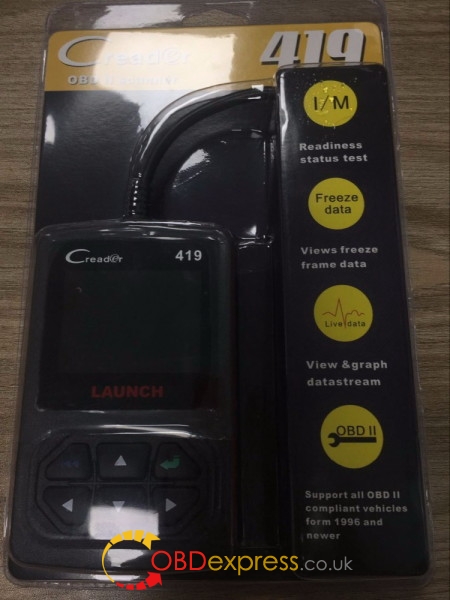
I confirm the plug is connected well;
all buttons are workable;
and the port can be used no issue

the screen resolution is good to read
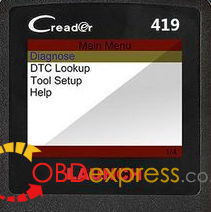
and the
so far, I have used
Read DTCs …OK
Clear DTCs …OK
Turns off Malfunction Indicator Light (MIL) …OK
Read dynamic data streams …OK
Read readiness status …OK
Read freeze frame data …OK
Read pending DTCs …OK
Read permanent DTCs …OK
Read vehicle information …OK
Color and graphical display of data streams …OK
Query DTCs …OK
I must say it's definitely worth every penny (€30 actually), very useful
If someone tired of ELM327, handheldCReader 419
Posted by: OBDexpress.co.uk at
05:55 AM
| No Comments
| Add Comment
Post contains 179 words, total size 5 kb.
June 20, 2017
Exciting news hereï¼ï¼ï¼ObdstarX300M can change mileage of Golf cars via OBD2 now。
ObdstarX300M Golf car list follow:
Golf
GOLF5 -2006
GOLF5 2007- CDC
9S12XHZ512
NEC+24C32
Read writemileage
Read EEPROM
Write EEPROM
NEC+24C64 VDO -12
NEC+24C64 color meter(type 1)
Read EEPROM
Write EEPROM
Read writemileage
NEC+24C64 color meter(type 2)
Read EEPROM
Write EEPROM
Read writemileage
NEC+24C64 13- white meter
Read EEPROM
Write EEPROM
Read writemileage
VDOK line
GTI
NEC+24C64 VDO -12
NEC+24C64 color meter(type 1)
Read EEPROM
Write EEPROM
Read writemileage
NEC+24C64 color meter(type 2)
Read EEPROM
Write EEPROM
Read writemileage
NEC+24C64 13- white meter
Read EEPROM
Write EEPROM
Read writemileage
The important tips-
Source:http://www.mileageprogrammer.com/obd2-change-golf-mileage-with-obdstar-x300m/
Posted by: OBDexpress.co.uk at
01:29 AM
| No Comments
| Add Comment
Post contains 126 words, total size 3 kb.
June 16, 2017
This is theKtag firmware 7.020test report. Here you go. Ktag firmware 7.020, how to use for car, truck, moto, tractor, boat ECU reading/writing...
Ktag firmware 7.020 how much do you know?
1- More languages available
KTAG fw 7.003: English, Italian, Portuguese
KTAG fw 7.020: English, Italian, Portuguese,French, Deutsch, Spanish
2- More ECUs and cars can be tested with
KTAG fw 7.020 adds 100+ ECU types and supports new car models e.g. Toyota 76FXXX, PSA 17.4.4, Ford E83, VW 17.5.5 (1766), Mercedes-Benz 276 ECU, Toyota 76F, etc.
3- Better wiring description
Ktag master V7.020 displays diagrams in words, not pictures
4- Runs faster and more stable
The important note-there are two versions of Ktag firmware 7.020 with different PCB design:
Version 1:Ktag firmware 7.020 with item no.SE135


(HOT) Version 2:Ktag firmware 7.020 with item no.SE135-B


Ktag firmware 7.020 not only differs from PCB design but also ktag software installation.
Ktag firmware 7.020 reads/writes acarECU:


V2.23 ktag fw 7.020 diagnoses amotorcycle


ktag fw 7.020works no issues on atruckECU R/W


K-tag firmware v7.020 works ok on atractor


Ktag 7.020ksuite 2.23 diagnoses on aboat


Ktag firmware 7.020 review:
Posted by: OBDexpress.co.uk at
06:56 AM
| No Comments
| Add Comment
Post contains 192 words, total size 24 kb.
This is theKtag firmware 7.020test report. Here you go. Ktag firmware 7.020, how to use for car, truck, moto, tractor, boat ECU reading/writing...
Ktag firmware 7.020 how much do you know?
1- More languages available
KTAG fw 7.003: English, Italian, Portuguese
KTAG fw 7.020: English, Italian, Portuguese,French, Deutsch, Spanish
2- More ECUs and cars can be tested with
KTAG fw 7.020 adds 100+ ECU types and supports new car models e.g. Toyota 76FXXX, PSA 17.4.4, Ford E83, VW 17.5.5 (1766), Mercedes-Benz 276 ECU, Toyota 76F, etc.
3- Better wiring description
Ktag master V7.020 displays diagrams in words, not pictures
4- Runs faster and more stable
The important note-there are two versions of Ktag firmware 7.020 with different PCB design:
Version 1:Ktag firmware 7.020 with item no.SE135
(HOT) Version 2:Ktag firmware 7.020 with item no.SE135-B
Ktag firmware 7.020 not only differs from PCB design but also ktag software installation.
Ktag firmware 7.020 reads/writes acarECU:
V2.23 ktag fw 7.020 diagnoses amotorcycle
ktag fw 7.020works no issues on atruckECU R/W
K-tag firmware v7.020 works ok on atractor
Ktag 7.020ksuite 2.23 diagnoses on aboat
Ktag firmware 7.020 review:
Posted by: OBDexpress.co.uk at
06:56 AM
| No Comments
| Add Comment
Post contains 192 words, total size 24 kb.
June 14, 2017
This is how to change or add a language manually to KTAG KTM100 firmware v7.003 / v7.020.
Part 1: To covert the KTM100 language:
Go toINI settingsfile and change manually to English!
see whats the default language that’s written in file, delete and write English
- ini = english
Or go toOptionsin KTM100 interface
Select the language you want to convert
Ktag KTM100 firmware 7.003languages: EnglishItalian Portuguese

Part 2: To add a new language to KTAG KTM100
Anyone can add a new language to KTM100 interface if you have the language pack. But try on your own risk!
If you need K-TAG KTM100 available in more language:Italian Deutsch English French Portuguese Spanish, you can go toKTAG firmware 7.020:http://www.obdexpress.co.uk/wholesale/v7.020-ktag-ecu-programming-tool.html

The factory has improved and added new language packs.
So,Ktag7.020has more languages can be chosen compared with Ktag firmware 7.003.
Posted by: OBDexpress.co.uk at
07:04 AM
| No Comments
| Add Comment
Post contains 145 words, total size 16 kb.
June 12, 2017
This is how to useXprog programmerto read BMW CAS2 mc9s12dg256c.
- BMW CAS2 mc9s12dg256c
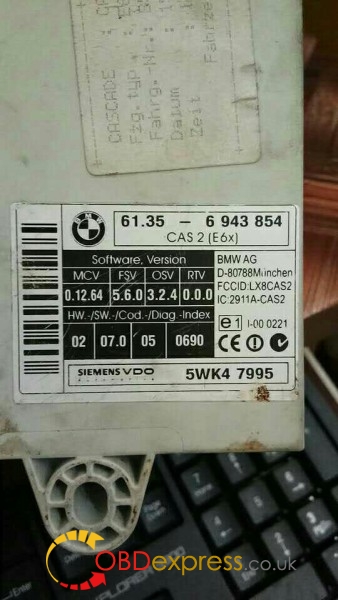
Reads good with Xprog m.
Xprog 5.55is ok but newXprog 5.70better i think.
Step 1: Xrpog > Device > MCU/MPU > Freescale HC(s)2-secured > MC9S12-EEPROM-secured (at very bottom)
Step 2: Xprog > File >New Bin File.
Step 3: Xprog > Run > Read
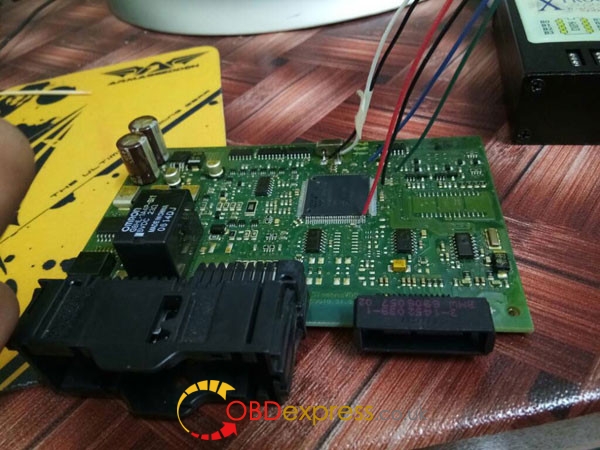
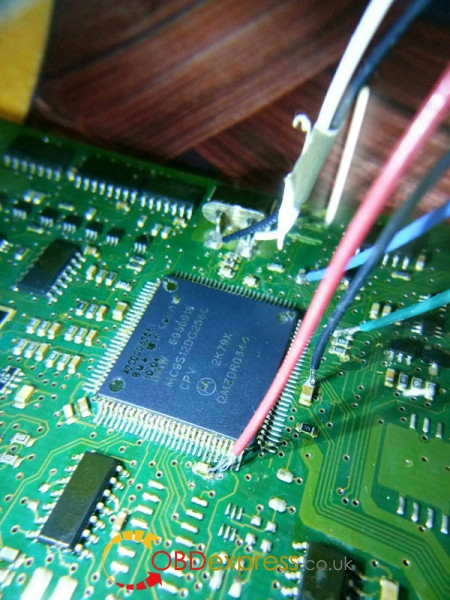
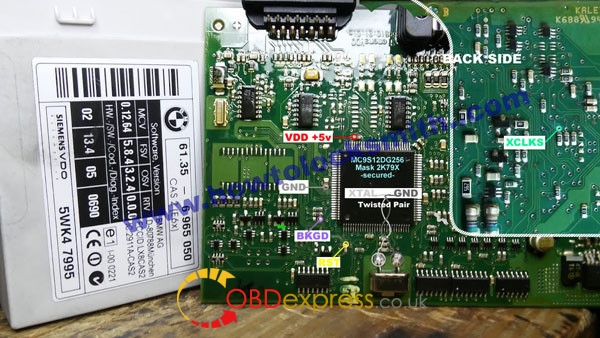
PS: You may want to take a little more care with your connections. Cas is easy to kill. Your Vdd and BKGD looks to be bridging.
Posted by: OBDexpress.co.uk at
03:07 AM
| No Comments
| Add Comment
Post contains 94 words, total size 3 kb.
June 09, 2017
obdexpress.co.ukrolls out newest 2017Ktag Master FW V7.020 SW V2.23 ECU programming tool, it adds many newencrypted new car models works I.EToyota 76FXXX, PSA 17.4.4, Ford E83, VW 17.5.5 (1766), Mercedes-Benz 276ECU, Toyota 76F, etc. as well as100+ ECU types.
So if you had the old firmware Ktag KTM100 7.003 and want to update to firmware 7.020, you could ship the full package back to rework (Cost 140USD, not including shipping)
Ktag Master FW V7.20 for sale: 425 USD (389EURO)

How to installKtag Master FW V7.20?
Hardware version: V7.020
Software version: V2.23
– XP works fine, try on WIN7 8 10 at your own risk
– How to install ksuite v2.33( applies for ksuite v2.23):
During installation, you are able to choose language: English, Italian, Portuguese
Using tips:
Tip 1: During operation, disable the internet connection; otherwise the ktag software may get damaged. (There are warning mark at the back of machine)
Tip 2: You may notice Ktag master V7.020 connection instructions is words not pictures, actually, you will find some words are blue or red color with underline, click them and you will see the connection instructions has pictures. Here two pictures for example.


Ktag Master V7.020 has no tokens limit.
It is easy to reset tokens:
When you run out of the tokens, plug the USB cable into the computer and the red indicator flashes, press the Reset button, wait until the indicator flashes off, unplug the USB cable and plug back to the computer, OK now you have another 30 tokens.

ktag master V7.020 outlook is same as Ktag V7.003:


Posted by: OBDexpress.co.uk at
05:56 AM
| No Comments
| Add Comment
Post contains 276 words, total size 22 kb.
June 08, 2017
Autel AutoLinkAL619 EUABS/ SRS system scan tool on most 1996 and newer major vehicle models. Vehicle Coverage: GM, Ford, Chrysler, Volvo, VW, BMW, Mercedes, Toyota, Honda, Nissan, Hyundai, Kia, Subaru, Mitsubishi, Peugeot,Citroen,Fiat, Renault, Landrover, Jaguar.

NEXT GENERATION OBDII&CAN SCAN TOOLAutoLink AL619EU
The ABS/SRS + CAN OBDII DIAGNOSTIC TOOL AutoLink AL619 is built to help you determine why the Malfunction Indicator Light or the ABS / SRS warning light is on. Featuring ABS/SRS system diagnosis, TFT color display, built-in speaker, troubleshooter code tips, the tool is truly ultimate in power and affordability.
Vehicle
Multi-Language: English/French/German/Spanish/Portuguese/Dutch/Polish/Swedish/Korean/Japanese/Russian/Simplified Chinese/Traditional Chinese
(Default language is
Features:
Works on ALL 1996 and newer vehicles (OBDII & CAN)
Diagnoses ABS/ SRS system codes on most 1996 and newer major vehicle models
Retrieves generic (P0, P2, P3 and U0), manufacturer specific (P1,
Turns off Malfunction Indicator Light (MIL) and ABS/SRS warning lights, clears codes and resets monitors
Views freeze frame data
Reads,
Graphs data
Retrieves vehicle information (VIN,
Troubleshooter code tips guide technicians to the root cause of trouble codes faster
Multilingual menu and DTC definitions – English, Spanish and French
TF memory card for data backup and software update
Prints data via PC
|
Display |
|
TFT color display (320 x 240 dpi) |
|
Operating Temperature |
|
0 to 60°C (32 to 140 F°) |
|
Storage Temperature |
|
-20 to 70°C (-4 to 158 F°) |
|
External Power |
|
8.0 to 18.0 V power provided via vehicle battery |
|
Length\Width\Height |
|
199 mm (7.83â€)\104.5 mm (4.11â€)\37.5 mm (1.48â€) |
|
Weight |
|
0.28kg (0.75lb, without wire) or 0.484kg (1.3lb, with wire) |
Autel AutoLink AL619EU Package list:
1pc x AutoLink AL619EU Main unit
1pc x TF Card
1pc x OBDII Cable
1pc x USB Cable
1pc x User's Manual
1pc x CD
1pc x Protective Nylon Case

More info :http://www.obdexpress.co.uk/wholesale/obd2-can-scan-autolink-al619eu.html
Posted by: OBDexpress.co.uk at
03:00 AM
| No Comments
| Add Comment
Post contains 388 words, total size 11 kb.
June 06, 2017
Here is the toturial on How to use theobdstar f109SUZUKI key programmer program a new keys to Suzuki Swift 2006 when it all key lost
Purpose:
Program a new key
Model:
Suzuki Swift 2006 diesel
Remaining keys:
0, ALL KEY LOST
Tool in use:

Obdstar f109 can do all key lost for Swift 2006?
In theObdstar F109 Suzuki Car List, Swift is listed- read fault codes, erase DTC, do ECU identification, do all key lost…all OK.

How to add a new key to Suzuki Swift 2006 using Obdstar F109:
Connect the F109 key programmer the port port on the car
Power on the key programmer
Go to function->immo
Select Suzuki->Swift

Other

05-

All key lost

After perform this function, all keys will be erased

Input value: 0408

If you meet "security code wrongâ€, please input value:0000

Continue to finish Suzuki key programming
Result:
Successfully program a new keys to Suzuki Swift 2006, via OBD
Posted by: OBDexpress.co.uk at
02:05 AM
| No Comments
| Add Comment
Post contains 169 words, total size 26 kb.
June 01, 2017
UsingOBDSTAR X300 DPto reset the odometer mileage iseasily,only via OBDII port spendFew Minute,it does not need to remove the dashboard.
Here ,weTested OBDSTAR X300 DP change mileage for Chevy Cruze 2013 success.
The steps follow below:
Car model :2013 Chevy Cruze

Chevy Cruze old odometer value: 42250

On main menu, click "Diag Programâ€, choose "Mileage Adjustment†function and car maker "GMâ€.

Go to newest GM software V30.50. Choose "Chevrolet†and "Cruze 2010â€.


After that it read out old odometer value as 42248. Click "Enter†button to input a new value.


Now time to input a new mileage. In this case, enter 42287.


Adjustment success! UseOBDSTAR X300 DP padsuccessfully change 2013 Chevy Cruze dashboard mileage from old 42250 to new 42287!

Check new mileage is 42287 on the dashboard.

Posted by: OBDexpress.co.uk at
07:29 AM
| No Comments
| Add Comment
Post contains 137 words, total size 16 kb.
32 queries taking 0.052 seconds, 145 records returned.
Powered by Minx 1.1.6c-pink.

