



April 28, 2018
I’ll chip in some words ofXTOOL V-A-G401 scanner.
XTOOL VAG401 OBD Diagnostic Tool bou
They include a reader. They also include a USB cable. The only use I have seen for the cable is to power up the unit from a USB port instead of your car. It
Turn to Auto Diagnosis
The OBDII 16PIN cable that hooks between the XTOOL VAG401 OBDII and the car is a straight thru cable. There are no components in the back shell of the OBDII connector. The other end has a 15 pin male d-sub connector.
I was able to use mine to read out the key code from the dash. I verified that it was the same as one I had gotten previously from VAG-Tacho. It reads error codes just like VCDS, although there is
The best way I can describe the interface to the modules is the older VCDS lite interface. The
It supposedly can match keys to
I figured out to update mine. Download the update application from
I got it in a couple of days. If you travel a lot, you can keep it in the car. You do not need a computer or power supply to use it, which is convenient. I can’t speak for how well it works on other cars but works fine on my 2005 Passat.

Src:
http://blog.obdexpress.co.uk/2018/04/28/xtool-vag401-review-work-perfect-on-2005-passat/
Posted by: OBDexpress.co.uk at
03:53 AM
| No Comments
| Add Comment
Post contains 445 words, total size 9 kb.
April 26, 2018
Confirmed!Tech II
It’s possible for GM vehicles to get
Subject:
Programming ECM For PTO Idle Up Operation
Models:
2001-2007 Chevrolet Silverado Classic
2003-2009 Chevrolet Kodiak
2001-2007 GMC Sierra Classic
2003-2009
with 6.6L or 8.1L Engine
Connect the Tech 2 and follow the steps below to program the ECM for idle up feature with PTO operation:
Turn on tech 2 and build the vehicle
select "Powertrain†(Or "Vehicle Control Systems†on later models)
select "Special Functions†(or "Module Setup†on later models)
select "PTO Optionsâ€
select "Change Options†(soft key at bottom of the screen)
select F1 "PTO Preset Speed Controlâ€
Note
select PTO set speed – set to 1400rpm
select PTO resume speed – set 1700 rpm
select PTO max engage speed – set to 1800 rpm (PTO engagement inhibit speed)
select PTO engine shutdown – no
select PTOengagerelay – no
select PTOfeed back-no
select "Reprogram†(soft key at bottom
key off-
key on – verify settings remain
Src:
http://blog.obdexpress.co.uk/2018/04/26/how-to-raise-and-lower-idle-rmp-using-a-tech-ii-scanner/
Posted by: OBDexpress.co.uk at
02:44 AM
| No Comments
| Add Comment
Post contains 286 words, total size 27 kb.
April 25, 2018
How to useKEYDIY KD-X2Remote Generator Transponder Clonerto Identify Chip Type
Video shows:
Put the chip you want to identify into the chip slot,


What’s theKEYDIY KD-X2?
1. Power supply: 2600mAh lithium battery; Charge method: USB 5V/1A
2. With 0.91inch OLED display screen.
3. Bluetooth BLE4.0 inside, work with mobile KD app
4. Can work with PC software by USB-B connection, and work with Androidphoneortablet by OTG connection.
5. WithPS-2interface for connecting remotes to generate.
6. Three functional shortcut buttons: chip identification, remote
7. Basic functions as below:
1) Wired Generation.
2) Wireless Generation.
3) Mobile Phone Simulation.
4) Garage Door Generation.
5) Proximity Key Unlock.
6) Frequency Detection.
7) Infrared Detection.
 Access Card Copy.
9) Fixed Code Remote Copy
10) Online HCS Remote Copy.
11) Online Chip Copy ( 96 bit 48chip, 46chip, 4Dchip, Toyota chip etc. )
12) Chip Generation.
13) Chip Editing.
14) Chip Simulation.
15)lgnitionCoildetection.
16) Remote Data Backup.
17) Additional Functions Will be Available in Succession.
1
Free Activation of 96 Bits 48 Transponder Copy (No token required)
Src:
Posted by: OBDexpress.co.uk at
01:33 AM
| No Comments
| Add Comment
Post contains 192 words, total size 12 kb.
How to useKEYDIY KD-X2Remote Generator Transponder Clonerto Identify Chip Type
Video shows:
Put the chip you want to identify into the chip slot,
What’s theKEYDIY KD-X2?
1. Power supply: 2600mAh lithium battery; Charge method: USB 5V/1A
2. With 0.91inch OLED display screen.
3. Bluetooth BLE4.0 inside, work with mobile KD app
4. Can work with PC software by USB-B connection, and work with Androidphoneortablet by OTG connection.
5. WithPS-2interface for connecting remotes to generate.
6. Three functional shortcut buttons: chip identification, remote
7. Basic functions as below:
1) Wired Generation.
2) Wireless Generation.
3) Mobile Phone Simulation.
4) Garage Door Generation.
5) Proximity Key Unlock.
6) Frequency Detection.
7) Infrared Detection.
Access Card Copy.
9) Fixed Code Remote Copy
10) Online HCS Remote Copy.
11) Online Chip Copy ( 96 bit 48chip, 46chip, 4Dchip, Toyota chip etc. )
12) Chip Generation.
13) Chip Editing.
14) Chip Simulation.
15)lgnitionCoildetection.
16) Remote Data Backup.
17) Additional Functions Will be Available in Succession.
1
Free Activation of 96 Bits 48 Transponder Copy (No token required)
Src:
Posted by: OBDexpress.co.uk at
01:33 AM
| No Comments
| Add Comment
Post contains 192 words, total size 12 kb.
How to useKEYDIY KD-X2Remote Generator Transponder Clonerto Identify Chip Type
Video shows:
Put the chip you want to identify into the chip slot,
What’s theKEYDIY KD-X2?
1. Power supply: 2600mAh lithium battery; Charge method: USB 5V/1A
2. With 0.91inch OLED display screen.
3. Bluetooth BLE4.0 inside, work with mobile KD app
4. Can work with PC software by USB-B connection, and work with Androidphoneortablet by OTG connection.
5. WithPS-2interface for connecting remotes to generate.
6. Three functional shortcut buttons: chip identification, remote
7. Basic functions as below:
1) Wired Generation.
2) Wireless Generation.
3) Mobile Phone Simulation.
4) Garage Door Generation.
5) Proximity Key Unlock.
6) Frequency Detection.
7) Infrared Detection.
Access Card Copy.
9) Fixed Code Remote Copy
10) Online HCS Remote Copy.
11) Online Chip Copy ( 96 bit 48chip, 46chip, 4Dchip, Toyota chip etc. )
12) Chip Generation.
13) Chip Editing.
14) Chip Simulation.
15)lgnitionCoildetection.
16) Remote Data Backup.
17) Additional Functions Will be Available in Succession.
1
Free Activation of 96 Bits 48 Transponder Copy (No token required)
Src:
Posted by: OBDexpress.co.uk at
01:33 AM
| No Comments
| Add Comment
Post contains 192 words, total size 11 kb.
April 24, 2018
CGDI Prog BMW tech support:
http://www.obdexpress.co.uk/wholesale/cgdi-prog-msv80-key-programmer-bmw.html
CGDI BMW Feedback: (updated in 04.201
19-03-2018, 11:04 AM
extremely fast for cas1, 2 & 3
for cas3+ if need downgrade 10 minutes and seems safe, ISN read from DME 10 minutes does not support all DME
make sure you have proper power on the car
cas4 /+ did not check
19-03-2018, 15:59 PM
cas4 F10 – ok (new key)
cas4+ F10 – ok (new key)
fem/bdcF31 – ok – reset mileage,
cas3+
28-03-2018, 05:51 AM
08-Mini Cooper – Added Key WithCGDIBmwprogrammer
the wording
07-04-2018, 06:06 AM
So I purchased
I figured out
07-04-2018, 07:22 AM
Cas4 can only be done by reading DFlash from Freescalecputhen load into programmer software
Needxprogorvvdiprog to read
10-04-2018, 06:55 AM
work likeVVDI2– synchronization every month
Src:http://blog.obdexpress.co.uk/2018/04/24/cgdi-bmw-feedback-support/
Posted by: OBDexpress.co.uk at
02:18 AM
| No Comments
| Add Comment
Post contains 272 words, total size 8 kb.
CGDI Prog BMW tech support:
http://www.obdexpress.co.uk/wholesale/cgdi-prog-msv80-key-programmer-bmw.html
CGDI BMW Feedback: (updated in 04.201
19-03-2018, 11:04 AM
Excellenttool so far. no bricks or problems.
extremely fast for cas1, 2 & 3
for cas3+ if need downgrade 10 minutes and seems safe, ISN read from DME 10 minutes does not support all DME isdown side.
make sure you have proper power on the car
cas4 /+ did not check
19-03-2018, 15:59 PM
cas4 F10 – ok (new key)
cas4+ F10 – ok (new key)isnfrom org key or dump DME
fem/bdcF31 – ok – reset mileage, ch
cas3+ E60-ok ,downgrade and makekeywithisnfrom org key
28-03-2018, 05:51 AM
08-Mini Cooper – Added Key WithCGDIBmwprogrammer
the wording wasalittleconfusing when it ask u is it a prox ornonprox this car was anonprox so u push yes and for add keys u put your first key in the programmer slot then put your unloc
07-04-2018, 06:06 AM
So I purchased thecgdipro
I figured out
07-04-2018, 07:22 AM
Cas4 can only be done by reading DFlash from Freescalecputhen load into programmer software
Needxprogorvvdiprog to read
10-04-2018, 06:55 AM
work likeVVDI2– synchronization every month
Src:http://blog.obdexpress.co.uk/2018/04/24/cgdi-bmw-feedback-support/
Posted by: OBDexpress.co.uk at
01:59 AM
| No Comments
| Add Comment
Post contains 272 words, total size 5 kb.
April 23, 2018
I have both
If you never intend to do anything other
My vcm2 functions
Keep in mind when purchasing a vcm2 that there are look alike ones out there that
Look here: good VCM2 with 2 boards:
Which IDS software version for VCM2 clone SP177-C1?
If you want aVCM2 SP177-C1, IDS V100 software will come with the unit.
But if you have a VCM2 clone already and the unit is HQ clone (same as units inhttp://www.obdexpress.co.uk/producttags/vcm2.html), you have luck with the latest IDS version 04-2018
The newest IDS compatible with VCM2 SP177C1 is version IDS 109:

Need install driver myself?
For vcm2cloneyou can

ForVxdiag Vcx Nano Ford

Src:http://blog.obdexpress.co.uk/2018/04/23/vcm2-clone-vxdiag-vcx-nano-ids-version/
Posted by: OBDexpress.co.uk at
01:56 AM
| No Comments
| Add Comment
Post contains 261 words, total size 16 kb.
April 20, 2018
How to installFord IDS 109 software:
1- Install the ids 86 before changing the date to 1 07 2015
(hold the date1/7/2015 ,, until you finish step 5
every time you restart your computer, check thedate,if it is on 1/7/2015)
2- install patch ( choice option 2 )
3- Make a backup of your windows system (I recommend, this is optional)
4- Open the program with the interfaceconnected ,,( choose NON DEALER,whenopenprogram forfirsttime) ,keepvcmturn on,onthe computer.
5 - create a restore point,,,thenturn offvcmof the computer
6 -Okay, now install the new version, v109.01, before installing, changing the date of your computer, to the current day
7- After installing, go back to the restore point, which you created in step 5, activate this restore point, and then open the program
8- Finally, install FordExtendProgram (click right mouse button click on, run as administrator)
Done, will work in the new version
Note,here’s solution ofVCM II IDS softwareupdate error
Error message in update IDS 109:
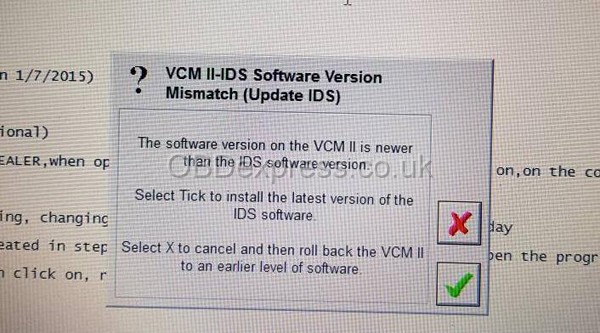
VCM II- IDS software version mismatch (update IDS)
The software versiononthe VCM II is newer than the IDS software version.
Select Tick to install the latest version of the IDS software.
Select X to cancel and then roll back the VCM II to an earlier level of software.
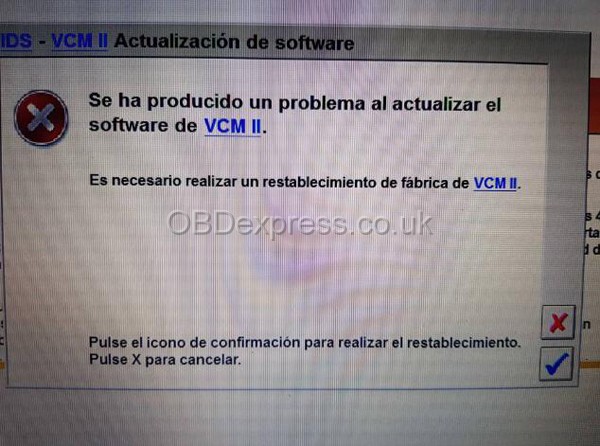
se ha producido un problema al actualizar el software vcm ii
es nece sario realizar un restablecimiento de fabrica de vcm ii
pulse el icono de confirmacion para realizar el restablcimiento
pulse x para cancelar
There was a problem updating thevcmii software
It is necessary to carry out a factory restoration ofvcmii
press the confirmation icon to perform the reset
press x to cancel
How-to’s:
Update VCM II firmware, using the tutorial:http://blog.obdexpress.co.uk/2018/04/12/vcm-ii-ids-software-version-mismatch/
Edit to add a note:
Ford IDS 109 Tech Support - Remote Installation
http://www.obdexpress.co.uk/wholesale/ford-vcm-ids-v108.01-software.html
Src:http://blog.obdexpress.co.uk/2018/04/20/how-to-install-ford-ids-109-software-for-vcm-ii/
more...
Posted by: OBDexpress.co.uk at
05:51 AM
| No Comments
| Add Comment
Post contains 307 words, total size 4 kb.
April 19, 2018
This is for those with
attach a photo…and help on how to resolve this problem, from mhhauto.com

Suggestion from experienced users:
1: close anti-virus program & disconnect
Anti
This software may disturb/block the vi-
in my case (using
I think
2:
If you have basic knowledge of checking
3:
Use a multimeter and check for broken wires
4:
Then its a case of deeper fault finding using things like scope, function generator etc, check continuity
Posted by: OBDexpress.co.uk at
03:33 AM
| No Comments
| Add Comment
Post contains 257 words, total size 18 kb.
April 16, 2018
VCM2 IDS USB device, language, license, drive issues (Advice/Suggestion)
Here are some advice and suggestion for yourVCMII IDStool,

- try with V86 versión, when I plug in the USB give me this error"unknown USB device"...
- download VMWare V93 from this fórums it
- try to install V92 like I saw
But even I put 31/10/2014 it says"no valid license"
note: I have format several times and tried with W7 Ultimate, W7 starter, W7 Pro... and always the same. Never works even if I always have in the BIOS the same date: October 31th of 2014
I cant
Advice & Suggestion:
IDS saves information to the master boot record of the hard drive, just reinstalling windows won't fix it. Either purchase a genuine license or you have to delete the hard drive partitions to rebuild the MBR and then reinstall windows. It is much easier to acquire VMWare Workstation 10 / 11 to install a copy of Windows 7 that you will use solely for IDS as you can make backup copies in case you goof up something.
What date you use is irrelevant as long as you continue to use the same date. Start with IDS version 91 -> upgrade to 94 (Use theVCM II
Maybe you could have a try
http://blog.obdexpress.co.uk/2018/04/16/solved-vcm2-ids-usb-device-language-license-drive-issues/
Posted by: OBDexpress.co.uk at
07:21 AM
| No Comments
| Add Comment
Post contains 355 words, total size 5 kb.
April 14, 2018
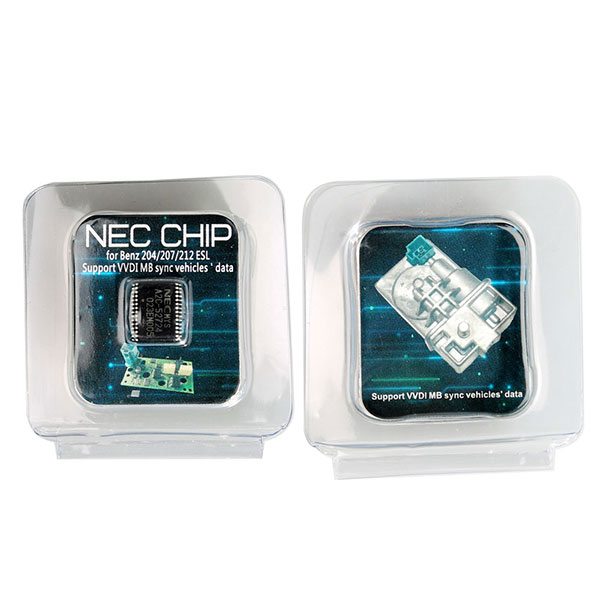
Benz W204 ESL/ELV A2C-45770 A2C-52724 NEC
How to use :
Step 2: assemble back ESL
Step 3: read EIS data and save
Step 4: renew ESL and the erase password is all 1
Step 5:
Feature:
No need for EIS renew!!!
No need to wait hours for disabled NEC chip to renew !!!
Adaptationdonewithin a minute!!!
Product pictures:


http://obdexpresscouk.blogspot.com/2018/04/benz-w204-eslelv-nec-chip-using-vvdi-mb.html
Posted by: OBDexpress.co.uk at
07:46 AM
| No Comments
| Add Comment
Post contains 97 words, total size 10 kb.
Benz W204 ESL/ELV A2C-45770 A2C-52724 NEC
How to use :
Step 2: assemble back ESL
Step 3: read EIS data and save
Step 4: renew ESL and the erase password is all 1
Step 5:
Feature:
No need for EIS renew!!!
No need to wait hours for disabled NEC chip to renew !!!
Adaptationdonewithin a minute!!!
Product pictures:
http://obdexpresscouk.blogspot.com/2018/04/benz-w204-eslelv-nec-chip-using-vvdi-mb.html
Posted by: OBDexpress.co.uk at
07:46 AM
| No Comments
| Add Comment
Post contains 97 words, total size 10 kb.
April 13, 2018
volvovida2014dhas a login error. It’s not working since 2018
Solution 1:
You must extract withwinrar2014D.exe patch and then edit the file "license†with notepad (2014D \ VIDA \ patch \ license)
Change:
serverType = "AIOCâ€subscriptionExpireDate= "2017-12-31 23:59:59â€
with
serverType = "AIOCâ€subscriptionExpireDate= "2020-12-31 23:59:59â€
A
Solution 2:
Or download the patch already modified from here:
https://drive.google.com/file/d/1ZFvmLeh…OdRrs/view
Good luck!
Posted by: OBDexpress.co.uk at
09:29 AM
| No Comments
| Add Comment
Post contains 93 words, total size 6 kb.
April 12, 2018
This is technical support fromobdexpress.co.ukfor "VCM II – IDS software version mismatch†and "Not Connected to VCM IIâ€
VCM II–IDS softwareversion mismatch (update IDS)
The software versiononthe VCM II is newer than the IDS software version.
Select Tick to install the latest version of the IDS software.
Select X to cancel and then roll back the VCM II to an earlier level of software.

Software IDS 103

VCM II Manager (Ford-VCM-II): Not Connected to VCM II


Tech support fromobdexpress.co.uk:
Find this button in the VCM 2 main unit, and then press on it.

Connect the VCM II unit to a laptop/PC with a USB cable
Note that VCM II is only connected to the PC via a USB cable, not connected to the car via an OBD cable
Press the button until the power is connected and all the lights are lighted.

Go to the START menu, then Bosch
Open FordVCM II Manager, then go to VCM II Update for recovery

Hope it’s helpful to you.
Good luck!
http://blog.obdexpress.co.uk/2018/04/12/vcm-ii-ids-software-version-mismatch/
Posted by: OBDexpress.co.uk at
06:30 AM
| No Comments
| Add Comment
Post contains 179 words, total size 18 kb.
April 11, 2018

Mazda IDS 109 Mega link:
Unknown risk! Good luck!
For security, go to tested versionsMazda IDS 108
tested no issues with VXDIAG VCX NANO:
Mazda IDS V96working for VCM2 clone:
Both tested 100% by realprosAndconfirmed to workperfectwith VCM2 cloneLook at the video
Posted by: OBDexpress.co.uk at
09:17 AM
| No Comments
| Add Comment
Post contains 55 words, total size 9 kb.
Mazda IDS 109 Mega link:
Unknown risk! Good luck!
For security, go to tested versionsMazda IDS 108
tested no issues with VXDIAG VCX NANO:
Mazda IDS V96working for VCM2 clone:
Both tested 100% by realprosAndconfirmed to workperfectwith VCM2 cloneLook at the video
Posted by: OBDexpress.co.uk at
09:17 AM
| No Comments
| Add Comment
Post contains 55 words, total size 9 kb.
Mazda IDS 109 Mega link:
Unknown risk! Good luck!
For security, go to tested versionsMazda IDS 108
tested no issues with VXDIAG VCX NANO:
Mazda IDS V96working for VCM2 clone:
Both tested 100% by realprosAndconfirmed to workperfectwith VCM2 cloneLook at the video
Posted by: OBDexpress.co.uk at
09:08 AM
| No Comments
| Add Comment
Post contains 55 words, total size 9 kb.
Mazda IDS 109 Mega link:
Unknown risk! Good luck!
For security, go to tested versionsMazda IDS 108
tested no issues with VXDIAG VCX NANO:
Mazda IDS V96working for VCM2 clone:
Both tested 100% by realprosAndconfirmed to
Posted by: OBDexpress.co.uk at
09:08 AM
| No Comments
| Add Comment
Post contains 60 words, total size 10 kb.
BMW ICOM A2diagnostic interface failed to be connected, because the firmware is too old and need to upgrade it.
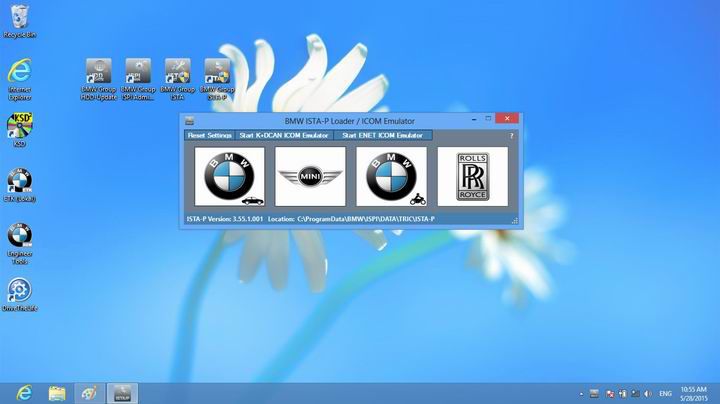
Firstly, you need to learn how tocheck BMW ICOM firmware need update.
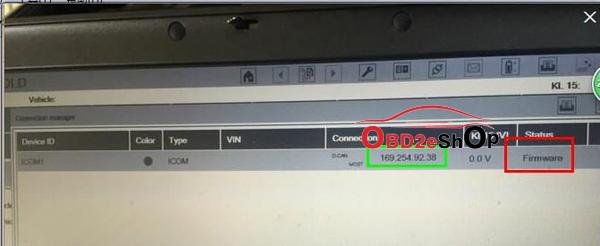
update the firmware of BMW ICOM Interface. You have no need to update it if it says FREE.Please read the above photo. It shows FIRMWARE in red frame, that mean you need to
Secondly, update the firmware of BMW ICOM Diagnostic tool step by step.
1.Power on your icom interface by OBD cable, and connect it to computer by LAN cable. PLEASE make sure they are connected well because your interface might be damaged if disconnection during updating.
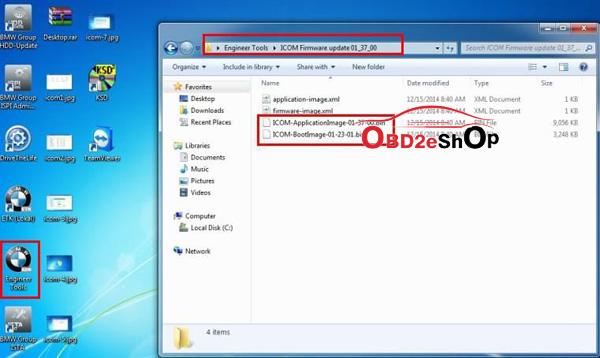
2.After connected, open the file ENGINEER TOOL on the desktop and you will see a file named ICOM FIRMWARE UPDATE. They are 2 BINs inside of it, ICOM-APPLICATIONIMAGE-XXX and ICOM-BOOTIMAGE-XXX. They are the files
|
|
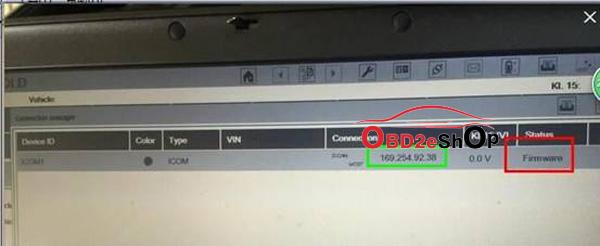
3.Open your IE and input the IP address of your icom. If you do not know what is the IP of your icom, you can use ISTA-D to find it. As below, the IP in green frame is the IP of your ICOM. It needs ID and password to enter in, the ID is root,pw is NZY11502.
|
|
- After entering into ICOM by IE.Click UPDATE FIRMWARE and choose ICOM-BootImage-XXX.bin,choose Image type as SYSTEM and click SEND THE FILE. Click YES when he say Write the image file to the flash? You will see the red right blinks after that.
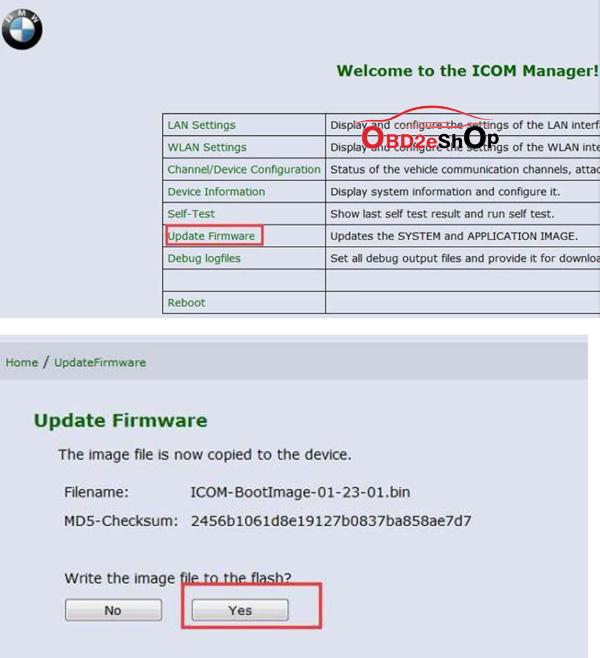
|
|
5.Now we click UPDATE FIRMWARE and choose ICOM-ApplicationImage-xxx.bin and then choose the Image type as APPLICATION and then click SEND THE FILE. Click YES when he says Write the image file to the flash?
6.Reboot your ICOM interface after you update those APPLICATIONIMAGE and Bootimage. And you need to wait for few minutes. Go to ISTA-D again, you will see the FRIMWARE turn to FREE. That means your interface is matched to latest BMW ICOM ISTA software.
|
|

Done!
Hope it helps!
Any question, please feel free to contactwww.obd2eshop.com, email at:Sales@OBD2eShop.com
Thanks for reading!
2018.3 BMW ICOM SoftwareHDD ISTA-D 4.09.13 ISTA-P 3.63.2.001 Engineering Mode support Windows 7 $99
http://blog.obd2eshop.com/how-to-check-bmw-icom-firmware-update/
Posted by: OBDexpress.co.uk at
07:44 AM
| No Comments
| Add Comment
Post contains 361 words, total size 9 kb.
32 queries taking 0.0273 seconds, 149 records returned.
Powered by Minx 1.1.6c-pink.

