



May 30, 2017
Purpose:
Raise voltage via UPA USB V1.3
Device used:
UPA USB V1.3hardware test pass 100%
Reason for voltage change:
reading s93a66…. fine but wanted to transfer data to 93c66 and wouldn’t read or write on 93c66 until I set jumper to 4.8v
UPAprogrammer voltage:
Options in program are only 3.3v or 4.8v controlled by jumpers
Optional solutions:
Check jumper 3.3V/ 5V
There are two series diode to drop 5v to 3.3v around 5/3.3v jumper. Try to make short to one of them now the 3.3v setting will raise about 0.6v but don’t know if the voltage monitoring circuit will report a problem!
or check the variable resistorin theUPA USB programmer

I read that ‘that’ was a fuseable link
It used to have a component marked N1 which was a fuse
It protect 5V power from top board to bottom board
when have the short circuit, it ‘ll change resistor first to protect other item.
After that, we need change it. can use fuse instead it
Disclaimer: You will try on your own risk!!
Posted by: OBDexpress.co.uk at
08:03 AM
| No Comments
| Add Comment
Post contains 182 words, total size 12 kb.
May 29, 2017
Launch Icarscan diagnostic tool full systems for Android / iOS with 5 car software & 3 specica function software free Update Online
Q:Only 8 software free,butIf there is no software I need, what should I do
A:You could buy the software software what you need at theEZdiag APP .
Follow these steps below:
1.RunICarScan APP "EZdiagâ€

2.Enter in user name and password, log on APP

3.Main Menu

4.Click "Full-system Scanâ€buy car software and click "Special Toolsâ€buy the special function software

5.Car software icon

Choose "Purchase Moreâ€

Please choose which software you want to buy

Make the payment(Click "Buy Nowâ€ï¼‰

Choose payment method
" data-blogger-escaped-style="border: 0px; font-family: inherit; font-size: inherit; font-stretch: inherit; font-style: inherit; font-variant: inherit; font-weight: inherit; height: auto; line-height: inherit; margin: 0px; max-width: 100%; padding: 0px; vertical-align: baseline;" data-orig-src="http://blog.obdexpress.co.uk/wp-content/uploads/2017/05/buy-launch-icarscan-software-paypal8.png" height="427" src="https://images-blogger-opensocial.googleusercontent.com/gadgets/proxy?url=http%3A%2F%2Fblog.obdexpress.co.uk%2Fwp-content%2Fuploads%2F2017%2F05%2Fbuy-launch-icarscan-software-paypal8.png&container=blogger&gadget=a&rewriteMime=image%2F*" width="465" />
Click "Submitâ€Finish the payment
6.If purchase Special function software , click the icon as bellow :

Choose the Special software which you want

Make the payment(Click "Buy Nowâ€ï¼‰

Choose payment method

Click "Submitâ€, finish the payment .
Done .
Posted by: OBDexpress.co.uk at
01:55 AM
| No Comments
| Add Comment
Post contains 149 words, total size 24 kb.
May 26, 2017
This is VXDIAG Allscanner for BMW TOYOTA FORD/MAZDA.
This vxdiag multi diagnostic tool is called VXDIAG A3.

Allscanner vxdiag a3can be performed as a combination of BMW ICOM A2, Vxdiag vcx nano Ford/Mazda, and Vxdiag vcx nano Toyota.
Professionals @obdexpress.co.uk tested its functionality and verified it’s working 100% no issues in OBDII diagnostics, coding, key/ ecu programming.
Vxdiag a3 diagnostic tool on BMW works asICOM A2

Vxdiag A3 and Bmw software worked!
ISTA-D 4.04.12………diagnose OK
ISTA-P 3.60.2.001…………….program OK
BMW ETK: 2017.2………read electronic catalogue OK
BMW KSD 09.2016………..read commercial service data OK
BMW Engineer Software:
– INPA………diagnose E series OK
– NCS………..coding E series OK
– WinKFP………..programming E series OK
– E-Sys 3.27.1, Psdzdata 59.0)……..coding f series OK
BMW FSC code generator
BMW AiCoder
Vxdiag a3 on Ford/Mazda works asVCM2 cloneorVxdiag vcx nano for Ford/Mazda


Vxdiag A3 with Ford IDS software is good at Ford diagnostics and programming as VCM2 china clone and Vxdiag vcx nano Ford do, incl.
- Programming & Installation of new ECUs (PCM, ABS, Instrument Cluster, Air Bag, Fuel Pumps, etc.)
- Live Data-stream with Recording & Playback Functions for Main ECUs
- Read & Clear Diagnostic Trouble Codes (DTCs)
- New Software Re-flash for Existing ECUs
- Set, Adjust or Remove Speed Governors
- Automatic vehicle recognition
- All Other Dealer Functions
- Guided Fault Finding
- Steering Angle Resets
- Program New Keys
- DPF Regeneration
- Brake Bleeding
- Injector Coding
The important tip:VXDIAG NANO vs VCM II : Which is better?
Full chip high quality VCM II (SP177-C1) better!
But be careful programming!
Vxdiag a3 on Toyota works as well asVxdiag vcx nano for Toyota

Vxdiag A3 Toyota performs well with Techstream software for Toyota/Lexus diagnostics and customizing setting.
Some of the more memorable ones are:
Program and erase my own keyless remotes, FOB’s, Smart Keys, Etc….
Change DRLs on or off
Change light sensor for when headlights come on or go off with AUTO mode
Make it so windows roll down when you hold down unlock on your remote for 2.5 seconds.
Roll up/down windows by turning key in the door lock for 2.5 seconds
Turn on or off seatbelt warning buzzer
Turn beeper on/off for doors locking and unlocking with remote
Change door locks on/off when shifting FROM park
Change door locks on/off when speed over 15mph
Change door locks on/off when shifting INTO park
Change doors locks to unlock all doors 10 seconds after driver door opens.
Change delay for how long headlights stay on after ignition off.
Program your TPMS sensors to your vehicle if you get a new/replace one.
Shows temp inside tires, and actual pressure inside each tire including spare.
Every switch in the car is displayed with it’s current status.
Press the Cruise control Accel stick up and it shows that switch is now on.
Pull the stick and it shows the cancel button is now on.
Push window down button and it shows window down button on.
Every imaginable sensor, temp, flow, psi, that’s on the vehicle is displayed to you.
….
Enjoy!
Posted by: OBDexpress.co.uk at
01:32 AM
| No Comments
| Add Comment
Post contains 506 words, total size 37 kb.
May 24, 2017
When starting virtual machine, some usershavegotFord IDSVMware Workstation Error: 64 bit operation is not possible.
This virtual machine is configured for 64-bit guest operating systems. However,64-bit operation is not possible.
This host supports Intel VT-x, but Intel VT-x is disabled.
Intel VT-x might be disabled if it has been disabled in the BIOS/firmware settings or the host has not been power-cycled since changing this setting.
(1) Verify that the BIOS/firmware settings enable Intel VT-x and disable ‘trusted execution.’
(2) Power-cycle the host if either of these BIOS/firmware settings have been changed.
(3) Power-cycle the host if you have not done so since installing VMware Workstation.
(4) Update the host’s BIOS/firmware to the latest version.

That means the cpu isn’t configured / isn’t capable of 64bit virtualization. Check thebios setting
To be honest… Just turning nonpersistent off before the first start is all usersneed to do… And also click i moved it.
Leaving internet on doesn’t matter.
In fact usersneed to keep it on if userswanna do programming from the server.
So, about the Vmware error on start up:
Justchange computer BIOS about virtualization that was disabled, change to enabled.ThenIDS is working ok!!!!

Agood tip fromobdexpress.co.uk- How to installFord IDS 105on a VMware machine:
> Downloaded & extracted:
Ford IDS V105.01 +VCM II Manager 2.3.85.7 Pass: nK6gE84)
https://mega.nz/#!519CwI5I!V57SrxIcMAtp87lg3iv-zDKU0Ueu8T5jPBc9sdUg-5g
> Opened in VMWARE 10.
(In one of the first couple of lines in config file change the "12†to "10â€)
> Clicked "I MOVED ITâ€
> Turned of internet (dunno if it matters).
> Turned off nonpersistent.
> Started Up IDS 105.1VMWARE
> Plugged in OEM VCM and installed drivers.
> Made cosmetic changes, performance changes to WIN7.
> Opened IDS and made settings changes
> Ran Shut down command in Guest System.
> Turned nonpersistent back on.
I did 6 module programming on a 2013 explorer yesterday and it went flawlesslywith VCM2 clone (SP177-C1it’s a wifi version)..
Posted by: OBDexpress.co.uk at
02:27 AM
| No Comments
| Add Comment
Post contains 329 words, total size 19 kb.
May 18, 2017
Carprog 10.05 software crack on Mega ,after tested ,carprog 10.05 istested100% and100% safeto use,carprog software is verifiedwork perfectlywithCarprog programmer clone
FREE download here :

It’s carprogcrack, no need pass
carprog v9.31 download: (try on your own risk)
What is Carprog:
CarProg FULL v10.31is a universal diagnostic, tuning and adjustment tool for car radios, odometers, dashboards and immobilizers repair, which includes advanced functions like EEPROM and microcontroller programmer and key transponder programmer.
How to use carprog full v10.05:
carprog v10.05 is easy to install and use on Windows 7 system
carprog user manual:http://carprog-clone.blogspot.com/2017/02/carprog-user-manual.html
You can get a CarProg clone for about $60-$70(Will post a link at the bottom of the page with trusted sources where you can purchase one). I remember about two years ago they cost about $200 and were a lot worse. Basically what I am saying is that at the current prices a CarProg can pay for itself in about one use. Let’s say you need to clear some airbag crash data, it will cost you about $50 to send it out and have it cleared or you can do it yourself and have a gadget that can do a few other nifty things. With that being said I would also want to mention that with the clone some things you want to do may not work. I would say that only about 70% of the clones features actually work. Its definitely a hit or miss situation. Personally I deal a lot with Acura RSX’s and Volvos and I had great success. If you look at the pictures below you can see the build quality is very poor. None of the sides seem to go together, but it works.
Here is my opinion, if you are not a car savvy guy and only plan on using this once to repair your airbag module or odometer then just send it into a service center since it will cost about the same. If you plan on using it a few times I would definitely suggest the clone so you can get a feel for what what it does and if its something you might want to use. If you are planning on starting a service center that deals with airbag resets and what not I would NOT recommend the clone.
http://blog.obdexpress.co.uk/2017/05/18/carprog-v10-05-software-download-crack-100-works/
Posted by: OBDexpress.co.uk at
09:54 AM
| No Comments
| Add Comment
Post contains 392 words, total size 11 kb.
Carprog 10.05 software crack on Mega ,after tested ,carprog 10.05 istested100% and100% safeto use,carprog software is verifiedwork perfectlywithCarprog programmer clone
FREE download here :
It’s carprogcrack, no need pass
carprog v9.31 download: (try on your own risk)
What is Carprog:
CarProg FULL v10.31is a universal diagnostic, tuning and adjustment tool for car radios, odometers, dashboards and immobilizers repair, which includes advanced functions like EEPROM and microcontroller programmer and key transponder programmer.
How to use carprog full v10.05:
carprog v10.05 is easy to install and use on Windows 7 system
carprog user manual:http://carprog-clone.blogspot.com/2017/02/carprog-user-manual.html
You can get a CarProg clone for about $60-$70(Will post a link at the bottom of the page with trusted sources where you can purchase one). I remember about two years ago they cost about $200 and were a lot worse. Basically what I am saying is that at the current prices a CarProg can pay for itself in about one use. Let’s say you need to clear some airbag crash data, it will cost you about $50 to send it out and have it cleared or you can do it yourself and have a gadget that can do a few other nifty things. With that being said I would also want to mention that with the clone some things you want to do may not work. I would say that only about 70% of the clones features actually work. Its definitely a hit or miss situation. Personally I deal a lot with Acura RSX’s and Volvos and I had great success. If you look at the pictures below you can see the build quality is very poor. None of the sides seem to go together, but it works.
Here is my opinion, if you are not a car savvy guy and only plan on using this once to repair your airbag module or odometer then just send it into a service center since it will cost about the same. If you plan on using it a few times I would definitely suggest the clone so you can get a feel for what what it does and if its something you might want to use. If you are planning on starting a service center that deals with airbag resets and what not I would NOT recommend the clone.
http://blog.obdexpress.co.uk/2017/05/18/carprog-v10-05-software-download-crack-100-works/
Posted by: OBDexpress.co.uk at
09:54 AM
| No Comments
| Add Comment
Post contains 392 words, total size 11 kb.
May 16, 2017
This is a W221 tutorial created for W221 owners with diesel engines.
How to change the heater booster system to a fully functional auxiliary heating system.
Tools & Stuff you need:


- Torx 20
- Wedge to leverage
- StarDiagnosis with DAS devleoper or Vediamo + Multiplexer
- Upper control panel (climate panel) with auxiliary switch
The Mercedes S-Classes (W221) with the diesel engines S320 CDI & S400 CDI are equipped as standard with an heater booster system. The heater booster switches itself on from an outside temperature of approx. 8 degrees independently and warms the cooling water, so that the engine comes faster to operating temperature. There are two types of heater booster systems: electrically operated and fuel operated. On the W221, fuel-powered heater booster were installed. These heater boosters are fully functional auxiliary heating systems from Webasto, which are only restricted in your control.
In the following course I describe what you can see, whether you have an heater booster system and what you have to convert, so that the booster can be used as a real auxiliary heater.
Standard climate switch (upper panel) without heater booster:

Cars with this switch can only use residual heat after a ride….
Climate switch (upper panel) with heater booster:

Only diesel vehicles have this switch… Heater booster turns automatically on an off, depends from the outside temperature…. You can also turn it on manually…
Climate switch (upper panel) with auxiliary heating:

This ist he switch you need to control your auxiliary heating system… Red LED turns on if the system is running… And the other LED turns yellow if you programmed a departure time…
Start the modification:

Use the wedge and fold away the two covers….

…next step turn out the two Torx screws…
….after this leap out the grid to find tha last Torx screw….

….if you have all three screws turned out, leap out the wooden modling….


As can be seen in the pictures, now disconnect both plug connections and loosen the four screws. Then simply insert the new control unit. Installation in reverse order.
Once again everything is put together, now it goes tocodingviaSD connect C4…
You have to code these three ECU:
- Central Gateway (Zentrales Gateway ZGW)
- Upper Control Panel (Oberes Bedienfeld OBF)
- Head Unit (Comand or HU221 inVediamo)
You can choose two ways for coding:


choose ecu central gateway….


…. Now follow the red arrows….


…VariantencodierungGlobale Variantenkodierung…
… now change the equipment „auxiliary heating" on available….


….. now switch tot he upper control panel and follow the red arrows….


… change the option auxiliary heating (Standheizung) to available…

… the last step ist o change the settings in ecu head unit (comand)….
…. go to adjust ecu….

… select the section „MMI controls" ….

… last step, set the „Independend Car Heating Installed" option to YES…
Now all necessary steps have been completed and you have a full-fledged auxiliary heating system. Before using, turn the ignition off and then on again.
If you now open the climate menu in the head unit, you will find a new menu item: "auxiliary heating departure time†Here you can pre-program up to three departure times. Depending on the outside temperature, the system will heat up the car for up to 50 minutes.


… new menu looks like this…..
Hints
- To ensure proper heating, the air conditioning system must be in the automatic mode and a temperature of 22 ° C must be set (see operating instructions book W221).
- The control unit for the air conditioning system will display an error in the future when reading out. The fault occurs because a valve for reducing the heating circuit is missing (heating of the room warms up a smaller cooling water circuit, the auxiliary heater warms the entire cooling water). The error has no effect on the functionality and can be ignored.
- If you are technically savvy and want to "tinkerâ€, you can also retrofit the control unit for the radio remote control in order to be able to program the heating from a distance (possibly also a Thermocall).
- BIG THANKS to the contributor Jason_Calvin from the MH community!!! THANKS A LOT.
Much success in conversion!
Posted by: OBDexpress.co.uk at
01:35 AM
| No Comments
| Add Comment
Post contains 709 words, total size 114 kb.
May 11, 2017
Looking for a MAN truck diagnostic tool? MAN VCI Lite… here you go. Just likeDAF VCI Lite, a professional truck diagnostic tool for a specific brand, to perform diagnosis, actuation and parameter viewing.
MAN truck diagnostic tool for sale:MAN VCI Lite
MAN VCI Lite price: €685
MAN VCI Lite, what can & cannot do:
- Simple testing of actuators…..Confirmed!
- Visualisation and assessment of current sensor signals……Confirmed!
- Identification of control unit in assembled condition……Confirmed!
- Depiction of all stored diagnosis entries……Confirmed!
- Fast orientation on vehicle by means of integrated overview wiring diagrams……Confirmed!
- HD-OBD scantool (Heavy Duty On Board Diagnosis), read-out and presentation of data relevant to exhaust gas……Confirmed!
MAN VCI Lite truck diagnostic tool, how to use:


In summary, MAN VCI Lite clone is good at trucks obdii diagnostics, actuation, measured values display and so on, works 95% as the original truck diagnostic tool. And it covers up to 95% of org T200 capabilities.
The only demerit-
Theclone MAN VCI Litecan not see the ignition, and users need go to individual modules for test all work, can not use the quick test.
http://blog.obdexpress.co.uk/2017/05/11/man-truck-diagnostic-tool-wanted-man-vci-lite/
Posted by: OBDexpress.co.uk at
07:00 AM
| No Comments
| Add Comment
Post contains 190 words, total size 22 kb.
May 10, 2017
Launch X431 or Launch Easydiag?
Lauch x431 is better than easy diag. If you really want one cheap with some bi-directional control a DS150e chinese clone is ok but you’ll need to set it up on a laptop.
I’d recommend Easydiag and Vlads Software 1 year update . It gives you id say 95% of what real x431 xpro3 can , i’m speaking about basic functions that original would have that cracked easydiag to xpro3 wouldn’t have 1 or 2 .
you can make easydiag xpro3 with dongle and software for 1/10th cost of what original x431 xpro3 costs .
with easydiag and vlad’s software, you can do actuator testing on most vehicles yes but limited only to what the vehicle u are testing has .
i have Original Launch X431 full and easydiag Vlads work 1 to 1
this Delphi ds150 e is full shit not have special function only live data and errors
I have for each car brand dealer unit !!!
before 1 year i work with TEXA this device is full full shit !!!
buy Launch! It works very well !!!
So, Launch x431wins!For launch x431 scan tools,2017 launch x431 v 8 inchtablet should be the most cost-effective among x431 series. This is why:https://launch-x431-v.blogspot.com/2017/03/why-need-new-launch-x431-v-scan-tool.html
Launch M-Diag or Launch Easydiag?
|
Product |
|
|
|
Price |
€59 |
€85 |
|
Android |
√ |
√ |
|
Apple IOS |
√ |
√ |
|
Generic OBDII check |
√ |
√ |
|
I/M check |
– |
√ |
|
Actuation test |
√ |
|
|
4 systems diagnosis (Engine, transmission, ABS, SRS) |
√ |
√ |
|
FULL systems diagnosis |
– |
√ incl. bl-directional capabilities |
|
IMMO & key programming |
– |
√ |
|
Oil / service reset |
– |
√ |
|
Brake pads |
– |
√ |
|
Battery matching |
– |
√ |
|
ABS bleeding |
– |
√ |
|
TPMS reset |
– |
√ |
|
Throttle body adaption |
– |
√ |
|
Steering angle reset |
– |
√ |
|
DPF regeneration |
– |
√ |
|
Injector coding |
– |
√ |


So, Launch M-diag Lite wins!€85 not only covers X431 easydiag 2.0 and Golo easydiag+ (four+full systems diagnosis); but adds new special functions incl.Oil / Service reset, ABS bleeding, IMMO & key programming, throttle body adaptation, brake pads, steering angle reset, battery matching, DPF regeneration, Injector coding.
Launch X431 or Launch M-Diag or Launch Easydiag
For DIYers,
Launch M-Diag LiteOBDII code reader is much more powerful than Launch X431 Easydiag 2.0 and Golo Easydiag+. It not only excels in basic obdii diagnosis but special functions and actuation test
Launch M-Diag Lite details:
-Price: €84.95
-Language: English, Chinese, Spanish, French
-Car list:supports the generic OBD, CAN bus, and proprietary protocols of over70 car manufacturers and2, 500 car models
For garage repair work,
2017 Launch X431 V8 inch pad is a good budget for reasons as below:
-Cheaper (€675) but more powerful than other launch x431
-Special functions available
-Full vehicle coverage: Brazilian, Indian, Chinese Australian, cars…
-2017 New vehicle support: BMW
-2017 New vehicle support: Toyota
-VW online programming withoutGerman server
Posted by: OBDexpress.co.uk at
06:18 AM
| No Comments
| Add Comment
Post contains 485 words, total size 55 kb.
May 08, 2017
How to choose the right ECU tuning tool you need really? MPPS v18, ktag, kess, fgtech4 or 2? Tips from pros here... Hope this helps.
|
ECU tools/Communication |
||||
|
OBD2 |
√ |
√ |
|
√ |
|
BOOT |
|
√ |
√ |
√ |
|
BDM |
|
|
√ |
√ |
|
J-TAG |
|
|
√ |
√ |
|
Tricore |
√ |
|
|
|
So, KESS v2 supports obd2, boot
MPPS v18 works for obd2, Multiboot, Tricore forMarelliECU’s
KTAG can work for bdm, j-tag, boot
FgTech Galleto v54 4 (or Fgtech 2) work no issues with obd2, bdm, j-tag, boot
|
Communication/ ECU tools |
OBD2 |
BOOT |
BDM |
JTAG |
Tricore |
|
MPPS V18 |
√ |
|
|
|
√ |
|
KESS v2 |
√ |
√ |
|
|
|
|
KTAG |
|
√ |
√ |
√ |
|
|
FgTech 2 / Fgtech 4 |
√ |
√ |
√ |
√ |
|
So, 3 options are available for OBDII connection: mpps v18, kess, fgtech
3 options for BOOT: kess v2, k-tag, fgtech galletto
2 options for BDM: ktag, fgtech
2 options for JATG: ktag, fgtech 4/2
Only 1 way for Tricore: MPPS V18!
That is why you need buy more than one ecu programmers.
When to buyGalletto 4 and kess v2together?
Galletto 4 work with truck, including Benz truck, read and write ECU via both BDM and OBD; KESS not works with truck, read and write ECU via only OBD, not BDM.
When to buyKess v2 and Ktagtogether?
KESS V2is aECU programming toolthat is perfect for OBD use, while KTag is perfect for Jtag, BDM and all the Boot application (tricore and ST10).
With KESS V2 you programming directly through the OBD port of the vehicle, while with Ktag (Ktag 2.13) you need to take apart the ECU and open it, after you can make the read/write operation.
Many ECU has the advantage that can be read and write from OBD port (so KESS V2 is perfect), but there are lot ECU that need to disassemble from the car and open and this is the case for all the ECU that need to be programmed with Jtag, BDM and Boot protocols, so KTAG is needed.
When to buyFgtech 4, Kess v2 and Ktagall together?
Because non of China tool will cover all cars good and if you buy clone tools, buy all (galletto+kess+ktag) from them, that you will cover more cars, or better to buy a good original tool if you will do the work as a pro, all depends want you will do.
Reference:
MPPS covers MAIN + TRICORE + MULTIBOOT and a wide range of controllers incl. M3.8, M5.9, ME7xx, MED9, MED17, EDC15/16/17, Delphi, Siemens, Marelli, Delco, Sagem, Trionic and many others…
Kess covers all major brands and protocols including Line, CAN, EDC17 and MED17 and Ford J1850
ktag firmware v6.070with ksuite v2.13 supports BDM MOTOROLA MPC5xx, and BMW Gasoline F Chassis and Mercedes W222
FGTech Galletto 4 is a famous chip tuning tool for all cars, trucks, motorcycles, Marine, BDM MPCxx, BDM Boot Mode Tricore, checksum
Fgtech 2 comes with all Cars, Trucks, Traktors and bikes. New Boot Mode System Tricore Infineon Tricore Sak TC1766, Sak TC1767 *new Infineon Tricore sak TC1792,TC1796,TC1797,TC1767. READ / WRITE New BMW by OBD2 port.
Posted by: OBDexpress.co.uk at
09:24 AM
| No Comments
| Add Comment
Post contains 540 words, total size 27 kb.
May 05, 2017
Where should I buy it?
I asked a few sellers on AliExpress about that version and they seem to not know about it.
I found it on obdexpress site. Did anyone buy from them? Are they serious?
I’d really appreciate if someone bought a good clone to let me know where should I buy from.
Review 1:
I have bought this :http://www.obdexpress.co.uk/wholesale/f…-card.htmland they sent what was advertised. I have done module programming on 10+ cars (both PWM and CANbus) and every time without any issues. And I will do programming 100% as original
Review 2:
That’s what I’m ordering today toohttp://www.obdexpress.co.uk/wholesale/f…-card.html
Review 3:
i bought this and it works perfect and fasthttp://www.obdexpress.co.uk/wholesale/w…a-ids.html
Review 4:
Hmmm in fact 99%
My sp177c1 failed an 08 escape PCM the other day.
That’s the only problem i had so far
Review 5:
Here is a SP177 version with wifi , I have bought the same without wifi 1 month ago and it can do programming and everything a genuine VCM2 can link :http://www.obd2express.co.uk/wholesale/b…rsion.html
Review 6:
Those are the 4 famous china VCM2 clone
Vcm2 of high quality – it’s the BEST

SP177C1 is like this most:
Vcm2 of good quality

Vcm2 of middle quality
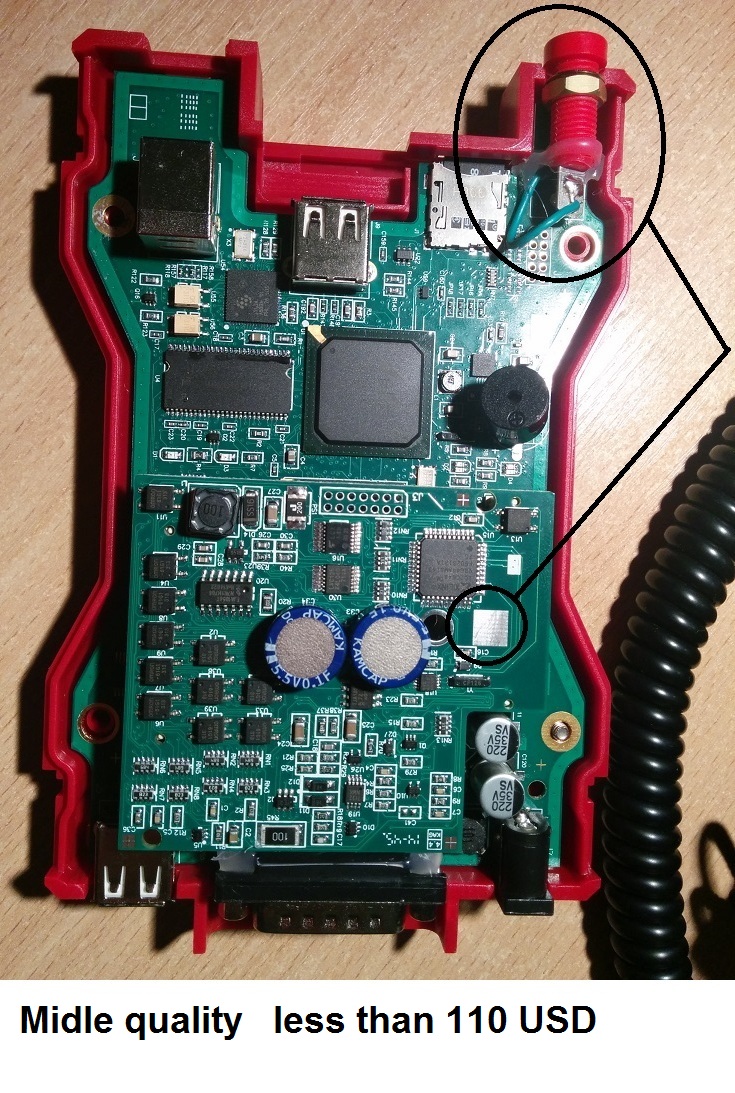
Vcm2 of very bad quality

Posted by: OBDexpress.co.uk at
07:06 AM
| No Comments
| Add Comment
Post contains 227 words, total size 21 kb.
May 03, 2017
Here is the Free download GM GDS2 crack V15.2 and Tech2Win 33.002 crack ! Definitely confirmedworking no issueswith VXDIAG VCX NANO GM diagnostic tools!!
Tech2win download crack:
version: 33.002
released on 02/24/2016
size: 138.9MB
GDS2 software download: (all-data VMware)
version: V15
size: 1.95 GB
About the software test:
Both Tech2win & GDS2 areconfirmed woking, by Allscanner!
Safe and free to use withVxdiag vcx nano GMonly.
About the software installation:
gm gds2/tech2winwindows 7 64 bit…confirmed working
gm gds2/tech2winwindows 8 64 bit…confirmed working
tech2win windows 10…needs luck
About Tech2win v33 functions:
Tech2Win, an application version of theTech 2andCANdi(Control Area Network diagnostic interface) moduleTech2Win can be used during a vehicle road test, offering a larger screen with all of the Tech 2 tool functionality. The Tech2Win application offers all of the features and functions of the Tech 2 for Opel, Saab etc.
About GDS2 v15.2 capabilities:
* Read codes, code status, Freeze Frame data and Clear Codes.
* Read VIN, ECU part numbers and software numbers.
* Record, store and replay Stored data.
* Control and monitor Output Control functions.
* Configure and Reset functions.
* Record or display history of the previous vehicle diagnostic sessions.
AboutVxdiag vcx nano& Tech2win GDS2:
* Flexible configuration supports wired or wireless connectivity
* Compatible with applications that diagnose engines, transmissions, ABS, instrument panels and more
* Mixed fleet capabilities with broad protocol support
* Quick access to vehicle data for maintenance or management reports
* Quickly attaches to vehicle’s diagnostic connector
* May be used with desktop PC or laptop
Posted by: OBDexpress.co.uk at
07:10 AM
| No Comments
| Add Comment
Post contains 267 words, total size 20 kb.
32 queries taking 0.0549 seconds, 133 records returned.
Powered by Minx 1.1.6c-pink.

