December 31, 2015
New Genius Flash Point ECU Chip Tuning Tool Released
New Genius Flash Point ECU Chip Tuning Tool Released at
obdexpress.co.uk,which allows reading / programming the ECU in modern vehicles over OBD2.It is able to work without connection a computer during the critical phases of reading and writing of the ECU, ensuring the process is executed in complete safety.
The
New Genius as a completely independent tool, the risks of working with a PC can be avoided, risks such as stalling, Windows crashes, power failure etc…
Top reasons to choose
New genius ecu chip tool:
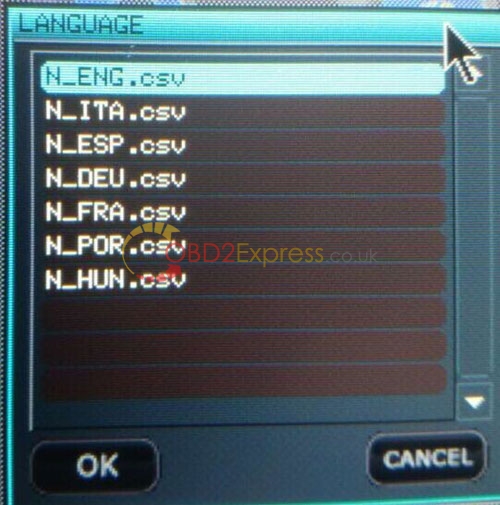
1) Multi-language: English, Italian, German, French, Spanish, Portuguese and Hungarian
2) Latest Firmware V5.05 version. New adds more newer ECUs.
V5.05 firmware support more ECUs than the old version. Click here to know
new genius ECU tool supported ECUs list3) Same function as KESS V2. Handheld version.
Handheld version, you can directly use this tool connect your car to read the data. If you need to modify the data, then can install the software on PC to do.
4) Unlited tokens version.
It has the tokens reset button on the main unit. Just click this button and token will be charged.
5.Update via USB
6.Easy to read/write ecu.
The New Genius supports CAN-BUS, KWP and J1850 protocols and has communication modules available for the following vehicles:
Cars
Bikes
LCV
Key Features:
Easy to use thanks to its touch screen and intuitive menu.
Completely independent of the PC during the phases of read / write.
System automatic backup.
SD 1 GB expandable memory (expandable to 16 GB)
System updates via USB.
Posted by: OBDexpress.co.uk at
07:51 AM
| No Comments
| Add Comment
Post contains 267 words, total size 3 kb.
December 30, 2015
SuperOBD SKP-900 key Programmer update to V3.9!
1. PROTON key and smart key program release(Free pincode)
2. Citroen c-elysee key program
3. TOYOTA camry ID-4C key program 2000-2004
4. Jeep Grand Cherokee key program 2007
5. MAZDA Axela smart key program optimize
6. MAZDA ATENZA smart key program optimize
7. Jaguar remote program 2008 optimize
8. Chrysler JEEP Dodge menu optimize
9. some Fix BUG
10. CHINA MODEL:
Zotye Z300 IMMO Program
Changan remote program 2014
Chery E3 remote program
Changhe-suzuki key program
1. Latest Version: V3.9
2. Support almost all vehicles in the world
3. Don't need pincode when programming keys for many vehicles
4. Can read pin code for many vehicles, only a few vehicles need to get pincode from other place.
5. No tokens needed. You can program as many cars as you can.
6. Low price to meet the economic crisis, cost-effective.
7. Support TOYOTA G CHIP.
This is the SKP900 car tested by our customers and feedback:
Here is for USA cars
2013 CHRYSLER 200 - WORKS FINE
2008 DODGE CHARGER - WORKS FINE
2013 FORD EDGE - WORKS FINE
2011-2013 FORD F-150 - WORKS FINE
2013 MUSTANG - WORKS FINE
2012 JEEP COMPASS - WORKS FINE
2008 JEEP WRANGLER - WORKS FINE
2014 KIA RIO - WORKS FINE
2013 KIA SOUL - WORKS FINE
2013 KIA FORTE - WORKS FINE
2009 TOYOTA CAMRY - WORKS FINE, REMOTE + TRANSPONDER SEPERATE PROCEDURE BOTH WORKS
2012-2013 TOYOTA CAMRY - WORKS FINE, REMOTE + TRANSPONDER SEPERATE PROCEDURE BOTH WORKS
2013 TOYOTA HIGHLANDER - WORKS FINE, REMOTE + TRANSPONDER SEPERATE PROCEDURE BOTH WORKS
2002 VOLKSWAGEN GTI - WORKS FINE
2005 - NISSAN 350Z - WAS ABLE TO PULL BCM BUT COULD NOT PROGRAM KEY. I THINK JUST NEED TO PLAY WITH IT LONGER
2013 FORD FOCUS - DOES NOT WORK
2014 FORD FIESTA - DOES NOT WORK
Can do all keys lost with every car mentioned.
Posted by: OBDexpress.co.uk at
07:10 AM
| No Comments
| Add Comment
Post contains 337 words, total size 3 kb.
December 29, 2015
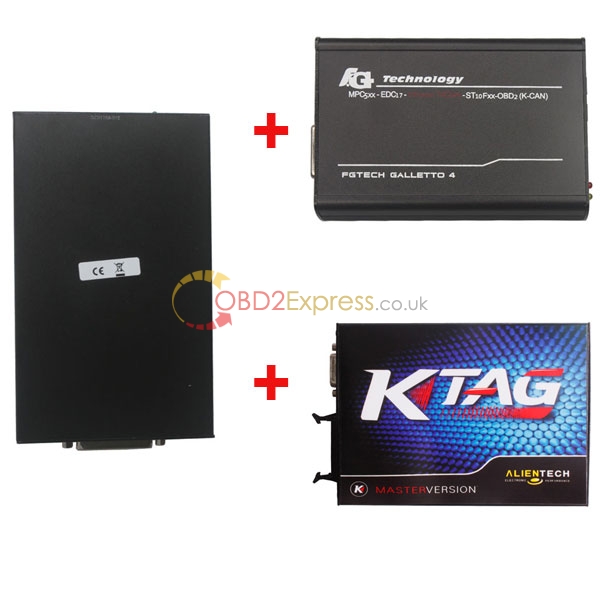
Package offer KESS V2 Plus K-TAG plus Fgtech galletto V54
KESS V2 Plus K-TAG plus Fgtech galletto V54 package offer save 10EUR
KESS V2,KTAG,FGTECH Galletto ,choose any 2 one,we will give you promotion in below link:
KESS V2 plus FGTECH Galletto V54 ECU programmer package offer save 9EUR
KESS V2 plus K-TAG ECU programmer save 16.4EUR
Package offer for software V2.13 K-TAG FW V6.070 +V2.13 KESS V2 FW V4.036
Top 4 reasons to choose
KESS V2:
1) Multi-Language: English, Intalian, German, French, Portuguese, Spanish.
2) With anti-tone module, work part encrypted ECUs and more new ECUs.
3) With coverage of all major brands and protocols including Line, CAN, EDC17 and MED17 and Ford J1850.
4) Updatable software. Software is updated via email.
All in all, Kess V2 is a successful tuner and its price is very affordable. Choose Kess V2, everything of your work will become easy.
Top 5 reasons to choose
FGTECH Galletto V54:
1) Support more system:
Supported system including windows xp, vista, win7, more friendly than Fgtech v53, much easier to operate. If you still worried about the software installation, you can buy our laptop package offer.
2) Multi-language:
Supported Language: Italiano, English, Deutsch, Francais, Espanol, Portugues, Czech, Turkish
3) More friendly for laptop:
Compared with V53 software, V54 software is more friendly for laptop. Do not have much requirement for laptop. Easy to install on most laptop. No need activation. Directly install the software and use. DO NOT update the software (You can disconnect the internet when use to avoid this)
4) Hardware updated to new version.
5) Supported: K-line, CANBUS, BDM
Top 3 reasons to choose
K-TAG:
1) Supported: K-TAG, bdm, BOOT, K-line, CANBUS and so on.
2) Updateable software: software is updated via Email
3) Universal ECU programmer. Can be used to read and write most ECUs in the market
Posted by: OBDexpress.co.uk at
07:31 AM
| No Comments
| Add Comment
Post contains 309 words, total size 3 kb.
December 28, 2015
December 25, 2015
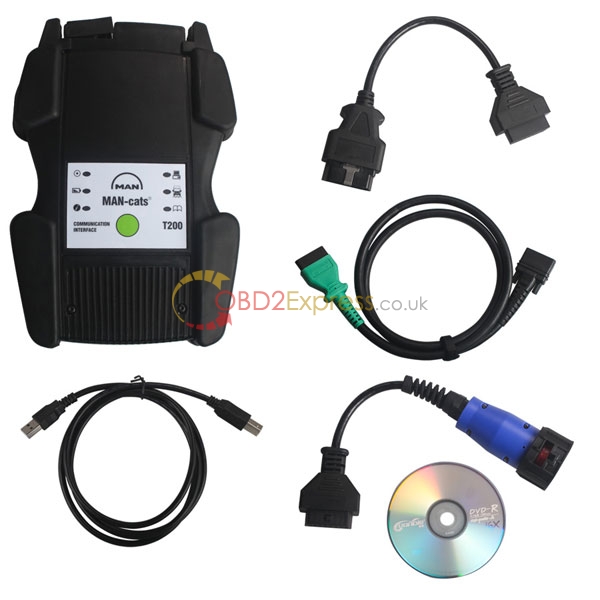
New Released MAN CAT T200 Diagostic tool For MAN trucks
MAN-cats T200 is an external diagnosis system with the most extensive test depth for electrical systems in MAN commercial vehicles, Providing dealer level diagnostic service for MAN trucks,with one year warranty.
Multi-languages: German, English, French, Spanish, Italian, Dutch, Portuguese, Russian, Greek, Croatian, Turkish, Polish, Romanian
Supported system: XP, win7, win8, win10
Notice: Software does not support update for now. Please do not update the tool !!!
PC requirement:
Dual-Core CPU, RAM at least 2G. More than 160G space
Examples of diagnosable systems:
• Electronic brake systems (EBS).
• Electronically controlled air suspension (ECAS).
• Engine regulation (EDC).
• Retarder.
• Gearbox.
• Air-conditioning systems.
• Central computer.
• Instrumentation.
• Door module.
• Airbag.
• And much more.
Possibilities of use:
• Simple testing of actuators.
• Visualisation and assessment of current sensor signals.
• Identification of control unit in assembled condition.
• Depiction of all stored diagnosis entries.
• Fast orientation on vehicle by means of integrated overview wiring diagrams.
• HD-OBD scantool (Heavy Duty On Board Diagnosis), read-out and presentation of data relevant to exhaust gas.
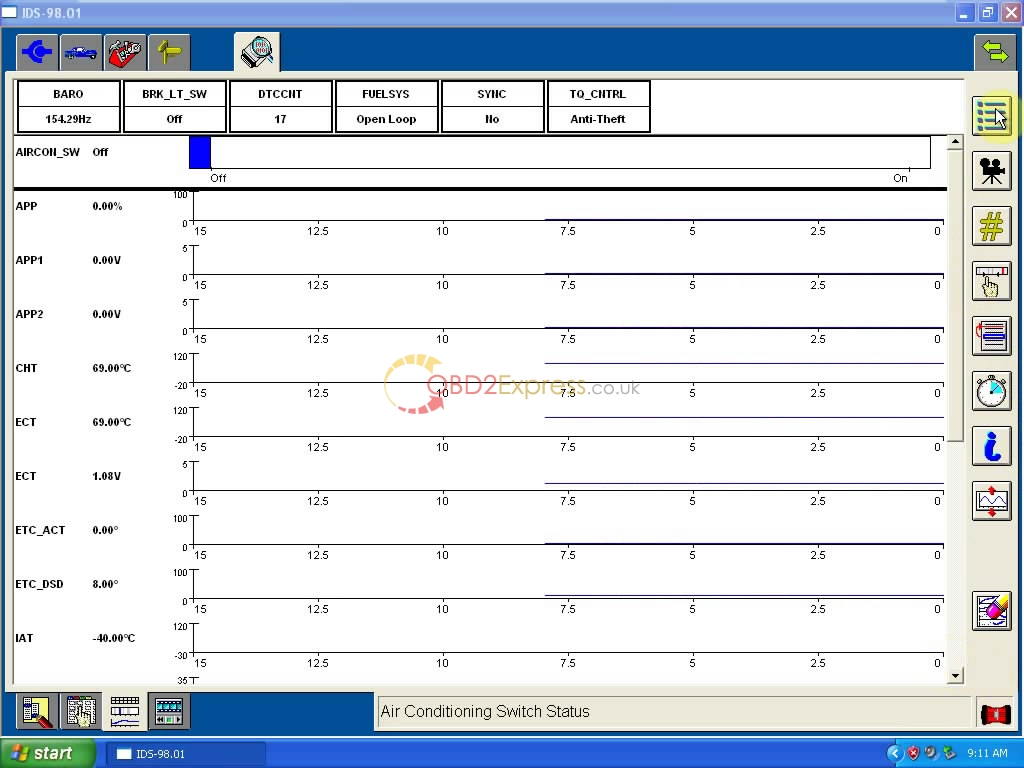
lang=EN-US style='font-size:9.0pt;font-family:Tahoma;color:saddlebrown'>img class="alignnone wp-image-3617" src="http://blog.obdexpress.co.uk/wp-content/uploads/2015/12/Ford-VCM-II-V98-4.jpg" alt="Ford-VCM II-V98 (4)" width="651" height="488" />
Posted by: OBDexpress.co.uk at
07:21 AM
| No Comments
| Add Comment
Post contains 219 words, total size 3 kb.
December 24, 2015
Xhorse VVDI MB TOOL BGA V2.0.3 software free download
This is the software download link for
Xhorse VVDI MB TOOL BGA for benz key programmer:
This
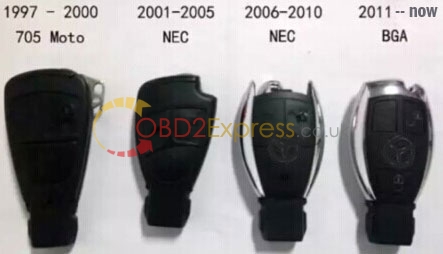
VVDI MB TOOL support all keys for Benz after 2011.
Require firmware V2.0.0
===== BENZ V2.0.3 =====
1. Password Calculation: Read EIS under OBD mode will check car power automatically. Avoid lost data in EIS
User manaul link:
Latest Technical details:
Note:
VVDI MB BGA tool update goes well, the following workable models are for reference only.
Model support IR/OBD:
W164, W164 2009+
A166, W197,W212, W218, A246
A169, W209, W211
W172, W204, A207
W203
W204, W207, W212 only by dump
W209 only by dump
W210
W215, W220
W230
W216
W221
W906
Keys version supported:
v03, v06, v08
v05, v07, v09
v59,v61
Want to know more information:
http://www.obdexpress.co.uk/wholesale/xhorse-vvdi-benz-vvdi-mb-tool-bag.html
Posted by: OBDexpress.co.uk at
09:04 AM
| No Comments
| Add Comment
Post contains 144 words, total size 3 kb.
December 23, 2015
V4.1.4 software for Xhorse VVDI-Prog ECU programmer free download
Free download:
V4.1.4 software for
Xhorse VVDI Prog:
http://www.mediafire.com/download/64i8d1d5ebzmvb2/VVDIProg4.1.4.zip
What to know more information about this product, please click:
update information:
v4.1.4 (2015-12-11)
* This version DON't need update
firmware
* Fix when the partition size
information error in MC9S12XE
series chips manual set the
partition size function error
problem
-------------------------------------
v4.1.3 (2015-12-11)
* This version DON't need update
firmware
+ Add PA28F200B5T(PSOP44),
PA28F200B5B(PSOP44),
PA28F200BVT(PSOP44),
PA28F200BVB(PSOP44),
PA28F200BXT(PSOP44),
PA28F200BXB(PSOP44),
PA28F400B5T(PSOP44),
PA28F400B5B(PSOP44),
PA28F400BVT(PSOP44),
PA28F400BVB(PSOP44),
PA28F400BXT(PSOP44),
PA28F400BXB(PSOP44),
PA28F800B5T(PSOP44),
PA28F800B5B(PSOP44),
PA28F800BVT(PSOP44),
PA28F800BVB(PSOP44),
PA28F800BXT(PSOP44),
PA28F800BXB(PSOP44),
TB28F200B5T(PSOP44),
TB28F200B5B(PSOP44),
TB28F200BVT(PSOP44),
TB28F200BVB(PSOP44),
TB28F200BXT(PSOP44),
TB28F200BXB(PSOP44),
TB28F400B5T(PSOP44),
TB28F400B5B(PSOP44),
TB28F400BVT(PSOP44),
TB28F400BVB(PSOP44),
TB28F400BXT(PSOP44),
TB28F400BXB(PSOP44),
TB28F800B5T(PSOP44),
TB28F800B5B(PSOP44),
TB28F800BVT(PSOP44),
TB28F800BVB(PSOP44),
TB28F800BXT(PSOP44),
TB28F800BXB(PSOP44)options
in <1-EEPROM&FLASH>-><INTER>
(Need the TB28FXXX adapter)
+ Add XP8000E option in
<3-ECU>-><OTHERS>
+ Add BCM-XEQ384 option in
<4-IMMOBILIZER>-><VOLKSWAGEN>
+ Add Laguna BCM(2010--)option in
<4-IMMOBILIZER>-><RENAULT>
+ Add EXCELLE(2011--)(3L16Y)option
in <5-DASHBORAD>-><BUICK>
* Fix the MC9S12XE series
"read partition" software bug
* Change the default connection
diagram size to 50%
Related Video:
How to install VVDI-Prog2.1.0 software obdexpress.co.uk
How to Read BMW Engine ECU by VVDI PRO 3.0
Add BMW CAS4+ key using Xhorse VVDI2 and VVDI Pro
VVDI Pro read 5M48H and common 8pin IC video
How to Read Great Wall Delphi EEPROM 93C66 with VVDI Prog
How to Make key for Great Wall Delphi 48 immobilizer with Xhorse VVDI Prog
Posted by: OBDexpress.co.uk at
08:33 AM
| No Comments
| Add Comment
Post contains 223 words, total size 4 kb.
December 22, 2015
New release VPECKER Easydiag Wireless 2015.12 software
Update attention:
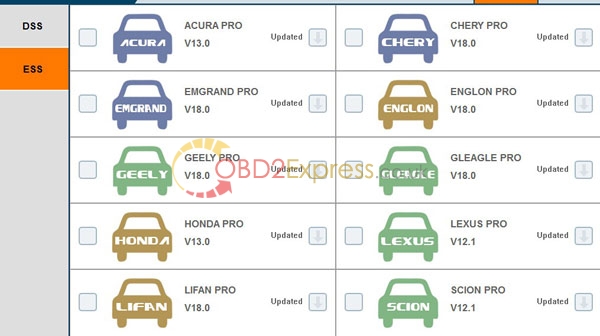
VPECKER Easydiag Wireless release new software on December 2015. It update the following software:
How to update your VPECKER to latest version?
1) register your information on official website
2) go to download center, and download the vehicles one by one.
Usage attention:
1) When you get this tool, please follow our video to register your information on official website first.
2) After you register ready, download the software and install it.
Free download:
VPECKER Easydiag Wireless OBDII Full Diagnostic Tool user manual
Posted by: OBDexpress.co.uk at
08:24 AM
| No Comments
| Add Comment
Post contains 93 words, total size 2 kb.
December 21, 2015
V143 JLR mangoose software installation video and attention tips
JLR mangoose now new release V143 software!!! Support for Jaguar and Land Rover Support till 2015. Support system including XP, vista and WIN7. Multi-language to choose.
What should you pay attention to install this software:
1) Install all software of CD
2) Install all compatible driver
3) Judge if the driver installed successfully based on device manager.
4) install the ice program
5) Open SSD software on desktop and run software.
Posted by: OBDexpress.co.uk at
06:41 AM
| No Comments
| Add Comment
Post contains 92 words, total size 1 kb.
December 18, 2015
How to open PIWIS tester 2 and software download
Piwis Tester II for Porsche is the new designed porsche scanner. With it, you can Read/clear error code, catch data stream, computer programming match, component test,maintenance information consult, components site drawing, wiring diagram.
Software download:
Cable connection photo display:
How to open
PIWIS tester 2?
When you receive the deivce, please open the computer, connect the internet, check the Piwis2 software and go to ->
Tools ->
Remtoe access ->
Team Viewer, then send us the id (9 digital numbers) online.
The engineer will open the authorization for the Piwis2 program within 3mins online.
If the computer screen locked, please login password piwis-3456, also there is a password note on the computer, you can check it and enter the code.
Piwis Tester II for Porsche software shown:
Posted by: OBDexpress.co.uk at
08:55 AM
| No Comments
| Add Comment
Post contains 153 words, total size 3 kb.
December 17, 2015
How to update AK500+ Key Programmer hardware
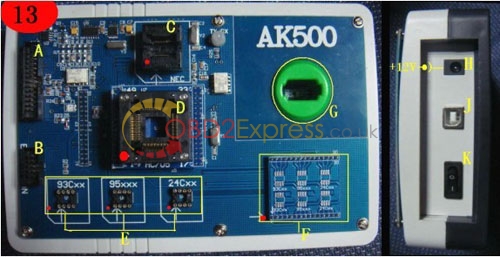
AK500+ Key Programmer with EIS SKC Calculator for Mercedes Benz can read data more quickly and safely, can read and write keys more quicky, and AK500+ is more stable for the functions with key programming and SKC Calculator.
A: HC705E6/HC711/HC908/HC912/HC9S12/MPC and so on read and write connection port
B: ESL/K-line/CANBUS connection port
C:Benz Infrared keys NEC chip Adapter Holder
D: HC705 chip Adapter Holder
E: EEPROM adapter socket
F: EEPROM Welded plate
G: Benz Infrared keys read and write Jack
H: AK500 power port
I : AK500 USB port
J: AK500 Power switch
Hardware update instruction:
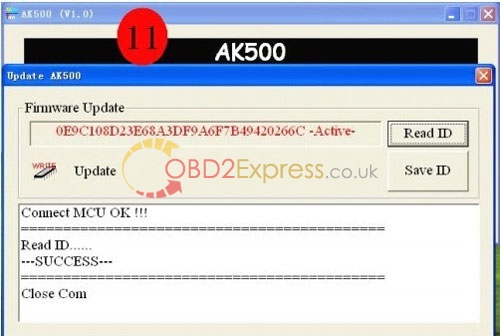
1 Enter the software by "Firmware updateâ€. Use "Read ID†to read out the serial number and "Save IDâ€. Save it as the "TXT†format. And send it to the factory or your seller. (Photo 11)
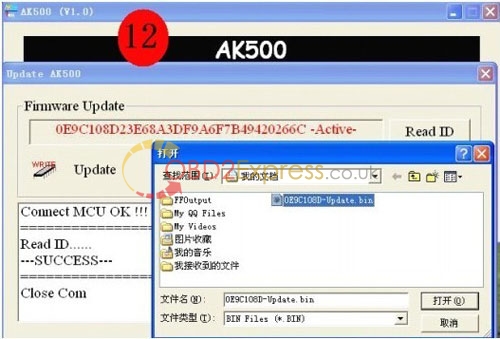
2 Open "Updateâ€, and download the software package sent by your seller or factory to AK500.
Free download:
Benz AK500+ Key Programmer Software
How to install software for Benz AK500+ Key Programmer
Posted by: OBDexpress.co.uk at
08:48 AM
| No Comments
| Add Comment
Post contains 190 words, total size 3 kb.
December 15, 2015
Xhorse VVDI 2 V1.1.0 Free Download
Free download VVDI 2 V1.1.0
VVDI2-Installer V110.exe:
https://www.dropbox.com/s/3crubhz5ftyg1sx/sv86%20VVDI2-Installer%20V110.exe?dl=0
Click to get user manual:
VVDI2 - OverView.pdf
VVDI2 - Install Software and Driver.pdf
VVDI2 - VAG User Manual.pdf
VVDI2 - BMW User Manual.pdf
VVDI2 - Transponder Programmer User Manual.pdf
VVDI2 - Update Online.pdf
What’s new in
VVDI 2 V1.1.0
-VAG V1.1.0
1. Fix bug for read BCM2 bug with BDM programmer
2. Fix bug for change KM with old A6 (CAN protocol)
3. Bugfix
-BMW V1.1.0
1. Bugfix
-Porsche V1.0.2
1. Fix bug for porsche key learn
-Transponder Programmer V1.1.0
1. Add auto antenna gain, no more set manually
2. Bugfix
Top reasons to get VVDI 2 commander key programmer:
1. This VVDI2 Full Package Contains AUDI Generation 5, BMW OBD Fucntion and BMW CAS4+ Functions Already, No Need Other Authorization
2. Choose
VVDI 2, you will enjoy the function for the following 5 programmer.
3. Support VW, Audi, BMW AND Porsche
4. Update Online Free Lifetime
5. Latest Version: V1.1.0
Difference Among
VVDI2 Key Programmers:
Posted by: OBDexpress.co.uk at
08:54 AM
| No Comments
| Add Comment
Post contains 220 words, total size 4 kb.
December 10, 2015
VXDIAG VCX NANO ford V97 software free download
VXDIAG VCX NANO is an OEM diagnostic interface for the vehicles of Ford and Mazda. It can be compatible with OEM software of Ford IDS and Mazda IDS
Software Version
FORD IDS Version: V97, Mazda IDS Version: V95
Update:By CD with unlocked firmware
Support vehicles:Support both new and old vehicles.
Multi-language:English/German/French/Italian/Spanish/Dutch/Slovenian/Finnish/Danish/Norwegian/Portuguese(European)/Portuguese(Brazil)
Requirement on computer:
1. Computer has at least 4GB Memory
2. Computer need produced after 2000 year, too old computer can not run the software.
3. OS needs to be WINDOWS XP SP3. If you install the software on VMware, then you can install it on Win7 64bit laptop.
Free download:
How to install vxdiag V97 ford software via VMware
1. Programming & Installation of new ECUs (PCM, ABS, Instrument Cluster, Air Bag, Fuel Pumps, etc.)
2. Live Data-stream with Recording & Playback Functions for Main ECUs
3. Read & Clear Diagnostic Trouble Codes (DTCs)
4. Set, Adjust or Remove Speed Governors
5. Automatic vehicle recognition
6. New Software Re-flash for Existing ECUs
7. All Other Dealer Functions
8. Steering Angle Resets
9. Guided Fault Finding
10. Program New Keys
11. DPF Regeneration
12. Brake Bleeding
13. Injector Coding
What should you pay attention to install V97 software:
1) After you install software till V96 ready. Backup your software first. Then install this V97 software.
2) You need to install the above new driver for V97 software.
3)When you open the software, it prompt you do not have license or license not valid. Do not worry. After you finish the installation, Just change the date and time (time zone) setting of master laptop to UTC+08:00 Beijing, ChongQin----, then to click OK. After that , it will be ok to run VMWare for FORD IDS software.
Posted by: OBDexpress.co.uk at
09:10 AM
| No Comments
| Add Comment
Post contains 312 words, total size 4 kb.
December 09, 2015
Bluetooth VAS 5054A software installation problem and solution
Bluetooth VAS 5054A is a universal diagnostic interface for the vehicles of the Volkswagen Group and all OBD vehicle systems from other manufacturers.The integrated Bluetooth interface connects the vehicle with a notebook, desktop PC or test system. Now this new VAS 5054A can support UDS protocols,New adds OKI chip,
VAS 5054A can work with VW, AUDI, Skoda, Seat. Multi-language to choose,More reliable and convenient.
Software avalible:
Option 1:
Idos V2.0. Work on more new vehicles.
Multi-language: English/ Japanese/ Portuguese/ Romanian/ Korean/ Dutch/ Polish/ Turkish/ Spanish/ French/ Italian/ Croatian/ Danish/ German/ Swedish/ Finnish/ Slovenian/ Czech/ Russian/ Greek/ Chinese (You Can choose any language you need freely)
Option 2:
IDOS v2.02.
Language: English and chinese.
Option 3:
Old V19 software.
More good at old car models. If you need old V19 software, please leave message on your order and tell us the language you need. Then we will add V19 software to your order. If you need Bently and Lamborghini software CD, please leave message too, we can add to this parcel for free.
Here is some problem our customers meet in software installation. If you meet this problem also, please use these solution to solve your problem.
Problem 1:
Before you install the software, go to website www.sun.com.
Then you will see the following page, put your mouse in "Download", then you will see the option "java for your cumputer" .
Download "java for your cumputer" to your computer, and install it. Then you can go on to follow the installation video to install the software.
Problem 2:
When i install the software on XP system. It prompt this problem: FDICopy() failed: code 4 [Currupt cabinet]
Problem reason: This is the system problem of your computer.
Solution: Change another computer with XP system. Make sure the format of C is ntfs. Otherwise you will meet this problem.
Problem 3:
I install the software on computer, but cannot search VAS 5054A via bluetooth, what happened? I check bluetooth, it work 100%, but i cannot connect the device with the car, and the light is off.
Solution:
When you use USB to connect the VAS 5054A with computer, then do not use bluetooth. There are two ways for connection: USB cable and Bluetooth. You can choose one way to use this tool, not both at the same time. This is the wrong place for your operation.
How to use bluetooth to connect the
VAS 5054A?
1) Connect the device with your car, then you will see the blue light is flashing.
2) Connect bluetooth adapter with your computer. There will be a bluetooth logo on the bottom right corner of computer. (There must be this logo, remember to install the bluetooth software)
3) Match the bluetooth as the instruction in the package
Problem 4: Customer asked questions for VAS 5054A:
Q: Can i use this VAS5054A to disable some functions? Like immobilizer?
A: No. This one has the same method as the original. It can be used to fix the broken system, not disable.
Q: I can use the bluetooth to test the car, but when i use USB cable to test the car, there is no response.
A: For this problem, can be caused by the following reason: 1) your computer charger leake away. You can change another computer to install the software and test 2) USB port has problem. Change another USB cable to test. If it is the problem of USB cable, we will resend you another one.
Q: I cannot open the software, it only gives me this prompt: "5054A license invalid, need to buy license", what's the problem?
A: You do not active the software. Follow the video to install the software and active it.
Q: I use the bluetooth to diagnose the car last week, but when i use it this week, bluetooth does not work/
A: Do you match the bluetooth before you use it? Bluetooth needs match before use. If you fail to match, change another xp system computer to install the software.
Q: Does 5054A V19 (Item No: SP33-B) French CD have Skoda CD and Seat CD? Can 5054 be used to diagnose Skoda and Seat?
A: It does not contain French Skoda CD and French Seat CD, and has no guide function, but it can be used to diagnose Skoda and Seat. It does not need to select car models when install 5054A, no matter what car brand to diagnose, all the 5054A software interface is the same, the data CD (VW CD, Audi CD, Skoda CD, Seat CD) only play a guiding role, even only install the basis CD, 5054A can be also used to diagnose (PS: guiding function means to step-by-step guide the users to diagnose car)
A: ODIS V1.2.0 is only software, it has nothing to do with OKI chip, and the software is stored with all the newest data of VW Audi Skoda Seat, VAS 5054A ODIS V1.2.0 (item No: SP33-C) contain 2pcs of CD (VW AUDI SKODA SEAT software), unlike VAS5054A (Item No:
SP33-BO and SP33-B), which have separate CD for each supported car brand. This version of 5054 has OKI chip.
Posted by: OBDexpress.co.uk at
10:01 AM
| No Comments
| Add Comment
Post contains 892 words, total size 8 kb.
December 08, 2015
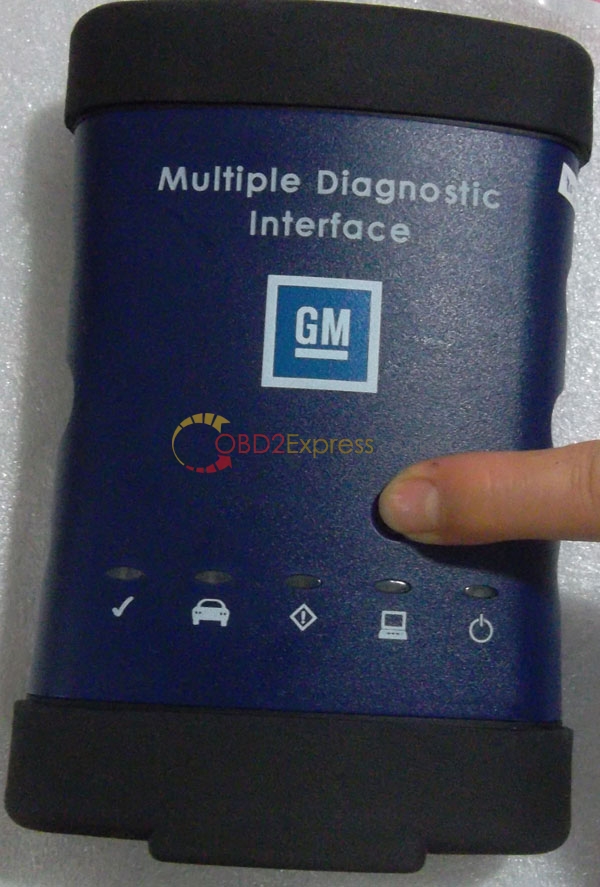
GM MDI meet "not connected to MDI" error and Solution
Best Quality
MDI Multiple Diagnostic Interface for GM is made up by original chips, With GDS2 diagnostic system, it supports online programming, wireless communication and so on,
GM MDI is more better for cars after 2009. For old cars, you can choose
GM TECH 2.
Attention: DO NOT UPDATE the software online.
Multi-language: English, French, German, Japanese, Italian and so on. Total 30 languages to choose. For detailed language, please see the software screen shot
Free download:
Video for how to set up the Global TIS MDI online and offline programming:
GM MDI original chip and PCB Board display and cable connection instruction.
How to refrech the firmware:
When you set everything ready and connect
GM MDI to your PC and meet "not connected to MDI" error, please follow this way to solve:
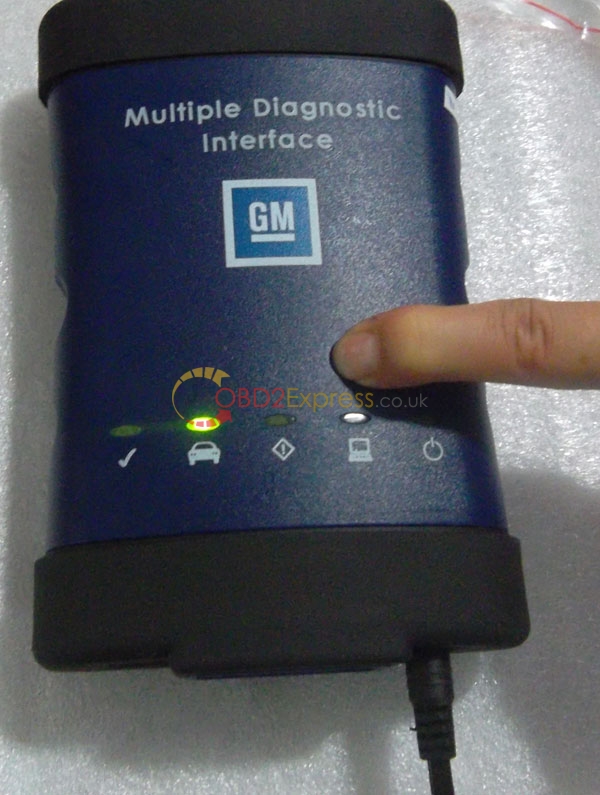
a, Press this button and connect the power
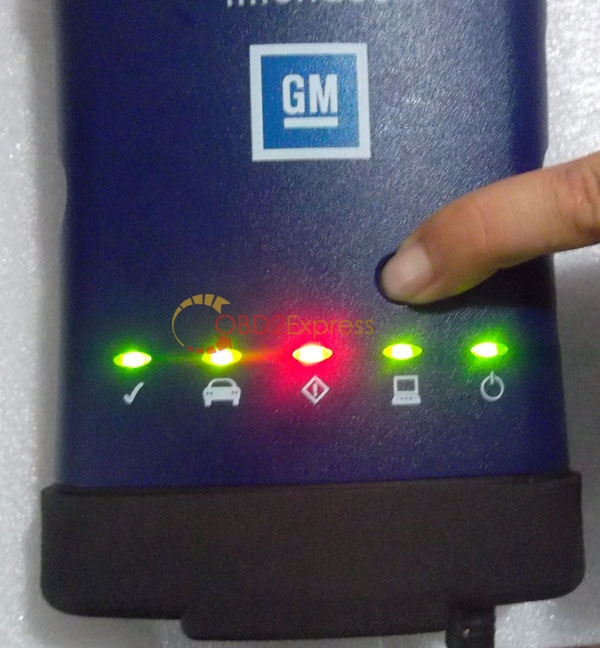
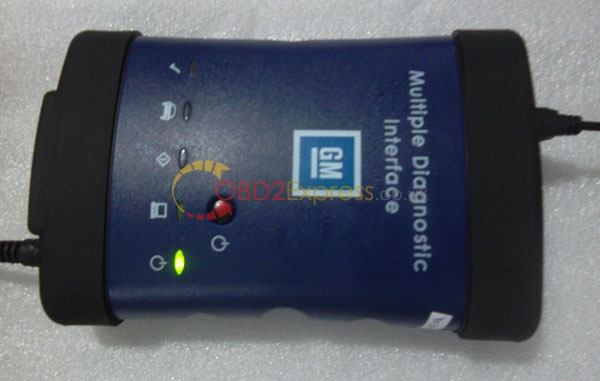
b, Keep press this button and connect it to power, the power light will be on, wait about 10 seconds.
c, When all light is on, then you can release the button, and it will enter firmware refresh status
d, Connect GM MDI with your PC via USB cable, prepare to refresh the firmware
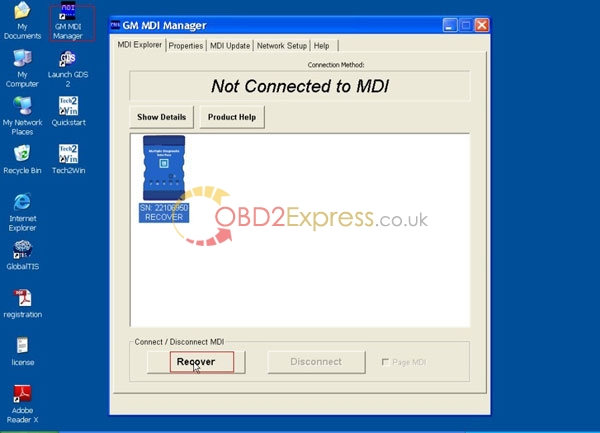
e, Open 'GM MDI Manager', choose "Recover"
Here is the
GM MDI software refresh video
http://www.dailymotion.com/embed/video/x2qx2be
Posted by: OBDexpress.co.uk at
09:41 AM
| No Comments
| Add Comment
Post contains 223 words, total size 4 kb.
December 07, 2015
Multi-Di@g Access J2534 Pass error and solution
2013.1 version
Multi-Di@g Access J2534 supports diagnose, ECU's programming for J2534 & J2534-1 specifications, maintenance, repair operations and so on. New update 26 brands, multi-language to choose.
Software version: 2013.1
Multi-Language: Bulgarian, Croatian, Czech, Danish, Dutch, English, Finnish, French, German, Hebrew, Hungarian, Italish, Polish, Portuguese, Romanian, Russian, Serbian, Slovenian, Spanish, Swedish, Turkish.
Error:
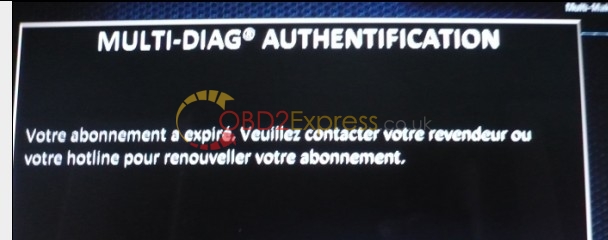
After the Software started and I choosed a car model. It say's when I want to read the cardata the interface with the car, that the Subscription has ended. I took a look at Video find something is different. The "Desactivation MAJ MD 1.0" File is missing on the DVD I downloaded. I do not know where is wrong to result this.
I also tried to update the key (folder "key076957") key components several times and used the setup data from MDprofile folder,Please see the photo the following
Here is the detailed way for solution:
1) Make sure your laptop is not connect with internet or WIFI when install the software
2) Open file "(1)Key076957" then run file "keyupdatespan". After do that, waiting for the message "Successful installation 076957" click "OK"
3) Install (2)1-2013 software.
If the software you installed need to unlock 27 - XXXXXXXXXX, pls contact us, we will provide you activation code.
Choose language, continue installing until finished.
When you get message "whether you need to reboot the computer?†, click "NOâ€
Once you get prompt "Installation succeeded 076957" and "OK", restart your laptop
5) Now Software is successfully installed. Your problem will be solved. You can run the multi-diag j2534 software smoothly.
Notes:
What should you pay attention to use J2534:
1) DO NOT use anti-virus software on your PC
2) Do not connect internet when you use this software diagnose your car
3) Activate the software when installation. Use the right serial ID.
4) After finish software installation. Go to the following folder C: \ ACTIA \ portal and then delete the file WEGT.EXE. Once delete this file. (If your software prompt you out of date when usage, do this step too)
Posted by: OBDexpress.co.uk at
08:35 AM
| No Comments
| Add Comment
Post contains 360 words, total size 3 kb.
December 04, 2015
ICOM WLAN with a Ralink rt5572 based WiFi dongle and no router!
(This is quoted form http://www.bimmerforums.com/, post here just for sharing)
Disclaimer: Comes with no warranty, posted for informational purposes, should not be used by anyone. (aka.: Whatever went horribly wrong - it was your own fault!)
This was tested on Windows7 Pro SP1 64-bit and 32-bit (Hardware: Intel Advanced N 6200 AGN). It should work on any version (ex. starter); both 64 and 32 bit (will not work with XP or Vista -also do not ask me about 8 or 10).
Assuming:
- Your
ethernet connection is working and you can already connect with
ICOM via cable,
- Your
ISTA-D settings (VCI config) are :
*This is not a "proper" software router, you will just get a simple access point, which is enough for another computer to connect from their end.
*Also: do not use the password in this picture!
2.Configure the network connection: go to Control panel, Wireless and sharing center, manage adapter settings. Look for your new connection (it is the one using the Microsoft virtual adapter). Open properties, then IPv4 properties.
Set a static IP address such as 169.254.92.4, subnet mask 255.255.0.0. (this will be added automatically). Remember; this address must be different from your wired connection and "real" wireless connection ( in my case these are 169.254.92.3 for wired and DHCP for wireless, which is not needed anyway, since this is a different connection alltogether):
*Of course, you could roll with Windows assigning the address. Based on my experience with APIPA in Windows however, I would not reccomend it. It is evil and not worth the effort.
Restart your computer (just making sure everything loads with the new settings).
3.Set up ICOM: Connect the rt5572 WiFi dongle to ICOM, connect ICOM to your computer via cable and power up ICOM by connecting it to your car. Upon powering on ICOM will load the drivers by itself, but WIFI will not work until the unit is restarted.
In your browser open:
http://169.254.92.38.58000 (or 169.254.92.38:58000/?CountryCode=DE -this made no difference for me)
You can change and check your settings now:
- Device Configuration /mode: ISPI NEXT (so you can configure WLAN Settings)
- LAN Settings/ Discovery mode: APIPA
- WLAN: set to the correct region, set security type to WPA2 Personal, set the same SSID and password as in Virtual router (step one).
4.Test ICOM: Restart the ICOM by disconnecting it from the car and reconnecting it (still on cable) go to ICOM Confirguration Manager, run Self-Test and you should see this:
5.Connect ICOM via WiFi: Disconnect
ICOM from the car, disconnect the ethernet cable from ICOM. Start Virtual router and reconnect ICOM to your car. The LAN indicator will be off. The WLAN indicator wil turn on.
*The indicator on the wifi dongle was turned off, this is normal (depends on the WiFi chipset, drivers...).
*Also observe the 3 m long extension cord!
ICOM shoud now be available in ITools and
ISTA-D (Choose "Operations", then click "Interfaces" button)! You should be able to establish connection and perform identification and vehicle test now:
*ICOM has a new IP address now (old one will be back once attach it again via cable - last one)!
That is all.
This should also work for the mini Pci cards, since
ICOM mux here is just another device (computer) looking for an access point (it does not matter which interface it will use, as long as it works - the problem is providing an access point it can use on your computer).
Posted by: OBDexpress.co.uk at
09:47 AM
| No Comments
| Add Comment
Post contains 591 words, total size 7 kb.
December 03, 2015
2 Steps to Reset SRS/ Airbag Light on Mercedes Benz
Here is a helpful analysis on SRS light/ Airbag warning message on Mercedes Benz vehicles, from reason to solution.
Why does SRS light/ Airbag warning message to appear on Mercedes Benz?
-seat occupancy sensor in passenger seat;
-low voltage in the car electrical system. Battery dying.
-seat belt latch;
-steering wheel clock spring;
-seat belt sensor;
-damaged wire contacts at the doors;
-defective airbag;
-defective, damaged or loose contact at the impact sensors
How to read and reset SRS/ Airbag light?
Very often the SRS/Airbag light goes on mainly because of a dying battery. But, if the light is on, it will stay on when you install a new battery, until you manually reset it.
That is, 2 steps to solve SRS/Airbag light on.
Step 1
Install a new battery;
Step 2
Reset SRS/ Airbag light.
Instruction on How to Reset the SRS Light on a Mercedes Benz:
1. Locate the fuse panel cover and remove it. This is located on the lower left side of the control panel on the driver's side of the car. Find the port that fits the OBD cable and plug the scan tool's cable into this port.
2. Put the key into the ignition and turn it to the "Run" position. This is the position just before the engine starts. Look at your OBD scan tool and write down the codes it displays.
3. Check your owner's manual for what the codes mean.
4. Unplug the scan tool and put the fuse panel cover back in place. Take your vehicle to your local Mercedes dealer to have repairs made, if needed.
5. Repeat step 1 (locate the fuse panel....) when you return home. Put the key into the ignition and turn it to the "Run" position. Wait until the SRS light turns off. Remove the cable and put the fuse panel cover back in place.
Optional tools to reset the light:
Professional:
Best feedback from users:
(DS708 is will be a better choice if money is not an issue for you and you have many cars, for DS708 covers more vehicle and can read codes or diagnose on more systems in the car.)
Cheapest & users’ recommendation:
Customer feedback:
My experiences: A copy (thanks gurunutkins) of CarSoft V7.4S scanner. The Mercedes Multiplexer. My wimpy old desktop PC used with a 25-foot serial extension cord addition. On my W203 C class 2002 C230 Kompressor Coupe, Manual 6 speed, Audio 20 HU, CDC (added - read later, no other Audio or phone Fiber optics installed), with the basic HVAC control head. And a SRS light on the dash & MFD.
Short Summary: Great experience. I scanned thru my OBDII port and found all errors. I reset my SRS fault light that I know I caused when I blew Audio20 HU fuse #64 and ran the car during my DIY MB OEM CDC installation like 3 weeks ago. It triggered many Comm. errors in many systems-arrghh. I am now left with a DCM FL and DCM FR error, but they are not tripping any light or malfunctions indications to dash. I also am super pleased that I WAS able to code my used DIY MB OEM glove box installation CDC, to the Fiber Ring, and now that specific DB2 scan is 100% error free.
Posted by: OBDexpress.co.uk at
09:05 AM
| No Comments
| Add Comment
Post contains 575 words, total size 5 kb.
December 02, 2015
V54 FGTECH Galletto 4 Master error solution
FGTech Galletto 4-Master V54 BDM-OBD is a famous chip tuning tool for all cars, trucks, motorcycles, Marine, BDM MPCxx, BDM Boot Mode, checksum. This item can not only work as
FGTech Galletto 4-Master, but can also work for BDM-OBD.
Here are the problems and solutions in the using process
Problem 1:
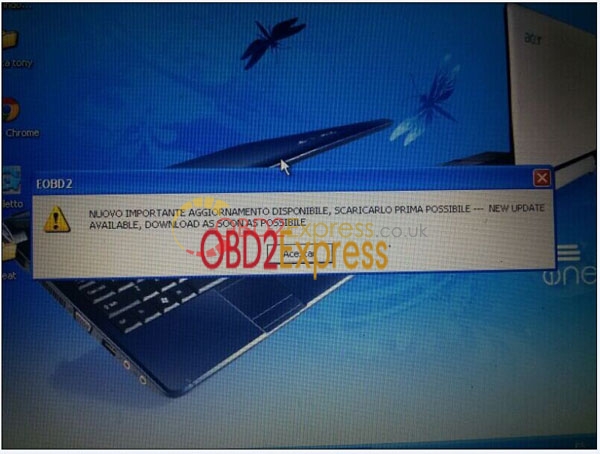
Q: I follow your video to install the software, after done, i can open it and use it to work on my car. But i always get this prompt: "MUOVO IMPORTANT AGGIORNAMENTO DISPOIBILE, SCARICARLO PRIMA POSSIBLE- NEW UPDATE AVAILABLE, DOWNLOAD AS SOON AS POSSIBLE", Why this happen, my PC do not have anti-virus and other OBD software.
A: This is normal. Just ignore it.
Problem 2:
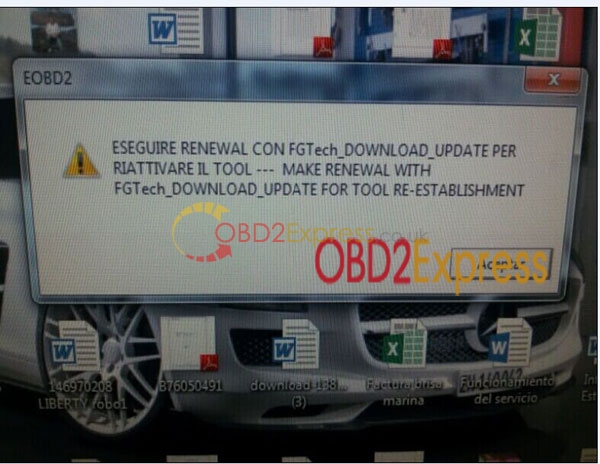
Q: Hello i install this software on my new laptop last week and test my car successfully. But today when i install the software on my old laptop again, it give me this prompt: ESEGUIRE RENEWAL CON FGTech_DOWNLOAD_UPDATE PER RIATTIVARE IL TOOL--- MAKE RENEWAL WITH FGTech_DOWNLOAD_UPDATE FOR TOOL RE-ESTABLISHMENT. What should i do?
A: 1) Disconnect the internet and click accept, it you can see the next interface, then software do not have problem
2) If you cannot see next interface, then it means your system does not fit, please change to use our system to install this software.
3) This software can be installed on most XP and Win7 system. For some laptop, if your PC has other software which is not compatible with this software, then it does not fit.
More information:
http://www.obdexpress.co.uk/wholesale/fgtech-galletto-4-master-bdm-tricore-obd-function.html
Posted by: OBDexpress.co.uk at
08:46 AM
| No Comments
| Add Comment
Post contains 256 words, total size 3 kb.
December 01, 2015
V4.036 firmware KESS V2 OBD2 tuning kit Error solution
Recent days, one of our customer use new V2.11
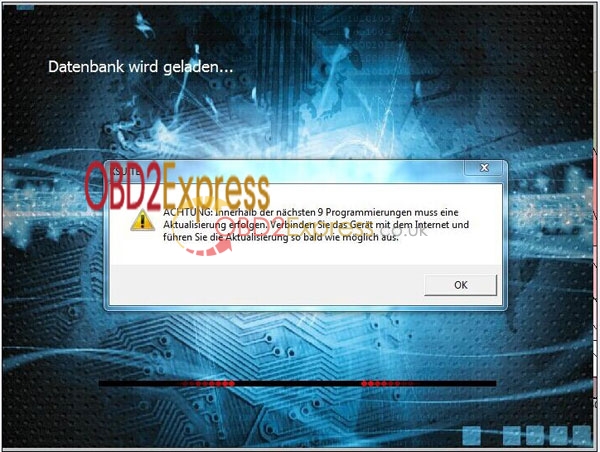
KESS V2 with V4.036 firmware, he find after 21 times the device is write locked, and All windows are gray. He get error prompt "Caution: must have a programming in the next 9 Update done. Connect the device to the internet and they drove the update as soon as possible." When you meet this problem, what should you do?
Solution:
1) Change a new 2GB TF card. (must 100% brand new TF card, do not use old card which after format.)
2) Follow this
KESS V2 final 8 or 9 tokens error solution video to program the files. For the necessary files (vido, TF card files, Ksuite tokens programming file, UPDATE TOOL) shown in the video, if you need, please send your order number to sales@obdexpress.co.uk to ask for.
3) Problem is solved now (Over 98% laptop can use this way to solve)
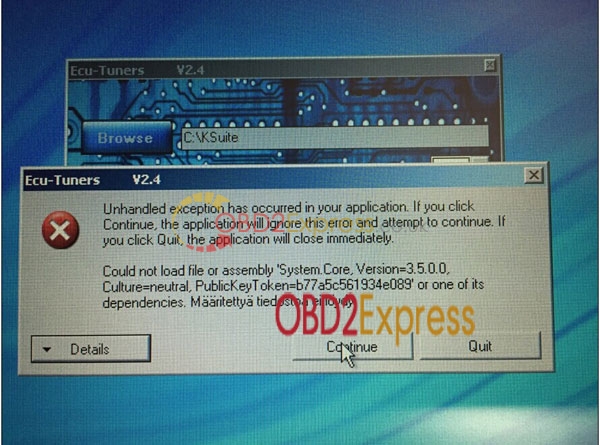
When after you use this file, get this error prompt : ECU-Tuners V2.4 Unhandled exception has occurred in your application. If you click continue, the application will ignore this error and attempt to continue. If you click quit, the application will close immediately. Could not load file or assembly 'system. Core, version =3.5.0.0, Culture=neutral, Publickeytoken=b7a5c561934e089' or one of its dependencies. Maaritettya tiedostoa ei loydy.
For this problem, it is caused by the patch file. Your PC does not have some system patch file. To solve this, you can install our 2014.2 TCSCDP software first. Then follow the video to program the tokens again. Then will solve the problem.
http://www.obdexpress.co.uk/wholesale/kess-v2-manager-tuning-kit-master-c.html
Posted by: OBDexpress.co.uk at
09:20 AM
| No Comments
| Add Comment
Post contains 269 words, total size 3 kb.
101kb generated in CPU 0.0328, elapsed 0.0744 seconds.
32 queries taking 0.0527 seconds, 149 records returned.
Powered by Minx 1.1.6c-pink.