



April 11, 2018
This is how to configure

This configuration allows the computer’s internal wireless card to connect to the internet while the supplied D-Link USB wireless adapter, installed in the computer, communicates with the VCM II.
INSTRUCTIONS: FIRST TIME CONNECTING WIRELESS TO THE VCM II (DEFAULT) (POINT TO POINT)
- Shutdown theIDS application.
- Disconnect the VCM II USB cable from both the computer and VCM II.
- Insert the supplied D-Link wireless adapter into an unused computer USB port.
A Windows "Pop-up†may appear if the device driver is being installed.
- Connect the VCM II to the vehicle using the DLC cable.
The VCM II’s wireless feature is enabled when connected to the vehicles 16-Pin DLC connector. It may take up to 30 sec for the wireless feature to be enabled.
- Startup the IDS application.
- If this is the first time IDS has been started, you will be prompted for preferences and settings. You may also be prompted for a license key or to validate your IDS license. For more details on IDS licensing, see the IDS Users Manual.
- If a VCM II software update is available, you will be prompted to connect the VCM II USB cable to perform the update.
- Click on the "Device Selection†tab
located at the top right corner of the IDS screen (see Figure 1
: Device Selection Screen).
If the "Device Selection†tab is not visible, connect the VCM II to the computer using the USB cable.

- Select the VCM II that you would like to connect to.
WARNING: Verify the VCM II serial number belongs to your device. Failure to do so may disrupt other VCM II’s and risk personal injury.
- Check the "Wireless Default†box to make this VCM II your default. By specifying a default, you will no longer need to
visittothis screen unless you want to connect to a different VCM II. - The VCM II is ready to operate with IDS wirelessly.
Now you
Posted by: OBDexpress.co.uk at
02:19 AM
| No Comments
| Add Comment
Post contains 355 words, total size 21 kb.
This is how to configure
This configuration allows the computer’s internal wireless card to connect to the internet while the supplied D-Link USB wireless adapter, installed in the computer, communicates with the VCM II.
INSTRUCTIONS: FIRST TIME CONNECTING WIRELESS TO THE VCM II (DEFAULT) (POINT TO POINT)
- Shutdown theIDS application.
- Disconnect the VCM II USB cable from both the computer and VCM II.
- Insert the supplied D-Link wireless adapter into an unused computer USB port.
A Windows "Pop-up†may appear if the device driver is being installed.
- Connect the VCM II to the vehicle using the DLC cable.
The VCM II’s wireless feature is enabled when connected to the vehicles 16-Pin DLC connector. It may take up to 30 sec for the wireless feature to be enabled.
- Startup the IDS application.
- If this is the first time IDS has been started, you will be prompted for preferences and settings. You may also be prompted for a license key or to validate your IDS license. For more details on IDS licensing, see the IDS Users Manual.
- If a VCM II software update is available, you will be prompted to connect the VCM II USB cable to perform the update.
- Click on the "Device Selection†tab
located at the top right corner of the IDS screen (see Figure 1: Device Selection Screen).
If the "Device Selection†tab is not visible, connect the VCM II to the computer using the USB cable.
- Select the VCM II that you would like to connect to.
WARNING: Verify the VCM II serial number belongs to your device. Failure to do so may disrupt other VCM II’s and risk personal injury.
- Check the "Wireless Default†box to make this VCM II your default. By specifying a default, you will no longer need to
visittothis screen unless you want to connect to a different VCM II. - The VCM II is ready to operate with IDS wirelessly.
Now you
Posted by: OBDexpress.co.uk at
02:19 AM
| No Comments
| Add Comment
Post contains 355 words, total size 21 kb.
April 06, 2018
Newly releasd!Lonsdor Toyota/Lexusthe5themulatorforChip 39 (128bit) supports Toyota H Chip All Smart Keys Lost by OBD through offline calculation-no need to connect from server.Can be used for Hilux, Fortuner, Yaris and more.
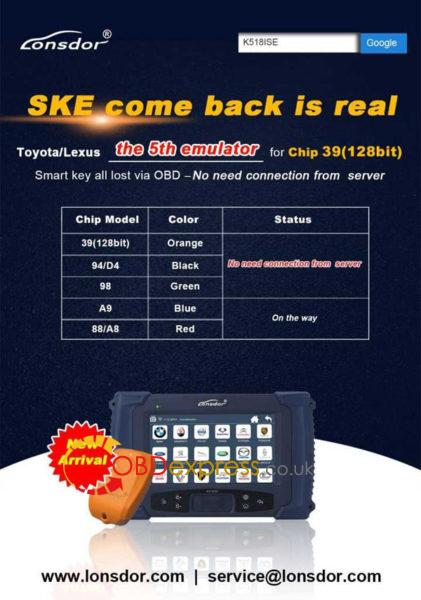
Orange smart key emulator for chip 39 (128bit) test car models:
Hilux...OK
Fortuner ... OK
YARIS... OK
More Toyota / Lexus car models will be tested, please be expected.
Note: It's not limited American Toyota, Australian Toyota or Asian Toyota.
User Manual
1.Toyota Lexus - Smart key - All key lost - Helps
Applied to :Toyota/Lexusthe5themulatorforChip39 (128 bit)
&"94/D4â€--theBlack
This help file basically includes 4 parts: Function, Operation, Attention, and
Reference.
Functions
Operational process for all key lost
Please confirm whether emulator key (SKE) is bound to K518 device beforehand.
Backup EEPROM data-> Generate new data-> Dismantle immo box and write
new data to EEPROM-> Generate SKE-> Add/delete smart key
- Backup original EEPROM immo data.
- Use backup data to generate new data.
- System certify and generate new data automatically, and program SKE to
become an available key,which can open dashboard.,before key programming.
- Add a smart key.
- Delete programmed key.
- Bind SKE: Require to bind all SKE to K518 for the first use.
Operation
Operational process for all key lost
Please confirm whether K518 is bound to emulator key (SKE).
- Backup EEPROM data--> 2. Generate emulator key (SKE)--> 3. Use SKE to
switch ignition ON--> 4. Add smart key
Operation
- Backup EEPROM immo data.
- Generate a SKE for emergency use.
- Put the SKE close to start button and dashboard will be lit up.
- Add a smart key.
- Delete a smart key.
Bind emulator key
- This function can bind emulator key (SKE-LT series) to K518 host.
- Please insert key to be bound into the host slot.
- System is binding... Program key when key binding complete.
Backup EEPROM data
- This function can backup EEPROM data.
Generate SKE for emergency when data backup complete.
Insert SKE to switch ignition ON and open dashboard.
- Receiving vehicle immo data... Please wait patiently.
- Please name EEPROM backup data.
- Data backup succeed.Please select "generate emulator keyâ€function to generate a spare key for emergency.
Generate emulator key
- This function can generate a spare master key when all keys are lost, which can
open dashboard to add other keys.
- Receiving local backup data...
- System shows current data and notify key type.
- Insert bound emulator key (corresponding color/type) into K518 host slot, and press
round button on the key.
- Generating SKE ... Please wait for 5 minutes patiently.
- When SKE is generated,press round button on it and put it against start button of
vehicle, and try to open dashboard.If the dashboard is lit up, please use SKE to
program and add new keys.
Add smart key
- Put SKE or available key against ignition switch and switch ignition ON till
dashboard is lit up.
- System communication, getting info about key numbers...
- Put registered smart key against vehicle start button, and remove it when
buzzer beeps once.
- Put smart key (to be registered) at start button of vehicle in 30 seconds, and
remove it when buzzer beeps twice.
- Please wait till key registration complete. Operation succeed.
Delete smart key
- Put emulator key or available key close to ignition switch and switch ignition ON till
dashboard is lit up.
- System communication, getting info about key numbers...
- Put back of registered smart key close to vehicle start button, and remove it
when buzzer beeps once.
- System is deleting key... Deleting succeed. Smart key (away from start button) will be deleted.
Attentions
- Bind emulator key: Require to power on the device when put emulator key into
K518 host slot.
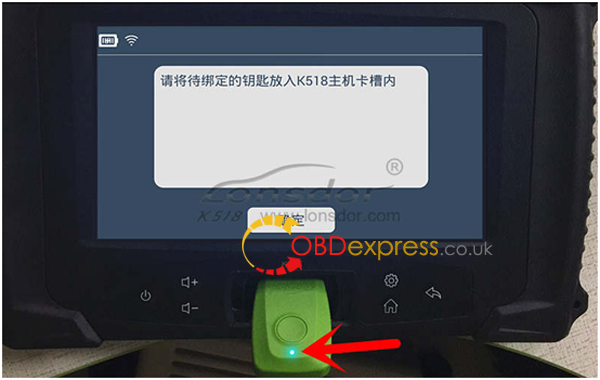
- System will read backup data of vehicle to generate emulator key and prompt
to choose corresponding key type(refer to back of the emulator).
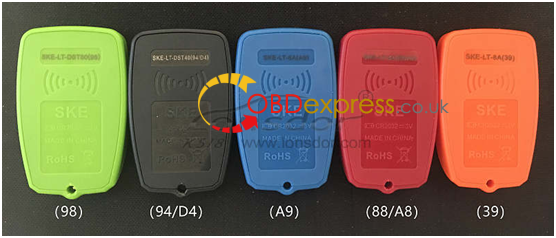
4.For Carola/Vios/Zelas all key lost, programming is not available in a state of alarm.
2.Toyota Lexus - Smart key - All key lost - Helps With LOND
Applied to :Green 98 SKE-LT Smart Key Emulator
This help file basically includes 4 parts: Function, Operation, Attention, and
Reference.
Functions
Operational process for all key lost
Please confirm whether emulator key (SKE) is bound to K518 device beforehand.
Backup EEPROM data-> Generate new data-> Dismantle immo box and write
new data to EEPROM-> Generate SKE-> Add/delete smart key
- Backup original EEPROM immo data.
- Use backup data to generate new data.
- System certify and generate new data automatically, and program SKE to become an available key, which can open dashboard, before key programming.
- Add a smart key.
- Delete programmed key.
- Bind emulator key: Require to bind all SKE to K518 for the first use.
Operation
Operational process for all key lost
Please confirm whether K518 is bound to emulator key (SKE).
Backup EEPROM immo data-> Generate new data-> Dismantle immo box and
write new data to EEPROM-> Generate SKE-> Add/delete smart key
Backup EEPROM data
- This function can backup EEPROM data.
- System is receiving data, please wait patiently.
- Please input data filename and save succeed.
- EEPROM data backup complete, please select "generate EEPEOM dataâ€
function to generate specific data.
Generate EEPROM data
- This function can generate EEPROM data for vehicle.
- Continue to select EEPROM data of smart key backed up before.
- Searching data... Please input filename of new data.
- Generating EEPROM data complete. Data saved in K518\file\feature_1013.
Please write newly-generated data to EEPROM(IC003)in smart immo box of
vehicle. More details, refer to "Referenceâ€.
89990-0N010 smart immo box (see below pic)
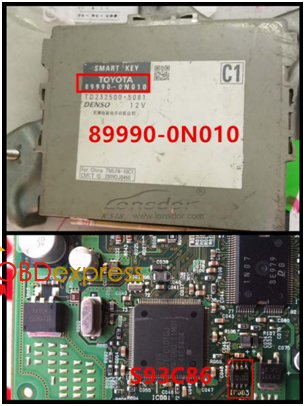
89990-06060smart box(see below pic)
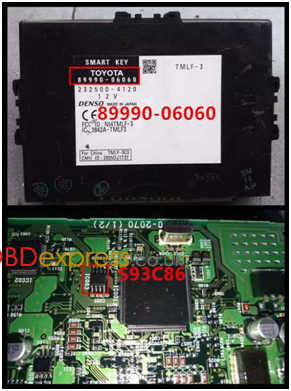
Note: Install back smart box when data writing complete.
Generate emulator key
It's required to write newly-generated data to EEPROM in smart immo box.
Dashboard is lit up after emulator key (SKE) generated.
- This function can generate a backup master key when all keys are lost, which
can open dashboard to add keys.
- Insert bound SKE(corresponding color/type) into K518 card slot, and press
round button on the key.
- System is building configuration... Please wait patiently.
- Key generation complete. Please press round button on it and put it against
ignition switch of vehicle, and try to open dashboard. If the dashboard is lit up,
please use SKE to program and add new keys.
Add smart key
- Put emulator key or available key against ignition switch and switch ignition ON
till dashboard is lit up.
- System communication, getting info about key numbers...
- Put registered smart key against start button of vehicle, and remove it when
buzzer beeps once.
- Please put smart key to be registered at start button of vehicle in 30 seconds,
and remove it when buzzer beeps twice.
- Please wait till key registration complete. Operation succeed.
Delete smart key
- Put emulator key or available key close to ignition switch and switch ignition
ON till dashboard is lit up.
- System communication, getting key numbers...
- Put back of registered smart key close to vehicle start button, and remove it
when buzzer beeps once.
- System is deleting key... Deleting succeed. Smart key (away from start button)
will be deleted.
Bind emulator key
- This function can bind smart key emulator (SKE-LT series) to K518 host.
- Please put key to be bound into K518 host slot.
- System is binding... When complete, continue to program all keys lost.
Attentions
- Newly-generated data must be written to EEPROM chip in smart box.
Dashboard can be lit up after simulate key is generated.
- Bind key/generate key: Change placement of simulate key to sense if failed.
98 card smart box is located at back of storage box at passenger seat.
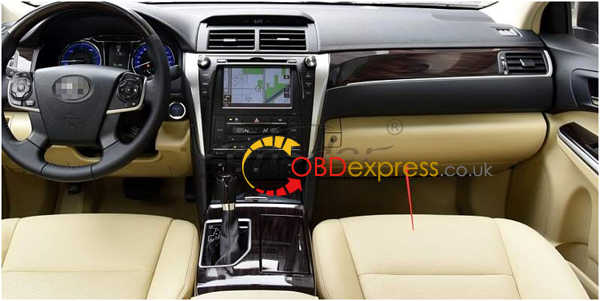
Reference
| Chip type | 94/D4(SKE black), 88/A8(SKE red), A9(SKE blue), 39(SKE orange) |
| Remote control type | Specific smart key |
| Key embryo No. | Specific smart key |
| Password required or not | Not required. |
| Remote control | Generate automatically when smart key programming complete. |
| OBD position | Under steering wheel |
| Reference pics |
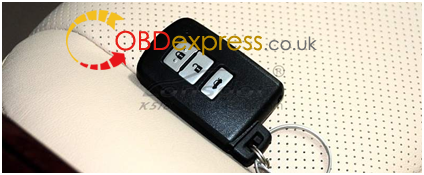
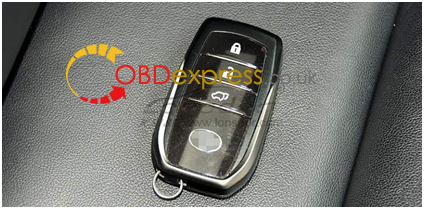
Smart key appearance for part of Toyota series
Toyota series: 2008 Reiz 0111 smart key 2008 RAV4 0111 smart key 2008 Prado 0140smart key 2008 Camry 0140smart key 2008 Corolla 0111smart key 2008 Cruiser A433smart key 2008 Alfa smart key 2008 Previa smart key 2008 Lexus 0140 smart key 2010 Camry 3370 smart key 2010 Prado 3370 smart key 2010 Reiz 5290 smart key 2010 Crown 5290smart key 2010 Lexus 3370 smart key 2010 Camry 0020smart key 2012 Reiz 7930 smart key
2012 Crown 7930smart ky 2012 Prado 7930 smart key 2012 RAV4 7980 smart key 2013 Lexus ES GS IS smart key 2014 RAV4 2-button smart key 2014 RAV4 3- button smart key 2014 New vios/Yaris L smart key
Lexus smart key,select from PCB type: 89904-30291(0140 PCB ES350 old ver. ) 89904-50430(3370 PCB ES240/ES350 new ver.) 89904-48321 (5290 PCB PX270) 89904-28132(0780 PCB 5-button Previa) 89904-6071 (A433 PCB Cruiser) 89904-0041(0111PCB RAV43-button Reiz Carola)
|
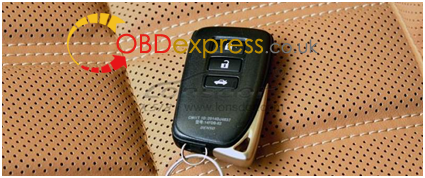
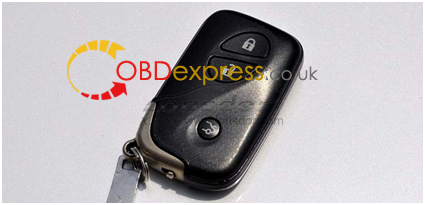
Source:http://www.obdexpress.co.uk/wholesale/ske-lt-smart-key-emulator-lonsdor-k518ise-ograge.html
Price: 185USD(150EURO) not incl. shipping cost.
Posted by: OBDexpress.co.uk at
08:18 AM
| No Comments
| Add Comment
Post contains 1443 words, total size 17 kb.
Newly releasd!Lonsdor Toyota/Lexusthe5themulatorforChip 39 (128bit) supports Toyota H Chip All Smart Keys Lost by OBD through offline calculation-no need to connect from server.Can be used for Hilux, Fortuner, Yaris and more.
Orange smart key emulator for chip 39 (128bit) test car models:
Hilux...OK
Fortuner ... OK
YARIS... OK
More Toyota / Lexus car models will be tested, please be expected.
Note: It's not limited American Toyota, Australian Toyota or Asian Toyota.
User Manual
1.Toyota Lexus - Smart key - All key lost - Helps
Applied to :Toyota/Lexusthe5themulatorforChip39 (128 bit)
&"94/D4â€--theBlack
This help file basically includes 4 parts: Function, Operation, Attention, and
Reference.
Functions
Operational process for all key lost
Please confirm whether emulator key (SKE) is bound to K518 device beforehand.
Backup EEPROM data-> Generate new data-> Dismantle immo box and write
new data to EEPROM-> Generate SKE-> Add/delete smart key
- Backup original EEPROM immo data.
- Use backup data to generate new data.
- System certify and generate new data automatically, and program SKE to
become an available key,which can open dashboard.,before key programming.
- Add a smart key.
- Delete programmed key.
- Bind SKE: Require to bind all SKE to K518 for the first use.
Operation
Operational process for all key lost
Please confirm whether K518 is bound to emulator key (SKE).
- Backup EEPROM data--> 2. Generate emulator key (SKE)--> 3. Use SKE to
switch ignition ON--> 4. Add smart key
Operation
- Backup EEPROM immo data.
- Generate a SKE for emergency use.
- Put the SKE close to start button and dashboard will be lit up.
- Add a smart key.
- Delete a smart key.
Bind emulator key
- This function can bind emulator key (SKE-LT series) to K518 host.
- Please insert key to be bound into the host slot.
- System is binding... Program key when key binding complete.
Backup EEPROM data
- This function can backup EEPROM data.
Generate SKE for emergency when data backup complete.
Insert SKE to switch ignition ON and open dashboard.
- Receiving vehicle immo data... Please wait patiently.
- Please name EEPROM backup data.
- Data backup succeed.Please select "generate emulator keyâ€function to generate a spare key for emergency.
Generate emulator key
- This function can generate a spare master key when all keys are lost, which can
open dashboard to add other keys.
- Receiving local backup data...
- System shows current data and notify key type.
- Insert bound emulator key (corresponding color/type) into K518 host slot, and press
round button on the key.
- Generating SKE ... Please wait for 5 minutes patiently.
- When SKE is generated,press round button on it and put it against start button of
vehicle, and try to open dashboard.If the dashboard is lit up, please use SKE to
program and add new keys.
Add smart key
- Put SKE or available key against ignition switch and switch ignition ON till
dashboard is lit up.
- System communication, getting info about key numbers...
- Put registered smart key against vehicle start button, and remove it when
buzzer beeps once.
- Put smart key (to be registered) at start button of vehicle in 30 seconds, and
remove it when buzzer beeps twice.
- Please wait till key registration complete. Operation succeed.
Delete smart key
- Put emulator key or available key close to ignition switch and switch ignition ON till
dashboard is lit up.
- System communication, getting info about key numbers...
- Put back of registered smart key close to vehicle start button, and remove it
when buzzer beeps once.
- System is deleting key... Deleting succeed. Smart key (away from start button) will be deleted.
Attentions
- Bind emulator key: Require to power on the device when put emulator key into
K518 host slot.
- System will read backup data of vehicle to generate emulator key and prompt
to choose corresponding key type(refer to back of the emulator).
4.For Carola/Vios/Zelas all key lost, programming is not available in a state of alarm.
2.Toyota Lexus - Smart key - All key lost - Helps With LOND
Applied to :Green 98 SKE-LT Smart Key Emulator
This help file basically includes 4 parts: Function, Operation, Attention, and
Reference.
Functions
Operational process for all key lost
Please confirm whether emulator key (SKE) is bound to K518 device beforehand.
Backup EEPROM data-> Generate new data-> Dismantle immo box and write
new data to EEPROM-> Generate SKE-> Add/delete smart key
- Backup original EEPROM immo data.
- Use backup data to generate new data.
- System certify and generate new data automatically, and program SKE to become an available key, which can open dashboard, before key programming.
- Add a smart key.
- Delete programmed key.
- Bind emulator key: Require to bind all SKE to K518 for the first use.
Operation
Operational process for all key lost
Please confirm whether K518 is bound to emulator key (SKE).
Backup EEPROM immo data-> Generate new data-> Dismantle immo box and
write new data to EEPROM-> Generate SKE-> Add/delete smart key
Backup EEPROM data
- This function can backup EEPROM data.
- System is receiving data, please wait patiently.
- Please input data filename and save succeed.
- EEPROM data backup complete, please select "generate EEPEOM dataâ€
function to generate specific data.
Generate EEPROM data
- This function can generate EEPROM data for vehicle.
- Continue to select EEPROM data of smart key backed up before.
- Searching data... Please input filename of new data.
- Generating EEPROM data complete. Data saved in K518\file\feature_1013.
Please write newly-generated data to EEPROM(IC003)in smart immo box of
vehicle. More details, refer to "Referenceâ€.
89990-0N010 smart immo box (see below pic)
89990-06060smart box(see below pic)
Note: Install back smart box when data writing complete.
Generate emulator key
It's required to write newly-generated data to EEPROM in smart immo box.
Dashboard is lit up after emulator key (SKE) generated.
- This function can generate a backup master key when all keys are lost, which
can open dashboard to add keys.
- Insert bound SKE(corresponding color/type) into K518 card slot, and press
round button on the key.
- System is building configuration... Please wait patiently.
- Key generation complete. Please press round button on it and put it against
ignition switch of vehicle, and try to open dashboard. If the dashboard is lit up,
please use SKE to program and add new keys.
Add smart key
- Put emulator key or available key against ignition switch and switch ignition ON
till dashboard is lit up.
- System communication, getting info about key numbers...
- Put registered smart key against start button of vehicle, and remove it when
buzzer beeps once.
- Please put smart key to be registered at start button of vehicle in 30 seconds,
and remove it when buzzer beeps twice.
- Please wait till key registration complete. Operation succeed.
Delete smart key
- Put emulator key or available key close to ignition switch and switch ignition
ON till dashboard is lit up.
- System communication, getting key numbers...
- Put back of registered smart key close to vehicle start button, and remove it
when buzzer beeps once.
- System is deleting key... Deleting succeed. Smart key (away from start button)
will be deleted.
Bind emulator key
- This function can bind smart key emulator (SKE-LT series) to K518 host.
- Please put key to be bound into K518 host slot.
- System is binding... When complete, continue to program all keys lost.
Attentions
- Newly-generated data must be written to EEPROM chip in smart box.
Dashboard can be lit up after simulate key is generated.
- Bind key/generate key: Change placement of simulate key to sense if failed.
98 card smart box is located at back of storage box at passenger seat.
Reference
| Chip type | 94/D4(SKE black), 88/A8(SKE red), A9(SKE blue), 39(SKE orange) |
| Remote control type | Specific smart key |
| Key embryo No. | Specific smart key |
| Password required or not | Not required. |
| Remote control | Generate automatically when smart key programming complete. |
| OBD position | Under steering wheel |
| Reference pics |
Smart key appearance for part of Toyota series
Toyota series: 2008 Reiz 0111 smart key 2008 RAV4 0111 smart key 2008 Prado 0140smart key 2008 Camry 0140smart key 2008 Corolla 0111smart key 2008 Cruiser A433smart key 2008 Alfa smart key 2008 Previa smart key 2008 Lexus 0140 smart key 2010 Camry 3370 smart key 2010 Prado 3370 smart key 2010 Reiz 5290 smart key 2010 Crown 5290smart key 2010 Lexus 3370 smart key 2010 Camry 0020smart key 2012 Reiz 7930 smart key
2012 Crown 7930smart ky 2012 Prado 7930 smart key 2012 RAV4 7980 smart key 2013 Lexus ES GS IS smart key 2014 RAV4 2-button smart key 2014 RAV4 3- button smart key 2014 New vios/Yaris L smart key
Lexus smart key,select from PCB type: 89904-30291(0140 PCB ES350 old ver. ) 89904-50430(3370 PCB ES240/ES350 new ver.) 89904-48321 (5290 PCB PX270) 89904-28132(0780 PCB 5-button Previa) 89904-6071 (A433 PCB Cruiser) 89904-0041(0111PCB RAV43-button Reiz Carola)
|
Source:http://www.obdexpress.co.uk/wholesale/ske-lt-smart-key-emulator-lonsdor-k518ise-ograge.html
Price: 185USD(150EURO) not incl. shipping cost.
Posted by: OBDexpress.co.uk at
08:18 AM
| No Comments
| Add Comment
Post contains 1443 words, total size 17 kb.
April 05, 2018
Anyone know how to Update Kess v2 4.036 to 5.017?ifound some tips herehttp://blog.obdexpress.co.uk/2018/01/26/how-to-update-kess-v2-4-036-to-5-017/
onlyway would be to replacenxpor unlocknxp(if possible) and reflash with 5.017 firmware if you have it
and newsdcardwith 5.017imageon it
And here is whatidid..
I rebuilt and generateda SDcard image for theRED Kess V2 5.017.
This image can fitinsmall SD cards.
This image is generated specially for the RED Kess CID number.
So you must write itinthe original SD card with good CID number.
(Some Green Kess havesameCID)
It’s preferable to replace the contents of the entire SD card with 0s before writing the image.
(ImageUSB includes functionality to Zero a USB Flash Drive).
WARNING:it’s just a test, but work for some.
Make a backup of your SD card before, even if it is corrupted. Sometimes it can help.
I can generate for other CID.
Try and report.
Free download Kess 5.017 SD card image:
Decryption Key:
!6FU2l9D9p2nQWj6mOll6I_NAQX2l2fVojD4ZKEzRypk
Credits to kitnoos2002
Again, I tested myself only, not sure if it works for you all
You guys try on your own risk.
I did find some failed. If so, you can have a try this
It’s working. Some brothers in forums with failure choose thiskessfinally.
I think it can be used with relief.
Posted by: OBDexpress.co.uk at
02:26 AM
| No Comments
| Add Comment
Post contains 215 words, total size 13 kb.
Anyone know how to Update Kess v2 4.036 to 5.017?
and
And here is
I rebuilt and
This image can
This image is generated specially for the RED Kess CID number.
So you must write
(Some Green Kess havesameCID)
It’s preferable to replace the contents of the entire SD card with 0s before writing the image.
(ImageUSB includes functionality to Zero a USB Flash Drive).
WARNING
Make a backup of your SD card before, even if it is corrupted. Sometimes it can help.
I can generate for other CID.
Try and report.
Free download Kess 5.017 SD card image:
Decryption Key:
!6FU2l9D9p2nQWj6mOll6I_NAQX2l2fVojD4ZKEzRypk
Credits to kitnoos2002
Again, I tested myself only, not sure if it works for you all
You guys try on your own risk.
I did find some failed. If so, you can have a try this
It’s working. Some brothers in forums with failure choose
I think it can be used with relief.
Posted by: OBDexpress.co.uk at
02:26 AM
| No Comments
| Add Comment
Post contains 219 words, total size 14 kb.
April 04, 2018
Searched a lot… and here are what
Hope it helps
I’ve found that
But you think I can adjust mileage on a Porsche Cayenne 2012 over OBD2 with it?
WithdigimasterandDigiprogI need to disassemble the odometer for Porsche Cayenne 2012, and to access
Please tell me more aboutObstarx300dp, what you
For
Anyone has boughtOBDSTAR X300 PRO3that could give some feedback?
I have OBDSTAR X300 PRO.
I use it via OBD for many
Even I need
Digimaster 3, Digiprog 3, Smok UHDS, Smok JTAG for CAS & EZS, FVDI, X300, etc…
Each tool is good for different car&model, this need hard work to learn!
Btw.
Digimaster 3 don’t use CAS BDM Programmer for CAS EZS! DEATH unit!
FVDI don’t make MB W212 W204 W221! Digimaster is better = NO DEATH ZGW!
Digiprog 3 don’t touch VOLVO via OBD!!! DEATH CAR!
Smok JTAG is better than R260 & R270! Only need remember heat processor!
I’ve never tried OBDSTAR products… I’ve bought OBDSTAR 300x DP to try it, it hasn’t arrived yet, but I’m afraid that it doesn’t work for cayenne 2012…
I’ve
Anyone didCayenneodometer with
I need to adjust mileage on Porsche Cayenne 2012, but to buy DiagProg4 is very expensive just to make this car… I’ve checked some pictures of OBDSTAR 300x DP and it seems to do it by OBD2.
http://blog.obdexpress.co.uk/2018/04/04/obdstar-tools-good-or-not/
Posted by: OBDexpress.co.uk at
06:12 AM
| No Comments
| Add Comment
Post contains 384 words, total size 19 kb.
April 02, 2018
Standalone versions ofISTA-D and ISTA-P.
For ISTA-P Loader

https://mega.nz/#!ZVYFzIiI!EzLW709OaKJzbwBWsibsv3AQsQHCfIASMuBA3-mNnHQ
For unpack archives use 7-zip 16.04 or higher.
All installed and ready to work.
ISTA-P work with old and new Loader
Instructions for installation, configuration
To view pdf files,
ISTA-P - 143 GB
Service Data (SDP) - 100 GB
Logistic Data (BLP) - 2.72 Gb
FASTA & HW check disabled !!!
What's included in torrent:

Source: cartechnology.co.uk, thanks to Spider80.
If you want the reliable source
http://www.obd2eshop.com/wholesale/2018-03-
All installed and ready to work.
Tested
Software Included:
BMW ETK: 2018.03
BMW KSD: 03.2018 Multilanguage
BMW FSC Navigation Code Generator
BMWAiCoder for BMW Coding
With free BMW Engineer Software (INPA, NCS, WinKFP, E-Sys 4.09.13 e-
Dr.gini B020 diagnostic software requires Ediabas properly installed and functional with a communication interface ( ICOM, ICOM Next, ENET, PASSTHRU or K+DCAN ),
the BMW manufactured before 2003 are not supported.


http://blog.obd2eshop.com/rheingold-4-09-13-ista-p-3-63-2-001-torrent-download/
http://obd2eshop.blogspot.com/2018/04/rheingold-40913-ista-p-3632001-torrent.html
Posted by: OBDexpress.co.uk at
01:09 AM
| No Comments
| Add Comment
Post contains 214 words, total size 11 kb.
Standalone versions ofISTA-D and ISTA-P.
For ISTA-P Loader
https://mega.nz/#!ZVYFzIiI!EzLW709OaKJzbwBWsibsv3AQsQHCfIASMuBA3-mNnHQ
For unpack archives use 7-zip 16.04 or higher.
All installed and ready to work.
ISTA-P work with old and new Loader
Instructions for installation, configuration
To view pdf files,
ISTA-P - 143 GB
Service Data (SDP) - 100 GB
Logistic Data (BLP) - 2.72 Gb
FASTA & HW check disabled !!!
What's included in torrent:
Source: cartechnology.co.uk, thanks to Spider80.
If you want the reliable source
http://www.obd2eshop.com/wholesale/2018-03-
All installed and ready to work.
Tested
Software Included:
BMW ETK: 2018.03
BMW KSD: 03.2018 Multilanguage
BMW FSC Navigation Code Generator
BMWAiCoder for BMW Coding
With free BMW Engineer Software (INPA, NCS, WinKFP, E-Sys 4.09.13 e-
Dr.gini B020 diagnostic software requires Ediabas properly installed and functional with a communication interface ( ICOM, ICOM Next, ENET, PASSTHRU or K+DCAN ),
the BMW manufactured before 2003 are not supported.
http://blog.obd2eshop.com/rheingold-4-09-13-ista-p-3-63-2-001-torrent-download/
http://obd2eshop.blogspot.com/2018/04/rheingold-40913-ista-p-3632001-torrent.html
Posted by: OBDexpress.co.uk at
01:09 AM
| No Comments
| Add Comment
Post contains 214 words, total size 11 kb.
32 queries taking 0.0516 seconds, 127 records returned.
Powered by Minx 1.1.6c-pink.

