



December 17, 2015
How to update AK500+ Key Programmer hardware
AK500+ Key Programmer with EIS SKC Calculator for Mercedes Benz can read data more quickly and safely, can read and write keys more quicky, and AK500+ is more stable for the functions with key programming and SKC Calculator.
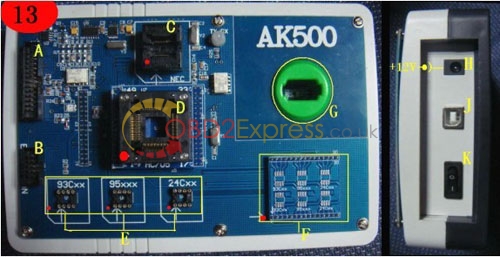
AK500+ hardware instruction:
A: HC705E6/HC711/HC908/HC912/HC9S12/MPC and so on read and write connection port
B: ESL/K-line/CANBUS connection port
C:Benz Infrared keys NEC chip Adapter Holder
D: HC705 chip Adapter Holder
E: EEPROM adapter socket
F: EEPROM Welded plate
G: Benz Infrared keys read and write Jack
H: AK500 power port
I : AK500 USB port
J: AK500 Power switch
Hardware update instruction:
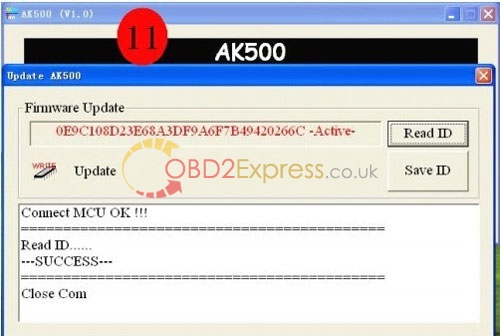
1 Enter the software by "Firmware updateâ€. Use "Read ID†to read out the serial number and "Save IDâ€. Save it as the "TXT†format. And send it to the factory or your seller. (Photo 11)
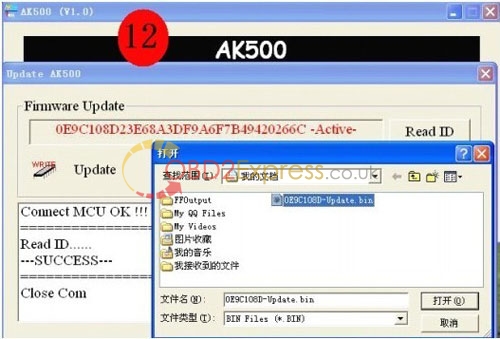
2 Open "Updateâ€, and download the software package sent by your seller or factory to AK500.
Free download:
video of Mercedes Benz AK500+ Key Programmer with EIS SKC Calculator
Benz AK500+ Key Programmer Software
How to install software for Benz AK500+ Key Programmer
More information:http://www.obdexpress.co.uk/service/mercedes-benz-ak500-key-programmer-video-and-software-free-download-185.html
Posted by: OBDexpress.co.uk at
08:48 AM
| No Comments
| Add Comment
Post contains 190 words, total size 3 kb.
17kb generated in CPU 0.0749, elapsed 0.1165 seconds.
35 queries taking 0.1031 seconds, 115 records returned.
Powered by Minx 1.1.6c-pink.
35 queries taking 0.1031 seconds, 115 records returned.
Powered by Minx 1.1.6c-pink.

