



August 11, 2017
I solved it this way.
1. OpenTaskmanageran Killall Processes of SDconnect Toolkit(Tkserver.exe, Tktray.exe).
2. Go to DTS install folder and find the folder with the Tkserver.exe in it.
3. Delete this folder.
4. Install SDconnect toolkit from here
Free download SDconnect Toolkit on Mega
encryption key: fQAtu6sTOfHFhfQi5ZObBJr742wGa7_CXuLY33JLhfc
(BTW, you can install this SDConnect toolkit
5. Go to original SDconnect Path (C:\Program Files (x86)\Mercedes-Benz\SDconnect Toolkit\)
6. CopyfilesToolkit.ini+ SDVersion.dll
7. Paste Toolkit.ini in C:\ProgramData\I+ME ACTIA\Toolkit\ and SDVersion.dll in Install-Directory of the new SDconnect Toolkit.
8. Start SDconnect Toolkit
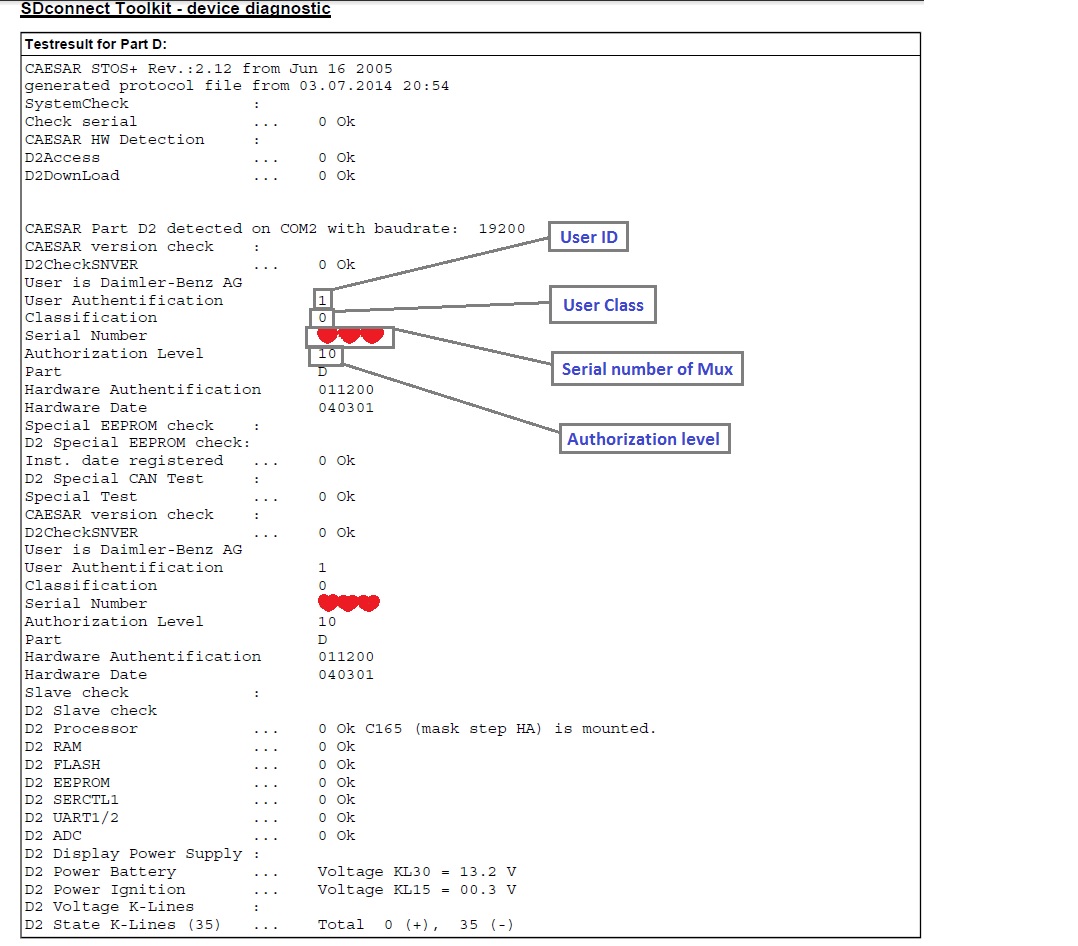
SDconnect Toolkit – device diagnostic
Testresultfor Part D:
Posted by: OBDexpress.co.uk at
08:39 AM
| No Comments
| Add Comment
Post contains 165 words, total size 11 kb.
35 queries taking 0.0549 seconds, 115 records returned.
Powered by Minx 1.1.6c-pink.

