



June 21, 2018
 ass-Through Or Go-Between
For
How to do
1
That is, the data are directly downloaded from the PC to the ECU in the vehicle.
Although theGM Tech 2is still
- Connect Tech 2 to the vehicle.
- Connect Tech 2 to the PC switch on Tech 2.
- Start TIS 2000 on the PC.
- Select the icon ‘Service Programming System’ (Fig. 1) on theTIS2000start page.
- Start TIS 2000 on the PC.
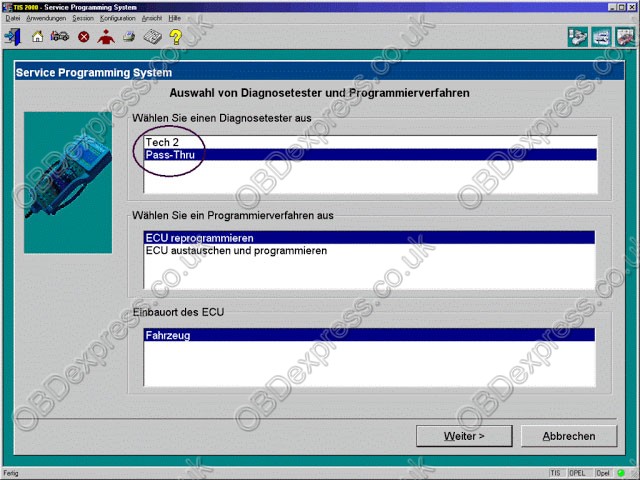
- On the screen ‘Select Diagnostic Tool and Programming Process’ (See picture below) make a selection for
***Pass-Thru mode
***the reprogramming of an ECU that was not exchanged or the replacement/programming of a new ECU
***the ECU location.
Thenclock‘Next’ button.
2
You connect the Tech 2 to the vehicle and download the module information that you want to program. Then you disconnect, run to the computer running Tis2000, connect it to the computer and download the programming information for that module, disconnect again and run back to the vehicle, connect it and it automatically programs the module. It can take a long time depending on the module (PCM is the longest).
Have fun in GM Tech II programming!
Good luck!
Src:
http://blog.obd2eshop.com/gm-tech2-scan-tool-pass-through-vs-go-between/
Posted by: OBDexpress.co.uk at
08:55 AM
| No Comments
| Add Comment
Post contains 312 words, total size 7 kb.
35 queries taking 0.0466 seconds, 115 records returned.
Powered by Minx 1.1.6c-pink.

