



February 14, 2019
Vxdiag Nano GM OpelGDS2 firmware checksum is incorrect. I will include pictures below. My guess is that VXManager is doing a 64-bit checksum but expects the result to be from a 32-bit checksum.


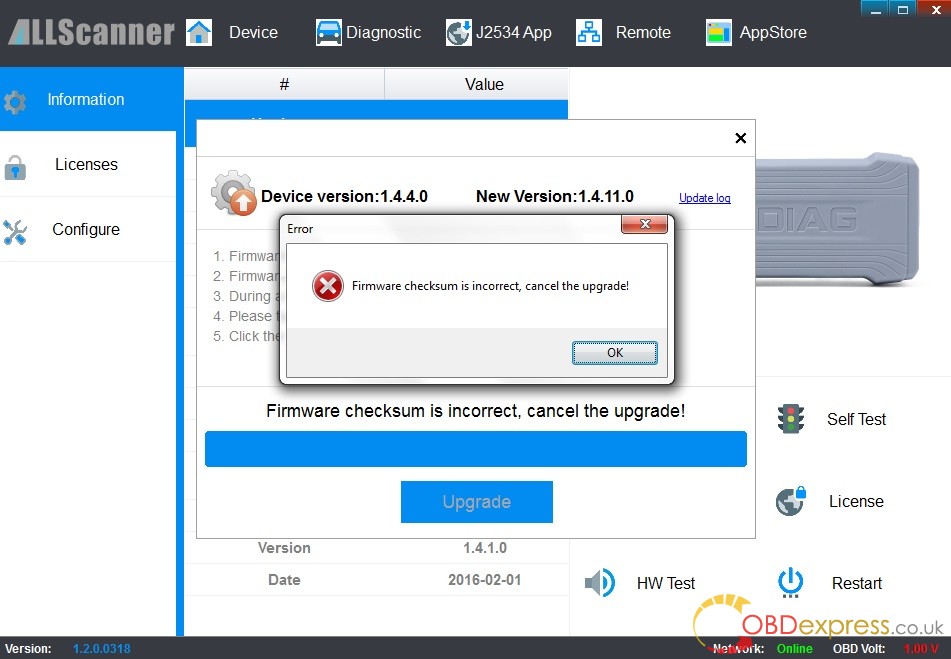
Problem description:
I have one concern remaining. On the Diagnostics screen in VXmanager, I select Passthru as one of MyApps and it shows a screen that says "Please installâ€. When I click the Install button, it says "Failed, Retry!â€. It does the same thing when I try to Install the "GM GDS2/T2Wâ€. I know thatTech2Winis working correctly because I have already used it for important work. I will have no need to use GM SPS for some time (and my belief is that is what "Passthru†is needed for) so I don’t know if it will fail later when I try to use it.
I do know that during the VxManager install it showed that it correctly installed "VCX Passthru Driver (SAE-J2534-2)†so perhaps the "Install†button in VxManager is not expected to work? I am attaching a picture of the failure screen.
Finally solved!!!
Hello.Ifoundawork-aroundfortheproblemsoIwasabletoupgradethefirmware,whichmeansIcannolongerdemonstratetheproblem.Mywork-aroundsupportsmytheorythatthereisconfusionover32-bitvs64-butchecksum.
WhatIdidwastoinstallVxManagerintothevirtualmachineusedforGDS2(whichappearstobe32-bit).Inthatenvironment,therewasnoproblemwithobtainingacorrectchecksumanddoingthefirmwareupdate.
Ihopethismighthelpthedeveloperstomakearealfixforthisproblem.Thankyou.
Posted by: OBDexpress.co.uk at
08:38 AM
| No Comments
| Add Comment
Post contains 191 words, total size 10 kb.
35 queries taking 0.0388 seconds, 115 records returned.
Powered by Minx 1.1.6c-pink.

