



May 31, 2019
Free download IDS V113.01 for Ford and Mazda, installation tips, VCM2 native install on win7.
Free download IDS V113.01
Link 1:
https://mega.nz/#!KRh3wA5A!k79Lj9jmwhKOyMhCPQkrCcW-kcox8tx_SH424R0HER8
Link 2:http://flyobd.com/shop/download-center/
Security:100% yes, uploaded by STIC Fly engineer.
No pass
FORD VCM IDS3...Confirmed
FLY FVDI J2534 for Ford Mazda...Confirmed
OS:Win7, Win8, Win 10
Free download Ford IDS V113 for VCM2(SP177-1)
Free download Mazda IDS V113 for VCM2(SP177-1)
Freed download Startup software VCMXLoader_01.018.06
Ford VCM2 (SP177-1)IDS V113 installation:
Installation Tips:
- Run IDS.
- Install VCM loader.
- use loader to run the software.
Pros:Native install, no VMWARE.
1.Ford and Mazda IDS softwarecannot be installed on the same computer at the same time.
2.Install Ford IDS/ Mazda IDS software according to the default path installation (don’t change the installation path) ,Please Exit or uninstall anti-virus software before installing software.
3.When installing IDS software, install the initial version of the subsequent upgrade patch version. (e.g.110.01, then110.02,110.03……)
4.After successfully installation of IDS software, installVCMXLoader startupsoftware and install it by default (check the Ford/Mazda IDS Programming Menu Patch option unless the computer system reports an error and the prompt point "Confirm" and "Yes" appears)
5.You can ONLY run/start IDS software from VCMXLoader (IDS software cannot be started directly)when using IDS. Only by connecting devices can IDS software be started. When running the software, please select the appropriate model (Ford or Mazda).
6.Question about online functions when enter the account password interface : if when jump page (the ActiveX controller is not enabled or not installed, please be sure to enable all the ActiveX controller prompts) on this site is typically IE browser has a problem, suggest that install the latest version of Internet explorer and use IE browser setting as the default browser.
Procedure on VCM2 IDS V113 native installation on WIN7:


Connect IDS3 /J2534 interface.
Run IDS v113 from VCMXLoader.


Choose none dealer type.


The IDS diagnostic software has been activated.

Connect VCMII with the vehicle and start diagnosis.
Thanks.
http://blog.obdexpress.co.uk/2019/05/29/ford-mazda-ids-v113-free-download-and-win7-native-install/
Posted by: OBDexpress.co.uk at
03:08 AM
| No Comments
| Add Comment
Post contains 328 words, total size 11 kb.
May 28, 2019
I got carried away with experimenting with adjusting the ride height of my car and I dropped my car way too (literally looks like all 4 shocks are completely deflated) and now I can’t get the car back to normal ride height. Whenever I go into the "inflate†options I get a "connection error 8.6000†or something like that. I doubt this helps but I’ve attached my voltage levels from before touching anything.
After I couldn’t raise the car, I ran a test on my airmatic compressor viaDASand it’s only putting out 8.6bar and according o the computer a healthy pump puts out
14-16bar. Do you think this could be part of my issue?

How to do I disable this message?

Tele Aid works with a whole bunch of other control modules and they look for it to be present, active and fully working. This is dealership quality coding. I expect nothing less than that from a moron mechanic and people who have not understood a thing about the system itself and how it works.
There is a specific setting to disable this message while everything else is still working as expected.
The correct steps are explained inWISbut that means one would actually have to get familiar with WIS, look it up and read it.
Enjoy
http://blog.obdexpress.co.uk/2019/05/28/how-to-solve-the-airmatic-compressor/
Posted by: OBDexpress.co.uk at
07:08 AM
| No Comments
| Add Comment
Post contains 228 words, total size 3 kb.
May 27, 2019
Which aregood programmers for 9S12, 908 etc motorola MCU?
preferably a one thatdoesn't require to lift MCU legsand can connect to mcu by connect points on PCB ?
There are lots of Eeprom programmer can read Motorola
her are few:
SMOK
CPT
and many more.
Car list + Reviews:
- UPA USBread & write 9S12, 908 etc Motorola MCU.
1) Car list:
Motorola HC08*: MC68HC08AS20, MC68HC08AS32, MC68HC08AS60, MC68HC08AZ32, MC68HC(9)08AZ32A, MC68HC908AZ60, MC68HC908AZ60A
MC9S12HY64/HA32
Motorola HCS12*: MC9S12D64, MC9S12A128, MC9S12DG128, MC9S12DG256, MC9S12H128, MC9S12H256, MC9S12HZ64, MC9S12HZ128, MC9S12HZ256
Freescale (Motorola) HCS12X*: MC9S12XD64, MC9S12XD128, MC9S12XDG128, MC9S12XDP384, MC9S12XDP512, MC9S12XHZ256, MC9S12XHZ512
2) Reviews:
- MC9S12DG128 - 3L40K reading withXprog
- How to read 68HC05b16 with UPA.


- VVDI Progreads & writes 9S12, 908 etc. Motorola MCU:
1). Support list:
reading MC9S12 series Chips, VVDI Pro is more stable than XP Prog.
attacking MC9S12 series Chips, VVDIProg is faster.
MCU
|
Manufactures |
Types |
Support |
Remark |
|
MOTOROLA |
MC9S12XEP |
R |
Can automatically determine D-FLASH/EEE space |
|
MC9S12XA |
R |
||
|
MC9S12XB |
R |
||
|
MC9S12XD |
R |
||
|
MC9S12XDT |
R |
||
|
MC9S12XDP |
R |
||
|
MC9S12XDQ |
R |
||
|
MC9S12DG |
R |
||
|
MC9S12DT |
R |
||
|
MC9S12P |
R |
||
|
MC9S12H |
R |
||
|
MC9S12HY |
ï¿¡ |
||
|
MC9S12HA |
ï¿¡ |
||
|
MC9S12HZ |
ï¿¡ |
||
|
MC9S12XHZ |
ï¿¡ |
||
|
MC9S12B |
ï¿¡ |
||
|
MC9S12GC |
ï¿¡ |
||
|
MC9S12XS |
ï¿¡ |
||
|
MC9S12K |
ï¿¡ |
||
|
MC9S12Q |
ï¿¡ |
||
|
MC9S12C |
ï¿¡ |
||
|
MC9S12P |
ï¿¡ |
||
|
MC9HC(9)08 |
ï¿¡ |
||
|
ATMEL |
ATTINY |
ï¿¡ |
|
|
ATMEGEA |
ï¿¡ |
||
|
NEC |
uPD70F |
ï¿¡ |
|
|
ST |
TMS370 |
ï¿¡ |
Note: R means the type is supported, ï¿¡ means the type will be supported soon in the future.
2) Review...
Question: Read car BMW 3 with Xhorse VVDI eeprom came up once read in Tango CAS 3 + encrypted can this be done if I have Isn of car let me know please asp
Anser: VVDI prog yes with wires…Eeprom
- SMOK reads & writes 9S12,908 Motorola MCU:
google and search http://smok.com.pl for official info.
- XProg reads & writes 9S12, 908 etc. Motorola MCU:
1) XPROG-M V5.84 Authorizations:
AUTH-0004 Motorola HC12, 9S12 family authorization (allows to read/write EEPROM and flash memory)
AUTH-0018 Motorola HC12, HC912, MC9S12, MC9S12X bypass security authorization (allows to read/write secured EEPROM and flash memory)
AUTH-0024-1 MC9S12Cxx
AUTH-0024-2 MC9S12XE
AUTH-0024-3 9S12XE SECURITY
AUTH-0024-4 MC9S12HA/HY/P
AUTH-0027-1 HC(S)908 update Authorized 2016/3/13
AUTH-0027-2 HC(S)908 sercurity Authorized 2016/3/13

2)Reviews on Xprog V5.8 Reads MCU 9S12 XEQ 384 on Rang Rover 2015-2016
Read MCU 9S12 XEQ 384 on Rang Rover 2015-2016
Save P-FLASH and D-FLASH unlock KVM secured
Now, I'll show you the location of a KVM module
And dismantle the module with secured MCU 9S12 XEQ
Read on bench using Xprog HQ clone or original
Then save P-FLASH and D-FLASH unlock KVM secured
Here we go.
Module location inside Rang Rover 2015-2016

Xprog box HQ clone.

The KVM board

Secured MCU 9S12 XEQ


Pin 42 and 46
Lift 1 pins shown in the image.


Maximum wires length 12cm

Secured MCU 9S12 XEQ 384

Run Xprog software v5.8

MCU/MPU, Freescale NXP 9S12XE, MC9S12XEQ384D-FLASH-Secured

Tip & Guide: How to get Xprog to work with secured MCU:
Reset MCU security
Run->change security state->reset MCU security
Wait 10...15 seconds if not success, cancel process
Check connection
Start from a
Remember MCU security byte value
Read, write...commands can be executed many times
Set MCU security
Run->change security sate->set MCU security
Read


Reset MCU security

It will take 10 to 12 seconds to unlock MCU
IP NOT STOP and repeat


Read


Save data

MCU/MPU, Freescale NXP 9S12XE, MC9S12XEQ384P-FLASH-Secured

Read


Save data

Job is done.
That's all.
Thanks.
http://blog.obdexpress.co.uk/2019/05/27/good-programmers-for-9s12-908-etc-motorola-mcu/
Posted by: OBDexpress.co.uk at
06:14 AM
| No Comments
| Add Comment
Post contains 560 words, total size 33 kb.
May 24, 2019
Newest update !!! bothLonsdor K518SandLonsdor K518ISE key programmerare able to work with almost all Ford incl. Europe, India, South America, Australia, Africa, Israel, China etc.
Confirmed working:
 Bypass PIN code
Offline

FORD\Europe... ...Lonsdor K518S / Lonsdor K518ISE confirmed working
FORD\Europe\B-MAX\2012-\Smart key
FORD\Europe\C-MAX\-2010\Immobilizer\Type 1
FORD\Europe\C-MAX\-2010\Immobilizer\Type 2
FORD\Europe\C-MAX\2010-2015\Smart key\Prox-rempartFORD\Europe\C-MAX\2010-2015\Smart key\Immo chip part
FORD\Europe\C-MAX\2010-2015\Immobilizer
FORD\Europe\C-MAX\2015-2016\Immobilizer
FORD\Europe\COUGAR \Immobilizer
FORD\Europe\COURIER\1996-1997\Immobilizer\Pats 3 iso diesel
FORD\Europe\COURIER\1997-1998\Immobilizer\Pats 3 iso diesel
FORD\Europe\COURIER\1997-1998\Immobilizer\Pats 3 iso petrol
FORD\Europe\COURIER\1999-2001\Immobilizer
FORD\Europe\COURIER\2001-2007\Immobilizer\Diesel
FORD\Europe\COURIER\2001-2007\Immobilizer\Petrol(Type 1)
FORD\Europe\COURIER\2001-2007\Immobilizer\Petrol(Type 2)
FORD\Europe\COURIER\2008-2013\Smart key
FORD\Europe\COURIER\2008-2013\Immobilizer
FORD\Europe\COURIER\2013-\Smart key
FORD\Europe\COURIER\2013-\Immobilizer
FORD\Europe\ECOSPORT\2013\Immobilizer
FORD\Europe\EDGE \2011-2013\Immobilizer
FORD\Europe\EDGE\2013-\Smart key
FORD\Europe\ESCAPE \Immobilizer
FORD\Europe\EXPLORER \1997-2001\Immobilizer\Type 1(PATS SCP)
FORD\Europe\EXPLORER \1997-2001\Immobilizer\Type 2
FORD\Europe\EXPLORER \1997-2001\Immobilizer\Type 3
FORD\Europe\EXPLORER \2011-2015\Immobilizer
FORD\Europe\FIESTA \1996-1997\Immobilizer\Diesel(PATS 3 ISO DIESEL)
FORD\Europe\FIESTA \1997-1998\Immobilizer\Diesel(PATS 3 ISO DIESEL)
FORD\Europe\FIESTA \1997-1998\Immobilizer\Petrol(PATS 3 ISO PETROL)
FORD\Europe\FIESTA \1999-2001\Immobilizer
FORD\Europe\FIESTA \2001-2007\Immobilizer\Diesel
FORD\Europe\FIESTA \2001-2007\Immobilizer\Petrol(Type 1)
FORD\Europe\FIESTA \2001-2007\Immobilizer\Petrol(Type 2)
FORD\Europe\FIESTA \2008-2013\Smart key
FORD\Europe\FIESTA \2008-2013\Immobilizer
FORD\Europe\FIESTA \2013-\Smart key
FORD\Europe\FOCUS \1995-1998\Immobilizer\Diesel
FORD\Europe\FOCUS \1998-2004\Immobilizer
FORD\Europe\FOCUS \2005-2011\Smart key
FORD\Europe\FOCUS \2005-2011\Immobilizer
FORD\Europe\FOCUS \2011-2014\Smart key\PROX-REM PART
FORD\Europe\FOCUS \2011-2014\Smart key\Immo chip part
FORD\Europe\FOCUS \2011-2014\Immobilizer
FORD\Europe\FOCUS \2015-2016\Immobilizer
FORD\Europe\FUSION \2002-2011\Immobilizer
FORD\Europe\GALAXY\1997-2000\Immobilizer\Petrol - 4 Cylinder- Type 1
FORD\Europe\GALAXY\2000-2006\Immobilizer\Diesel
FORD\Europe\GALAXY\2000-2006\Immobilizer\Petrol - 4 Cylinder - PATS 3 SCP 1
FORD\Europe\GALAXY\2000-2006\Immobilizer\Petrol - 4 Cylinder - Type 1
FORD\Europe\GALAXY\2000-2006\Immobilizer\Petrol - 4 Cylinder - Type 4(PATS 3 ISO PETROL)
FORD\Europe\GALAXY\2000-2006\Immobilizer\Petrol - 6 Cylinder Engine
FORD\Europe\GALAXY\2007-2010\Smart key
FORD\Europe\GALAXY\2007-2010\Immobilizer
FORD\Europe\GALAXY\2010-2015\Smart key
FORD\Europe\GALAXY\2010-2015\Immobilizer
FORD\Europe\GALAXY\2015\Smart key
FORD\Europe\GRANADA\1997-\Immobilizer\Diesel(PATS 3 ISO DIESEL)
FORD\Europe\GRANADA\1997-\Immobilizer\Petrol - AUTOMATIC - Type 1
FORD\Europe\GRANADA\1997-\Immobilizer\Petrol - (PATS 3 ISO PETROL)
FORD\Europe\KA\1997-1998\Immobilizer\PATS 3 ISO PETROL
FORD\Europe\KA\1998-2001\Immobilizer
FORD\Europe\KA\2002-2008\Immobilizer
FORD\Europe\KUGA \2007-2009\Immobilizer
FORD\Europe\KUGA \2009-2013\Smart key
FORD\Europe\KUGA \2013-2015\Smart key\PROX-REM PART
FORD\Europe\KUGA \2013-2015\Smart key\Immo chip part
FORD\Europe\KUGA \2013-2015\Immobilizer
FORD\Europe\MONDEO \1997-1998\Immobilizer\Diesel(PATS 3 ISO DIESEL)
FORD\Europe\MONDEO \1997-1998\Immobilizer\Petrol - AUTOMATIC
FORD\Europe\MONDEO\1997-1998\Immobilizer\Petrol- MANUAL(PATS3ISO PETROL)
FORD\Europe\MONDEO \1998-2007\Immobilizer
FORD\Europe\MONDEO \2007-2010\Smart key
FORD\Europe\MONDEO \2007-2010\Immobilizer
FORD\Europe\MONDEO \2010-2014\Smart key
FORD\Europe\MONDEO \2010-2014\Immobilizer
FORD\Europe\MONDEO \2015-\Smart key
FORD\Europe\MONDEO \2015-\Immobilizer
FORD\Europe\MUSTANG \2015-\Smart key
FORD\Europe\PUMA\1996-2001\Immobilizer\Petrol - 1.4L ZETEC(PATS 3 ISO PETROL)
FORD\Europe\PUMA \1996-2001\Immobilizer\Petrol - 1.7L ZETEC
FORD\Europe\RANGER\-2012\MANUAL PIN
FORD\Europe\RANGER\-2012\Immobilizer
FORD\Europe\RANGER\2012-2014\Immobilizer
FORD\Europe\S-MAX\2007-2010\Smart key
FORD\Europe\S-MAX\2007-2010\Immobilizer
FORD\Europe\S-MAX\2010-2015\Smart key
FORD\Europe\S-MAX\2010-2015\Immobilizer
FORD\Europe\S-MAX\2015-\Smart key
FORD\Europe\SCORPIO \1997\Immobilizer\Diesel(PATS 3 ISO DIESEL)
FORD\Europe\SCORPIO \1997\Immobilizer\Petrol - AUTOMATIC - Type 1
FORD\Europe\SCORPIO \1997\Immobilizer\Petrol - MANUAL(PATS 3 ISO PETROL)
FORD\Europe\TOURNEO CONNECT\2013-2014\Immobilizer
FORD\Europe\TOURNEO CUSTOM\2014-\Immobilizer
FORD\Europe\TOURNEO COURIER\2014-\Immobilizer
FORD\Europe\TOURNEO\2007-2010\Immobilizer
FORD\Europe\TRANSIT CONNECT\-2006\Immobilizer
FORD\Europe\TRANSIT CONNECT\2007-2013\Immobilizer
FORD\Europe\TRANSIT CONNECT\2013-\Immobilizer
FORD\Europe\TRANSIT COURIER\2014\Immobilizer
FORD\Europe\TRANSIT CUSTOM\2014-\Immobilizer
FORD\Europe\TRANSIT CUSTOM\2017-\Immobilizer
FORD\Europe\TRANSIT \1997-1998\Immobilizer\Diesel(PATS 3 ISO DIESEL)
FORD\Europe\TRANSIT \1997-1998\Immobilizer\Petrol
FORD\Europe\TRANSIT \1998-2000\Immobilizer\EPIC - Type 1(PATS 3 ISO PETROL)
FORD\Europe\TRANSIT \1998-2000\Immobilizer\EPIC - Type 2
FORD\Europe\TRANSIT \1998-2000\Immobilizer\Diesel
FORD\Europe\TRANSIT \1998-2000\Immobilizer\Petrol
FORD\Europe\TRANSIT \2000-2007\Immobilizer\DURA-TORQUE - Type 1
FORD\Europe\TRANSIT \2000-2007\Immobilizer\DURA-TORQUE - Type 2
FORD\Europe\TRANSIT \2000-2007\Immobilizer\Diesel
FORD\Europe\TRANSIT \2000-2007\Immobilizer\Petrol
FORD\Europe\TRANSIT \2007-2013\Immobilizer
FORD\Europe\TRANSIT \2014-\Immobilizer
FORD\Europe\VIGNALE \2015-\Smart key
FORD\Europe\WINDSTAR\1997-1998\Immobilizer
FORD\Europe\WINDSTAR\1998-\Immobilizer
FORD\Australia... ...Lonsdor K518S / Lonsdor K518ISE confirmed working
FORD\Australia\C-MAX\Immobilizer\Type1
FORD\Australia\C-MAX\Immobilizer\Type2
FORD\Australia\COUGAR\Immobilizer
FORD\Australia\COURIER\diesel\1997-
FORD\Australia\COURIER\diesel\1999-2001
FORD\Australia\COURIER\diesel\2001-2008\Immobilizer
FORD\Australia\COURIER\diesel\2008-\Smart Key
FORD\Australia\COURIER\diesel\2008-\Immobilizer
FORD\Australia\COURIER\petrol\1997-1998
FORD\Australia\COURIER\petrol\1998-2000
FORD\Australia\COURIER\petrol\2001-2008\Type1
FORD\Australia\COURIER\petrol\2001-2008\Type2
FORD\Australia\COURIER\petrol\2008-\Smart Key
FORD\Australia\COURIER\petrol\2008-\Immobilizer
FORD\Australia\ESCAPE
FORD\Australia\ESCAPE ZD
FORD\Australia\EXPLORER\1997-\Type1
FORD\Australia\EXPLORER\1997-\Type2
FORD\Australia\EXPLORER\1997-\Type3
FORD\Australia\FIESTA\diesel\1997-
FORD\Australia\FIESTA\diesel\1999-2001
FORD\Australia\FIESTA\diesel\2001-2008\Immobilizer
FORD\Australia\FIESTA\diesel\2008-2012\Smart Key
FORD\Australia\FIESTA\diesel\2008-2012\Immobilizer
FORD\Australia\FIESTA\petrol\1997-1998
FORD\Australia\FIESTA\petrol\1998-2000
FORD\Australia\FIESTA\petrol\2001-2008\Type1
FORD\Australia\FIESTA\petrol\2001-2008\Type2
FORD\Australia\FIESTA\petrol\2008-2012\Smart Key
FORD\Australia\FIESTA\petrol\2008-2012\Immobilizer
FORD\Australia\FOCUS\diesel\1995-1998
FORD\Australia\FOCUS\diesel\1998-2004
FORD\Australia\FOCUS\diesel\2005-2011\Smart Key
FORD\Australia\FOCUS\diesel\2005-2011\Immobilizer
FORD\Australia\FOCUS\diesel\2011-\Immobilizer
FORD\Australia\FOCUS\petrol\1998-2004
FORD\Australia\FOCUS\petrol\2005-2011\Smart Key
FORD\Australia\FOCUS\petrol\2005-2011\Immobilizer
FORD\Australia\FOCUS\petrol\2011-\Immobilizer
FORD\Australia\FUSION
FORD\Australia\GALAXY\diesel\2000-\Type1\PATS SCP
FORD\Australia\GALAXY\petrol\-1997\NOT V6\PATS 2 SCP
FORD\Australia\GALAXY\petrol\1997-2000\NOT V6\Type1(PATS SCP)
FORD\Australia\GALAXY\petrol\2000-\NOT V6\Type1(PATS SCP)
FORD\Australia\GALAXY\petrol\2000-\V6
FORD\Australia\GRANADA SCORPIO\diesel\1997-\PATS 3 ISO dieselL
FORD\Australia\GRANADA SCORPIO\petrol\AUTOMATIC\1997-\Type1(PATS SCP)
FORD\Australia\GRANADA SCORPIO\petrol\manual\1997-\PATS 3 ISO PETROL
FORD\Australia\KA\petrol\1997-1998
FORD\Australia\KA\petrol\1998-2000
FORD\Australia\KA\petrol\2002-2008
FORD\Australia\MAVERICK\2001-
FORD\Australia\MONDEO\diesel\1997-1998\Type1\PATS SCP
FORD\Australia\MONDEO\diesel\1998-\Type1\PATS SCP
FORD\Australia\MONDEO\diesel\2007-\Smart Key
FORD\Australia\MONDEO\diesel\2007-\Immobilizer
FORD\Australia\MONDEO\petrol\AUTOMATIC\1997-
FORD\Australia\MONDEO\petrol\AUTOMATIC\2007-\Smart Key
FORD\Australia\MONDEO\petrol\AUTOMATIC\2007-\Immobilizer
FORD\Australia\MONDEO\petrol\manual\1997-1998\PATS 3 ISO PETROL
FORD\Australia\MONDEO\petrol\manual\1998-\PATS SCP
FORD\Australia\MONDEO\petrol\manual\2007-\Smart Key
FORD\Australia\MONDEO\petrol\manual\2007-\Immobilizer
FORD\Australia\PUMA\petrol\14 ZETEC\1996-
FORD\Australia\PUMA\petrol\14 ZETEC\1997-\PATS 3 ISO PETROL
FORD\Australia\Ranger\-2012
FORD\Australia\Ranger\2012-
FORD\Australia\TRANSIT CONNECT\-2007
FORD\Australia\TRANSIT CONNECT\2007-\Type1
FORD\Australia\TRANSIT CONNECT\2007-\Type2
FORD\Australia\TRANSIT\DURA TORQUE\Type1
FORD\Australia\TRANSIT\DURA TORQUE\Type2
FORD\Australia\TRANSIT\EPIC\1998-\Type1
FORD\Australia\TRANSIT\EPIC\1998-\Type2
FORD\Australia\TRANSIT\diesel\1997-1998
FORD\Australia\TRANSIT\diesel\1998-
FORD\Australia\TRANSIT\diesel\2007-
FORD\Australia\TRANSIT\petrol\1997-2000
FORD\Australia\TRANSIT\petrol\2000-
FORD\Australia\TRANSIT\petrol\2007-
FORD\Australia\WINDSTAR\1997-1998
FORD\Australia\WINDSTAR\1998-
China Ford...Lonsdor K518S / Lonsdor K518ISE confirmed working
FORD\China\New Mondeo\-2017\Immobilizer Add key,All key lost,
FORD\China\New Mondeo\-2017\Smart key Add smart key,All smart key lost,
FORD\China\ Escort\-2017\Immobilizer Add key,All key lost,
FORD\China\Edge\2015-2017\Smart key Add smart key,All smart key lost,
FORD\China\Mustang\Smart key Add smart key,All smart key lost,
FORD\China\Escape\2005-2007\Immobilizer All key lost, Add key,Read key count,
FORD\China\ Raptor F350\Immobilizer Delete key,Add key, Read key count,
FORD\China\Transit\2000-2013\Immobilizer Add key,Delete key,All key lost,
FORD\China\Mondeo CHIA-X\Smart key\Smart key Smart key all lost,Add smart key,
FORD\China\Mondeo CHIA-X\IMMO\Type 2\Immobilizer Add key,Delete key,All key lost,
FORD\China\Mondeo CHIA-X\IMMO\Type 1\Immobilizer Add key,Delete key,All key lost,
FORD\China\Focus\Classic Focus\Type 1\Immobilizer Add key,All key lost,
FORD\China\Focus\New Focus\2011-2013\Immobilizer Add key,Delete key,All key lost,
FORD\China\Kuga\-2015\Immobilizer Add key,Delete key,All key lost,
FORD\China\Ecosport\Immobilizer Add key,Delete key,All key lost,
FORD\China\Fiesta\IMMO\-2013\Immobilizer Add key,Delete key,
FORD\China\Focus\Classic Focus\Type 2\Immobilizer Add key,Delete key,All key lost,
FORD\China\Mondeo\Immobilizer All key lost,Read key count,
FORD\China\Ecosport\Smart key All smart key lost,Add smart key,
FORD\China\Fiesta\Smart key\Smart key All smart key lost,Add smart key,
FORD\China\Focus\New Focus\2014-\Immobilizer Add key,Delete key,All key lost,
FORD\China\Explorer\2011-\Immobilizer Delete key,Add key,Read key count,
FORD\China\Classic Focus\Type 2\Immobilizer Add key,Delete key,All key lost,
FORD\China\Kuga\-2015\Smart key Add key,Delete key,All key lost,Add smart key,Delete smart key,
FORD\China\Kuga\2016-\Smart key Add smart key,All smart key lost,
FORD\China\Edge\-2015\Smart key Erase smart key,Add smart key,Read smart key count,
FORD\China\ Raptor F150\2011-2014\Immobilizer Delete key,Add key,Read key count,
FORD\China\ Raptor F150\2009-2010\Immobilizer Add key,Delete key,Read key count,Synch PCM-PATS,
FORD\China\ Raptor F250\2009-2010\Immobilizer Add key,Delete key,Read key count,Synch PCM-PATS,
FORD\China\Everest\Smart key Add smart key,All smart key lost,
FORD\China\Classic Focus\Type 1\Immobilizer Add key,All key lost,
FORD\China\Explorer\2015-\Smart key Add smart key,All smart key lost,
FORD\China\Taurus\2015-2016\Smart key Add smart key,All smart key lost,
FORD\China\Everest\Immobilizer Add key,All key lost,
FORD\China\S-MAX\IMMO\Type 2\Immobilizer Add key,Delete key,All key lost,
FORD\China\S-MAX\IMMO\Type 1\Immobilizer Add key,Delete key,All key lost,
FORD\China\Focus\New Focus\2011-2013\Smart key Add key,Delete key,All key lost,Add smart key,Delete smart key,
FORD\China\Fiesta\IMMO\2013-\Immobilizer Add key,Delete key,All key lost,
FORD\China\New Mondeo\2017\Smart key Add smart key,Delete smart key,
FORD\China\Taurus\2017\Smart key Add smart key,Delete smart key,
FORD\China\Ranger\2007-2010\Immobilizer Read key numbers,Add key,All key lost,
FORD\China\Ranger\2015\Immobilizer Add key,Delete key,All key lost,Read key numbers,ECU immobilization,
FORD\China\Ranger\2017\Immobilizer Read key count,Add key,All key lost,
FORD\China\Escape\2008-2009\Immobilizer Read key numbers,Add key,All key lost,
FORD\China\ Raptor F150\2015-\Smart key Add smart key,All smart key lost,
FORD\China\ Raptor F250\2015-\Smart key Add smart key,All smart key lost,
FORD\China\C-MAX\Smart key Add key,Delete key,All key lost,Add smart key,Delete smart key,
FORD\China\Focus\New Focus\2014-\Smart key Add smart key,All smart key lost,
FORD\China\Remote Remote,Delete remote,
FORD\China\Edge\-2015\Immobilizer Delete key,Add key,Read key count,
FORD\China\Edge\2017-\Smart key Add smart key,Delete smart key,
FORD\China\ Escort\2017\Immobilizer Add key,Delete key,
FORD\China\ Raptor F150\2015-\ Immobilizer Add key,All key lost,
FORD\China\Transit\2013-2017\Immobilizer Add key,Delete key,All key lost,
FORD\China\Fusion\2006-2009\Immobilizer Program key,Delete key,Key count,
FORD\China\Mustang\Immobilizer\2011-2014 Program key,All key lost,Key count,
Israel Ford... ...Lonsdor K518S / Lonsdor K518ISE confirmed working
FORD\Israel\EDGE\2011-\Smart Key
FORD\Israel\EDGE\2011-\Immobilizer
FORD\Israel\EXPLORER\2011-\Smart Key
FORD\Israel\EXPLORER\2011-\Immobilizer
FORD\Israel\FOCUS\2011-2014\Immobilizer
FORD\South America... ...Lonsdor K518S / Lonsdor K518ISE confirmed working
FORD\South America\ECOSPORT\2003-2008\Immobilizer
FORD\South America\ECOSPORT\2009-2010\Immobilizer
FORD\South America\ECOSPORT\2010-2011\Immobilizer
FORD\South America\ECOSPORT\2011-2015\Smart Key
FORD\South America\ECOSPORT\2011-2015\Immobilizer
FORD\South America\EDGE\2007-2011\Immobilizer
FORD\South America\F250\DIESEL DIESEL(CUMMINS)
FORD\South America\F250\Petrol
FORD\South America\F350\-2017\CUMMINS DIESEL System
FORD\South America\FOCUS\2005-2010\Immobilizer
FORD\South America\FUSION\2010-\HYBRID
FORD\South America\Ranger\2012-2014
FORD\India\......Lonsdor K518S / Lonsdor K518ISE confirmed working
FORD\India\ECOSPORT\2012-\Smart Key
FORD\India\ECOSPORT\2012-\Immobilizer
FORD\India\FIESTA\2004-
FORD\India\FIESTA\2008-\Smart Key
FORD\India\FIESTA\2008-\Immobilizer
FORD\India\FIGO\2004-
FORD\India\FIGO\2008-\Smart Key
FORD\India\FIGO\2008-\Immobilizer
FORD\India\FUSION\1318
FORD\India\MONDEO\DIESEL\1997-1998
FORD\India\MONDEO\DIESEL\1998-2007
FORD\India\MONDEO\DIESEL\2007-\Smart Key
FORD\India\MONDEO\DIESEL\2007-\Immobilizer
FORD\India\MONDEO\Petrol\AUTOMATIC\1997-2006
FORD\India\MONDEO\Petrol\AUTOMATIC\2007-
FORD\India\MONDEO\Petrol\manual\1997-1998
FORD\India\MONDEO\Petrol\manual\1998-2006
FORD\India\MONDEO\Petrol\manual\2007-\Smart Key
FORD\India\MONDEO\Petrol\manual\2007-\Immobilizer
FORD\Africa... ...Lonsdor K518S / Lonsdor K518ISE confirmed working
FORD\Africa\BANTAM\2007-\Immobilizer
FORD\Africa\FIESTA\2002-2008\Immobilizer
FORD\Africa\FIESTA\2012-2014\Immobilizer
FORD\Africa\FIGO\2007-\Immobilizer
FORD\Africa\ICON\2002-2008\Immobilizer
FORD\Africa\MONDEO\1997-1998\Immobilizer
FORD\Africa\TRANSIT\2014-\Immobilizer
Enjoy.
http://blog.obdexpress.co.uk/2019/05/24/lonsdor-k518s-k518ise-all-ford-immo/
Posted by: OBDexpress.co.uk at
07:49 AM
| No Comments
| Add Comment
Post contains 1055 words, total size 20 kb.
May 23, 2019
Look here: how to useLaunch X431 Vto recode or change the injector flow rate for BMW’s, this was done a 2008 E60 535xi with the N54 direct injection twin turbo engine.
Select "BMW" - then "OK" to confirm the BMW newest Version (V50.00) is not the newest version, here is just an example.


Automatically search.

Information
1.If equipped with two socket, 20-pin and 16-pin, please use[BMW-20]connector.


Read out the BMW information.


Help Information:
To ensure the accuracy of the test results, Do the following:
- Turn off the Ignition Switch.
- Wait 10 seconds.
- Turn on the ignition switch.


Select "System Scan".

Select "Drive" , then "ECM (Engine Control Module -DME/DDE)".


ECU Identify.

Special Function.

Select "Adjust Injectors."

Selection:
- Description of Injector Rate Adjustment.


- Perform Injector Quantity Compensation.


End the session.
Launch X431 Vto recode or change the injector flow rate for E60 BMW 535xi (N54),works done!
Enjoy.
http://www.obdexpress.co.uk/service/launch-x431-v-to-recode-injector-flow-rate-for-bmws-36826.html
Posted by: OBDexpress.co.uk at
03:20 AM
| No Comments
| Add Comment
Post contains 160 words, total size 20 kb.
May 22, 2019
Confirmed: BMW Mini Cooper remote programming can be done byYanhua Mini ACDP programmer.
If it is CAS3, ACDP can do via OBD, if it is CAS3+, ACDP can do only after dismantling the CAS3+ and program new key using interface board.
Method 1: ACDP program remote on Mini Cooper using the interface board
Method 2: ACDP program remote on Mini Cooper via OBD
Obd port:located in the driver side, on the left

Connection:Mini ACDPis connected to the car, through OBD


The test:
Insert the key
Run Mini ACDP application on the mobile
Run BMW module programming

Select CAS3/CAS3+

OBD mode

Immobilizer

Step 1: read CAS data
Step 2: generate a dealer key/program a key
Step 3: write new key data into CAS
Step 1: read CAS data
ACDP is gonna to read CAS data

Pop-up: Take out the key and wait for 5 min.
If the key without ignition-start function, take the key outside the car, 3m away
Read immo data successfully

File (CAS3_ORGKEYxxxx.bin) has been backup.

Upload bin file
Save the immo data to generate a dealer key

Step 2: generate a dealer key/program a key
Yanhua ACDPis gonna to add a new key
Check the connection of BAV adapter
Prepare a blank key
Choose the correct bin file with immo data

Here select Key 5 to program

Note: Gray number is used for the original key
The black numbers are available for calculation
Pop-up: It’s one of keys available. If you enable a new key, the original key will not work anymore.

Select a method to generate a dealer key
Here: add a new key with a working key

Check if the key is a smart one or not. If yes, you have to choose Key 1-3
Here: it’s not a smart key
Go to add a new key
Insert the blank key to program

Programming...
ACDP successfully programmed a new key
The generated CAS data includes the new key info.
Pls go to write new data into CAS

File is backup
Upload file (will be written into CAS...DLRKEY...bin)
Step 3: write new key data into CAS
Insert the original key before you’re gonna to write data into CAS

Go to update key data
Select the correct bin file

Select a method to generate a dealer key
Here: add a new key with a working key
Updating new immo data
(writing the key data into CAS)
Immo data is updated successfully.

Backup data
Please install the CAS into the car and try the new key to start.


The ELV is faulty; you should synchronize it

Go to special function, synchronize CAS and ELV

Synchronize CAS and ELV successfully

Backup data
Insert the new key again to start

The dashboard works well, without fault codes

Done.
http://blog.obdexpress.co.uk/2019/05/21/acdp-on-bmw-mini-cooper-key-programming/
Posted by: OBDexpress.co.uk at
02:35 AM
| No Comments
| Add Comment
Post contains 463 words, total size 20 kb.
May 15, 2019
DQ250 DQ200 VL381 VL300 DQ500 DL501 data read solution:KTMflash+special adapters.
First comes with the connection among KTMflash, the adapters, the PC and the vehicle.
And the specific adapter's detailed images.


KTMflash can readDQ250E successfully (Images + Videos):


KTMflash ECU read VW DSG DQ250 transmission data part 1:
KTMFlash ECU Programmer read V-AG DQ250 DSG Transmission part 2:
FYI, I will test more and share the corresponding test reports here, hope you like them.
Thanks.
The Gearbox Adapter full kit for reading the data of DQ250 DQ200 VL381 VL300 DQ500 DL501:
http://www.obdexpress.co.uk/wholesale/vw-audi-gearbox-adapter-dq250-dq200.html

http://blog.obdexpress.co.uk/2019/05/15/how-to-read-the-gearbox-data-of-dq250/
Posted by: OBDexpress.co.uk at
07:54 AM
| No Comments
| Add Comment
Post contains 105 words, total size 6 kb.
May 14, 2019
Autel MaxiAP AP200is an OBD2 diagnostic and service reset tool. It is a small adapter but covers a wide range of car models. It features in running with one IOS phone or Android phone via Bluetooth; Autel MaxiAP AP200 is more suitable for home user because it comes with one free car diagnostic software and allow user to add more whenever you need. If you want to have Autel MK808 or Autel MX808, but consider the price is beyond your budget, Autel MaxiAP AP200 is good choice.

8 steps to use Autel MaxiAP AP200
- MaxiAP200 APP download & setup
Search for MaxiAP200 in Google Play or App Store to download and install the app to your device.

Or scan the QR code to download the MaxiAP200 app.

- Register & log in MaxiAP200
Open the MaxiAP200 app and select Register near the top right of the screen.
Follow the on-screen instructions to complete the registration.
Log in with your registered email address and password.
NOTE: If you have a previously created Autel ID, please use it to log in.
Autel MaxiAP AP200 Language:Polish , Korea , German , Italian , Russian , Dutch , Portuguese , Japanese , Spanish , Swedish , English , French

- Bind VCI of MaxiAP200
SelectMe>VCI Management. Scan the QR code on the MaxiAP AP200 Bluetooth
dongle to enter the serial number. Check if the email information is correct. Select
Bind to bind VCI.

- Purchase & install software for Maxi AP200
SelectMallor the plus sign below the Diagnose list to purchase and install vehicle-specific software. (For iOS devices, the purchased vehicle-specific software will display in the Diagnose list, tap it to another application for diagnosing.) Full OBDII functions included at no charge. One vehicle software is free and permanently valid, you can get it throughMallafter successfully binding VCI for the first time.


- Hook the connector of the MaxiAP200 tool up the vehicle's Data Link Connector
(DLC).
The vehicle's DLC is generally located under the vehicle dash.

- Turn the vehicle ignition to Key On, Engine Off position.
The LED on the tool will light solid green when connected.
- Autel MaxiAP AP200 VCI Connection
For Android devices, selectMe>VCI Connectionor theVCI buttonnear the top right
of the Home screen.
ForiOS devices, tapSetting>Bluetoothof your iOS device to open the Bluetooth function.
Select the Bluetooth name of the MaxiAP AP200 tool to pair it with the device. The Bluetooth name starts with AP, followed by the serial number of the tool.
Ensure your Android device's Bluetooth is turned on.
When the device is successfully paired with the tool, the LED on the tool will light
solid blue.
Check if the communication status turns to VCI connected. Select Done near the
top left to return to the Home screen.

- Your MaxiAP200 APP is now ready for use
 ①Dynamic Rotation Banner – display information about other popular Autel
products, tap the banner to visit the product page on Autel websites,
www.autel.com or www.maxitpms.com.
 ② Application Buttons.
 ③ Purchased vehicle-specific software (EOBD and Demo are included for free).
 ④ Plus Icon – Tap to purchase and install vehicle-specific software.
 ⑤ Navigation Buttons.


2: "Eobd" is free to use
A fast-access option for OBD II/EOBD vehicle diagnosis is available on the Home screen. This option presents a quick way to check for DTCs, isolate the cause of an illuminated malfunction indicator lamp (MIL), check monitor status prior to emissions certification testing, verify repairs, and perform a number of other services that are emissions-related. The OBD direct access option is also used for testing OBD II/EOBD compliant vehicles that are not included in the Diagnostics database.
General Procedure for OBD II/EOBD diagnostics functions:
To access the OBD II/EOBD diagnostics functions
- Select the EOBD button. There are two options to establish communication with the vehicle.
ï¬
Auto Scan – when this option is selected the diagnostic tool attempts to establish communication using each protocol in order to determine which one the vehicle is broadcasting on.
ï¬
Protocol – when this option is selected the screen opens a submenu of various protocols. A communication protocol is a standardized way of data communication between an ECM and a diagnostic tool. Global OBD may use several different communication protocols.
- Select a specific protocol under the Protocol option. Wait for the OBD II Diagnostic Menu to display.
- Select a function option to continue.
DTC & FFD
I/M Readiness
Live Data
On-Board Monitor
Component Test
Vehicle Information
Vehicle Status
NOTE: Some functions are supported only on certain vehicle makes.
This section describes the various functions of each diagnostic option:
DTC & FFD
When this function is selected, the screen displays a list of Stored Codes and Pending
Codes. When the Freeze Frame data of certain DTCs are available for viewing, a snowflake button will display on the right side of the DTC item.
The erase codes function can be applied by tapping the Clear DTC button at the bottom
of the screen.
Stored Codes
Stored codes are the current emission related DTCs from the ECM of the vehicle. OBD II/EOBD Codes have a priority according to their emission severity, with higher priority codes overwriting lower priority codes. The priority of the code determines the illumination of the MIL and the codes erase procedure. Manufacturers rank codes differently, so expect to see differences between makes.
Pending Codes
These are codes whose setting conditions were met during the last drive cycle, but need to be met on two or more consecutive drive cycles before the DTC actually sets. The intended use of this service is to assist the service technician after a vehicle repair and after clearing diagnostic information, by reporting test results after a driving cycle.
- a) If a test failed during the driving cycle, the DTC associated with that test is reported. If the pending fault does not occur again within 40 to 80 warm-up cycles, the fault is automatically cleared from memory.
- b) Test results reported by this service do not necessarily indicate a faulty component or system. If test results indicate another failure after additional driving, then a DTC is set to indicate a faulty component or system, and the MIL is illuminated.
Freeze Frame
In most cases the stored frame is the last DTC that occurred. Certain DTCs, which
have a greater impact on vehicle emission, have a higher priority. In these cases,
the top prioritized DTC is the one for which the freeze frame records are retained.
Freeze frame data includes a "snapshot†of critical parameter values at the time the
DTC is set.
Clear DTC
This option is used to clear all emission related diagnostic data such as, DTCs, freeze frame data and manufacturer specific enhanced data from the vehicle's
ECM.
A confirmation screen displays when the clear codes option is selected to prevent accidental loss of data. Select Yes on the confirmation screen to continue or No to exit.
I/M Readiness
This function is used to check the readiness of the monitoring system. It is an excellent
function to use prior to having a vehicle inspected for compliance to a state emissions
program. Selecting I/M Readiness opens a submenu with two choices:
Since DTCs Cleared – displays the status of monitors since the last time the DTCs
are erased.
This Driving Cycle – displays the status of monitors since the beginning of the current
drive cycle.
Live Data
This function displays the real time PID data from ECU. Displayed data includes analog
inputs and outputs, digital inputs and outputs, and system status information broadcast
on the vehicle data stream.
Live data can be displayed in various modes.
On-Board Monitor
This option allows you to view the results of On-Board Monitor tests. The tests are
useful after servicing or after erasing a vehicle’s control module memory.
Component Test
This service enables bi-directional control of the ECM so that the diagnostic tool is able
to transmit control commands to operate the vehicle systems. This function is useful in
determining whether the ECM responds to a command well.
Vehicle Information
The option displays the vehicle identification number (VIN), the calibration identification,
and the calibration verification number (CVN), and other information of the test vehicle.
Vehicle Status
This item is used to check the current condition of the vehicle, including communication
protocols of OBD II modules, retrieved codes amount, status of the Malfunction Indicator
Light (MIL), and other additional information.
Exiting Diagnostics
The Diagnostics application remains open as long as there is an active communication
with the vehicle. You must exit the diagnostics operation to stop all communications with
the vehicle before closing the Diagnostics application.
NOTE
Damage to the vehicle electronic control module (ECM) may occur if communication is
disrupted. Make sure the wireless connection is properly connected at all times during
testing. Exit all tests before disconnecting the test connection or powering down the tool.
3: Autel MaxiAP AP200 service reset functions details
The Service section is specially designed to provide you with quick access to the vehicle
systems for various scheduled service and maintenance performances. The typical
service operation screen is a series of menu driven executive commands. By following
the on-screen instructions to select appropriate execution options, enter correct values
or data, and perform necessary actions, the system will guide you through the complete
performance for various service operations.
The most commonly performed service functions include:
ï¬Oil Reset Service
ï¬ EPB Service
ï¬ BMS Service
ï¬ SAS Service
ï¬ DPF Service
ï¬ TPMS Service
ï¬ IMMO Service
After entering each special function, the displayed screen consists of two applications:
Diagnosis and Hot Functions. The Diagnosis is for you to read/clear data since this is
necessary after some special functions. Hot Functions consists of sub functions of the
selected special function.

Autel MaxiAP AP200 scanner overview:
Enjoy
http://www.obdexpress.co.uk/wholesale/autel-ap200-scanner-code-reader.html
http://blog.obdexpress.co.uk/2019/05/13/how-to-use-autel-maxiap-ap200/
Posted by: OBDexpress.co.uk at
01:29 AM
| No Comments
| Add Comment
Post contains 1639 words, total size 21 kb.
May 10, 2019
Question: Can I use Ford IDS version 112 on VCM2 china clone?
Answer: It depends.
There are different Chinese producers making VCM2 units.
If you use VCM 2 SP177-C or SP177-C1, the latest IDS software you can use is version 108.
If you use VCM 2 SP177-2, you will have good luck with IDS version 112.
VCM 2 SP177-C:
VCM 2 SP177-C1:
VCM 2 SP177-2:
How to know if your VCM is SP177-C or SP177-C1 or SP177-2?
They’re varied from
Pls check your inner board inside your vcm unit.
VCM 2 SP177-C PCB:
VCM 2 SP177-C1 PCB:
VCM 2 SP177-2PCB :
On a side note, compare SP177-C and SP177-C1:
C1 have usb sticker for wifi. That is, only usb wifi is not included in SP177-C.
It’s the only difference.
Both are Quality A version.
Posted by: OBDexpress.co.uk at
03:25 AM
| No Comments
| Add Comment
Post contains 155 words, total size 15 kb.
May 09, 2019
Hello to all withVIDA 2015A,
This is for your information.
Tips and guides you have to know when you install Volvo VIDA 2015A software.

1. Operating system:Windows 7 Professional 32 bit or 64 bit

2. Internet Explorer:11 or newer

3. Computer:laptop made after year 2012, core i5, CPU 4G RAM+
4. C: space:must have 60GB
5. Location:software must install on C://
(pls copy files from the CD to the local disk on the laptop. otherwise, the installation might fail)
6. USB key:must insert the USB key when running installation files
7. Format:It must be NTFS format
8. Patch:have to installVIDA 2015A patchbefore the computer restarts
9. Vehicle coverage:VIDA 2015A works for models 1999-2016 and even 2019 (only a few)


Video:Volvo Dice VIDA 2015AWindows 7 install
Posted by: OBDexpress.co.uk at
01:24 AM
| Comments (1)
| Add Comment
Post contains 133 words, total size 5 kb.
May 07, 2019
Confirmed:Yanhua Mini ACDPis allowed to bound in more than one mobile Phone, not only one phone.But only in one mobile phone at the same time, if you want to bound another one mobile phone, this former one needs to be unbound.
You can use your mobile phone to unbound by yourself, or you can press the "Reset" button on the Yanhua Mini ACDP to unbound.
Mobile phone bound to Yanhua Mini ACDP Procedure:

->Open the Bluetooth and connect the WI-FI

->Open the ACDP on your phone and click setting as the following icon

->Click "Initial use settings"

->Following the directions:
press and hold the "SET"button ,after 7 seconds,ACDP 's buzzer sounds"Di~~~" and finish initial programming process

->Choose the Bluetooth device

->Enter the password of WI-FI, the clic Start configuration

->Bond the device

->Done!
Yanhua Mini ACDP tech support is offered bywww.obdexpress.co.uk
http://blog.obdexpress.co.uk/2019/05/06/bound-yanhua-mini-acdp-in-another-phone/
Posted by: OBDexpress.co.uk at
06:22 AM
| No Comments
| Add Comment
Post contains 152 words, total size 5 kb.
May 05, 2019
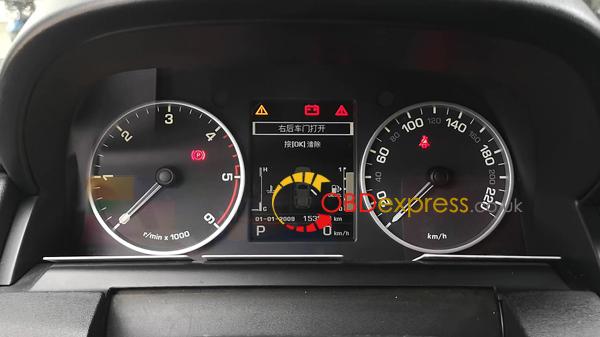
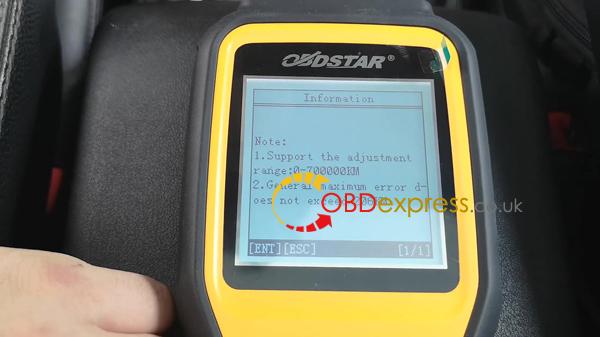
Used obdstar X300M for 2012 Land Rover Discovery 4 Cluster Calibration via OBD succeed.
Video demo:
Simple to use:
Old kilometer value: 153503KM.
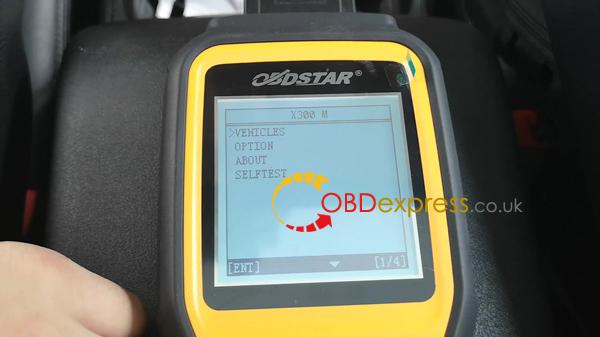
Hook obdstar X300M up to Discovery 4 via OBD, choose "Vehicle".
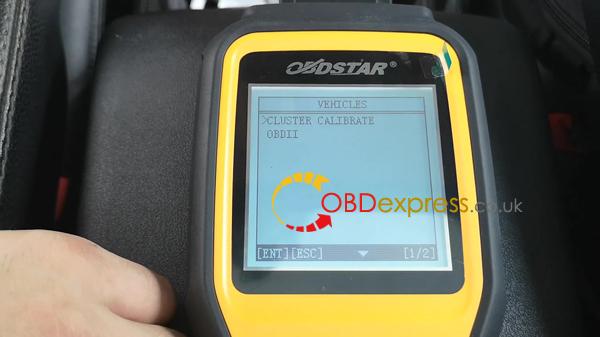
Cluster Calibration.
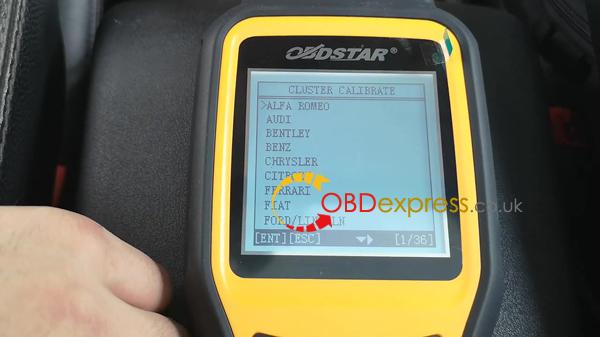
Land Rover, then Discovery 4.
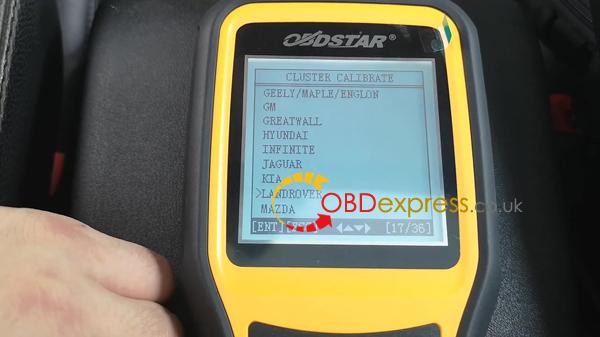
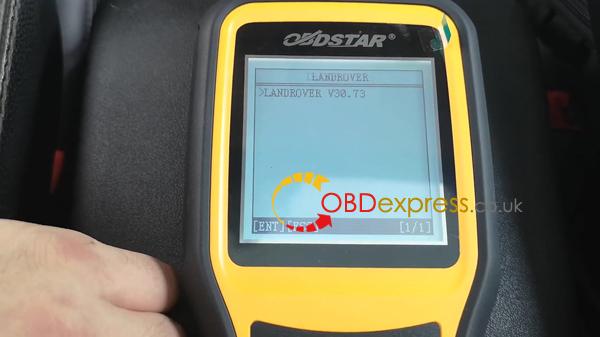
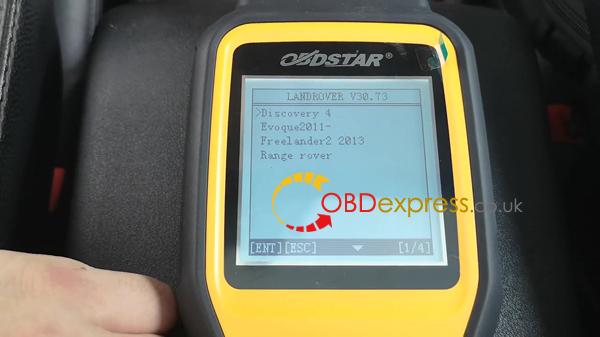
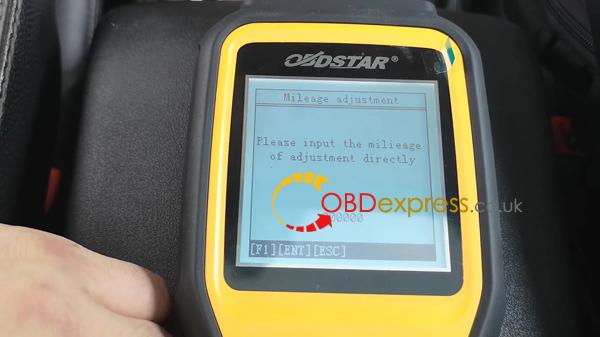
Mileage adjustment
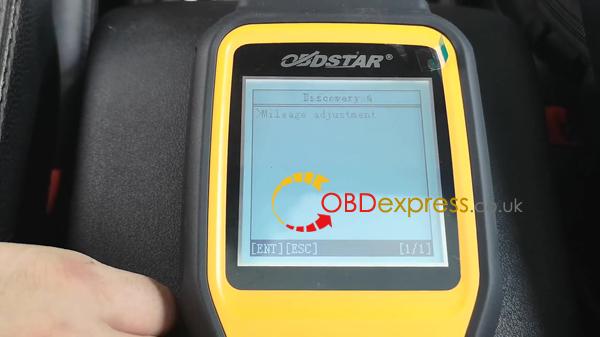
Please input the mileage of adjustment directly.
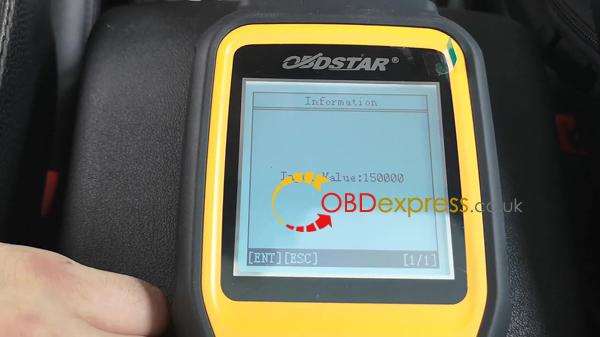
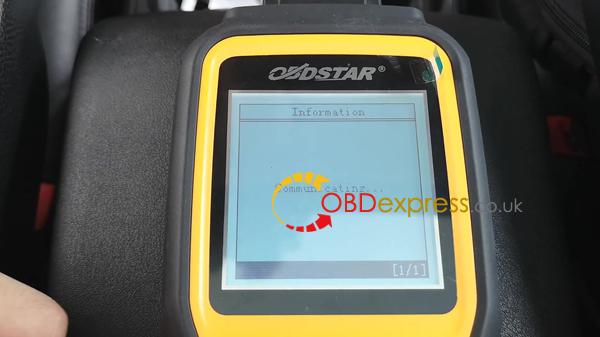
Adjustment complete.
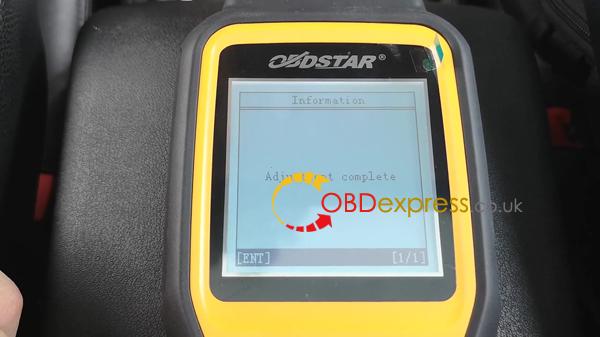
Get new mileage value on the dashboard.
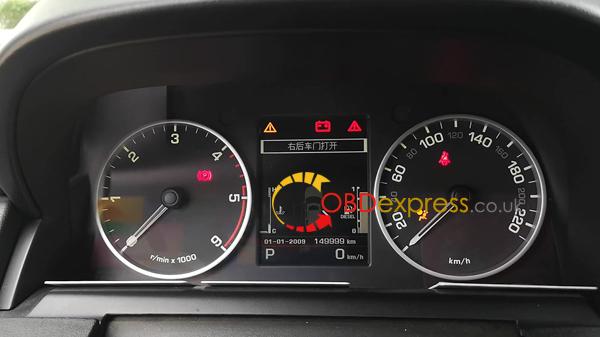
Done.
obdstar X300M is good and fast to correct mileage for 2012 Land Rover Discovery 4 via OBD2.
OBDSTAR X300 DP PLUS also supports2012 Land Rover Discovery 4 odomter correction via OBDII,here is the video demo below:
http://www.mileageprogrammer.com/2012-land-rover-discovery-4-cluster-calibration/
Posted by: OBDexpress.co.uk at
02:02 AM
| No Comments
| Add Comment
Post contains 119 words, total size 6 kb.
34 queries taking 0.0474 seconds, 135 records returned.
Powered by Minx 1.1.6c-pink.

