



June 16, 2018
OBDSTARX300 DP Key MasterBENZ newest software V30.29 can do mileage adjustment on A-Class w169 and w176
VideoTutorial:
In words:
Purpose: OBD odometer correction foraMerceders-
How-to’s: How to use Obdstar X300 DP to adjustMerceders-
Step1: Prepare
ConnectX300 DPwithvechileand

Onmainmenu, click "Diag Programâ€, choose "Cluster Calibrate†function and car maker "BENZâ€.


Go to newest BENZ software V30.29. Choose "A-Class†and "W169â€.


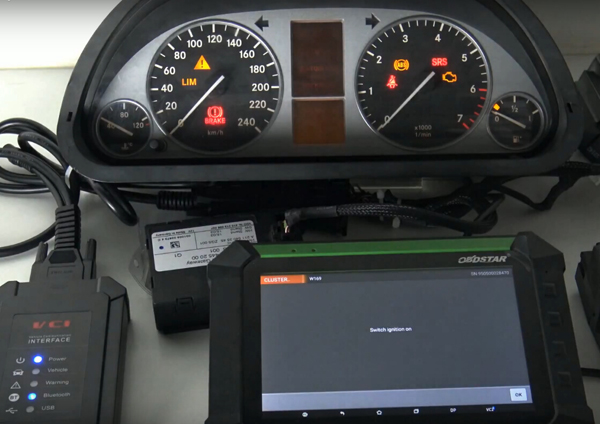


Now time to input a new mileage. In this case, enter 2000


Adjustment success! Using OBDSTAR X300 DP pad successfully

Done!
Src:
http://www.mileageprogrammer.com/x300-dp-change-km-on-w169/
Posted by: OBDexpress.co.uk at
03:52 AM
| No Comments
| Add Comment
Post contains 144 words, total size 16 kb.
OBDSTARX300 DP Key MasterBENZ newest software V30.29 can do mileage adjustment on A-Class w169 and w176,Thisis theintroduction manual of how to do mileagecorretiononMerceders-benzA-class W169 via OBD,thismanualalsoworkfor W176.
VideoTutorial:
In words:
Purpose: OBD odometer correction foraMerceders-benzA-class W169
Toolused:Obdstar X300 DP
How-to’s: How to use Obdstar X300 DP to adjustMerceders-benzA-class W169 mileage through OBD
Step1: Prepare
ConnectX300 DPwithvechileand open X300DP
Onmainmenu, click "Diag Programâ€, choose "Cluster Calibrate†function and car maker "BENZâ€.
Go to newest BENZ software V30.29. Choose "A-Class†and "W169â€.
Afterthatit read out old odometer value as 5007click"OK"buttonto input a new value.
Now time to input a new mileage. In this case, enter 2000
Adjustment success! Using OBDSTAR X300 DP pad successfully changeMerceders-benzA-class W169 dashboard mileage from old 5001 to new 2000!
Done!
Src:
http://www.mileageprogrammer.com/x300-dp-change-km-on-w169/
Posted by: OBDexpress.co.uk at
03:52 AM
| No Comments
| Add Comment
Post contains 136 words, total size 14 kb.
June 15, 2018
Foxwell NT520 Pro– This is for those looking a decent car diagnostic tool for his/her own car(s),
Why did IsaidNT520 (NT510)
Because:
- NT520 is used
for diyer only (not for repair-shops)
usually good for a customer with one or two cars, better with five or less
5 programs at most for a unit (for 5 car brands)
Note that you can get ONLY 5 car brands software authorization with NT510, while you could get ALL software authorization with NT520 and install less than 5 programs on the NT520.
Please
- Software from Foxwell
is cheaper than that from Autel or Launch
Foxwellsoftware authorization: 60 euro per program (with FREE update lifetime)
- NT520 is
a hand -held tool
It depends. Some like handheld, some like
- hardware improvement:
Foxwell NT520 adopts 9X35 + 128MDPR + SPI (2.8-inch screen), which help start faster and running faster than NT510. And it would have better compatibility for some cars
- more cars and software authorization:
Mercedes Benz,Acura,Alfa Romeo,Abarth,American / European Ford (Not incl. Au Ford),BMW, Mini, Chrysler,Fiat,GM,Honda,Hyundai, Kia,Holden,Land Rover, Jaguar,Lancia,Toyota, Lexus, Scion, Maserati,Opel, Vauxhall,Rolls-Royce,VW, Audi, Skoda, Seat,Porsche,Peugeot, Mazda,Ferrari, Aston Martin,Volvo
NT510 is authorized with 5 programs at most.
NT520 has no limit of software authorization, but 5 or less is better for a unit to install, for it can work well if with much software inside.
- more special functions:
TPMS, CVT, Injector, Odometer, Gear learn, Other service maintenance function
- easier to
updatesw :
"Update†is added to the new NT520 Foxwell, so you can connect the device by a USB cable with a laptop/PC to update, download and install software for use. You don’t need a card

http://blog.obdexpress.co.uk/2018/06/15/which-diagnostic-tool-for-you-car-as-personal-use/
Posted by: OBDexpress.co.uk at
03:44 AM
| No Comments
| Add Comment
Post contains 406 words, total size 30 kb.
June 14, 2018
ThisTOYO KEY PROOBD2 OBD II for Toyota 40/80/128 BIT isspecially designed for Toyota 4D67 / 4D68 / G / H,
no matter you have original keys or not.

TOYO KEY PRO Vs TOYO KEYTJECU:
TOYO KEY PRO can work alone, it is plug-and-play.
TOYO KEY TJECU is supposed to work with cn900mini/ND900 mini
TOYO KEY PRO OBD IIFeatures:
1. This TOYO KEY PRO OBD II Can work alone, it's plug-and-play.
2. Works on 40/80/128 BIT (4D, 4D-G, 4D-H)
3. Can use this device to match 2 master keys and 1 valet key.
Using Steps / How to use TOYO KEY PRO?
Video guide:
In words:
1. Insert the key into the ignition lock.

2.Plugthe TOYO KEY Pro OBD-II adapter into the car.

3. When you hear the beeps for the first time, pull out the key and insert the key again.

4. When you hear the beeps again, it means the first key is matchedsuccessful.Meanwhilethe immobilizer light is on and the car enters the matching mode.

5. Pull out the firstkey ,then insert the keys which need to be matched one by one.

6. If the immobilizer light goes out, that means all work done and you can start the car.

7. If the immobilizer light is on all the time, use any key on-off it for 5 times to finish matching.

トヨタOBDï¼2æ“作方法:
1.ã‚ーを入れã¾ã™ã€‚
2.OBDを入れã¾ã™
3.『DI DIã€ã®éŸ³ãŒé€£ç¶šã«2回ã—ãŸæ™‚ã€ã‚ーを引ã抜ãã€ã¾ãŸã‚ーを入れã¾ã™
4.″DIDI″ã®éŸ³ãŒ2回ã—ãŸæ™‚ã€ä¸€ç•ªç›®ã®ã‚ーãŒãƒžãƒƒãƒãƒ³ã‚°å®Œäº†ã§ãã¾ã—ãŸã€‚ãã®æ™‚ã®security
lighãŒé•·ãã¤ã„ã¦ã„ã¾ã™ã€‚マッãƒãƒ³ã‚°æ¨¡å¼ã«å…¥ã£ãŸã¨ã®æ„味を表示ã—ã¾ã™ã€‚
5.一番ã®ã‚ーを抜ã出ã—ã¦æ‰‹é †ã«å¾“ã£ã¦ä½œã‚Šå¿…è¦ãªã‚ーを入れã¾ã™ã€‚
6.ã‚‚ã—security light ãŒæ¶ˆãˆãŸã‚‰å…¨éƒ¨ãƒžãƒƒãƒãƒ³ã‚°çµ‚ã‚ã‚Šã¾ã—ãŸã€‚車を始動ã§ãã¾ã™
7.ã‚‚ã—security lightãŒãšã£ã¨ç‚¹ã„ãŸã‚‰éšæ„1個ã®ã‚ーã§ON-OFFイグニッション5回ã—ã¦ãƒžãƒƒãƒãƒ³ã‚°ã‚’終ã‚ã‚Šã¾ã™ã€‚
PS:40/80/12Bit(4D/4Dï¼G/4D-H)ã«é©ç”¨ã§ã™
ã“ã®å•†å“ã§å¤šãã¦ã‚‚master2個ã€vice1個ã«ãƒãƒƒãƒ—ã‚ーをマッãƒãƒ³ã‚°ã§ãã¾ã™
Шаги ÑƒÐ¿Ñ€Ð°Ð²Ð»ÐµÐ½Ð¸Ñ Ð¢Ð¾Ð¹Ð¾Ñ‚Ð° OBD-â…¡
1) вÑтавлÑÑ‚ÑŒ ключ
2) вÑтавлÑÑ‚ÑŒ OBD-â…¡
3) когда поÑвитÑÑ Ð±ÐµÐ·Ð¾Ñтановочный Ñигнал,
выÑвобождать ключ, еще раз вÑтавлÑÑ‚ÑŒ ключ.
4) Когда Ñлышать Ñигнал два раза,
первый ключ уÑпешно ÑоглаÑовали.
в Ñто Ð²Ñ€ÐµÐ¼Ñ ÑƒÐºÐ°Ð·Ð°Ð½Ð½Ñ‹Ð¹ Ñвет Ñветит, начать ÑоглаÑовать.
5) Ð’Ñ‹Ñвобождать первый ключ, и вÑтавлÑÑ‚ÑŒ ÑоглаÑованный ключ.
6) ЕÑли противоугонное уÑтройÑтво глушит,
вÑе закончилиÑÑŒ.можно зажигать мишину.
7) ЕÑли противоугонное уÑтройÑтво Ñветлеет,
зажигать 5 раза любым ключом,и вÑе
Примечание:подходит чипам 40/80/128 bit (4D /4D–G /4D-H)
Только ÑоглаÑовать Ñ ÐºÐ»ÑŽÑ‡Ð°Ð¼Ð¸ главными 2шт и неглавным 1шт Ñтим прибором.
Package List:
1pc x NEW TOYO KEY PRO OBD II Support Toyota 40/80/128 BIT (4D, 4D-G, 4D-H) All Key Lost


http://blog.obdexpress.co.uk/2018/06/14/how-to-use-toyo-key-pro-obdii/
Posted by: OBDexpress.co.uk at
03:06 AM
| No Comments
| Add Comment
Post contains 354 words, total size 14 kb.
ThisTOYO KEY PROOBD2 OBD II for Toyota 40/80/128 BIT isspecially designed for Toyota 4D67 / 4D68 / G / H,
no matter you have original keys or not.
TOYO KEY PRO Vs TOYO KEYTJECU:
TOYO KEY PRO can work alone, it is plug-and-play.
TOYO KEY TJECU is supposed to work with cn900mini/ND900 mini
TOYO KEY PRO OBD IIFeatures:
1. This TOYO KEY PRO OBD II Can work alone, it's plug-and-play.
2. Works on 40/80/128 BIT (4D, 4D-G, 4D-H)
3. Can use this device to match 2 master keys and 1 valet key.
Using Steps / How to use TOYO KEY PRO?
Video guide:
In words:
1. Insert the key into the ignition lock.
2.Plugthe TOYO KEY Pro OBD-II adapter into the car.
3. When you hear the beeps for the first time, pull out the key and insert the key again.
4. When you hear the beeps again, it means the first key is matchedsuccessful.Meanwhilethe immobilizer light is on and the car enters the matching mode.
5. Pull out the firstkey ,then insert the keys which need to be matched one by one.
6. If the immobilizer light goes out, that means all work done and you can start the car.
7. If the immobilizer light is on all the time, use any key on-off it for 5 times to finish matching.
トヨタOBDï¼2æ“作方法:
1.ã‚ーを入れã¾ã™ã€‚
2.OBDを入れã¾ã™
3.『DI DIã€ã®éŸ³ãŒé€£ç¶šã«2回ã—ãŸæ™‚ã€ã‚ーを引ã抜ãã€ã¾ãŸã‚ーを入れã¾ã™
4.″DIDI″ã®éŸ³ãŒ2回ã—ãŸæ™‚ã€ä¸€ç•ªç›®ã®ã‚ーãŒãƒžãƒƒãƒãƒ³ã‚°å®Œäº†ã§ãã¾ã—ãŸã€‚ãã®æ™‚ã®security
lighãŒé•·ãã¤ã„ã¦ã„ã¾ã™ã€‚マッãƒãƒ³ã‚°æ¨¡å¼ã«å…¥ã£ãŸã¨ã®æ„味を表示ã—ã¾ã™ã€‚
5.一番ã®ã‚ーを抜ã出ã—ã¦æ‰‹é †ã«å¾“ã£ã¦ä½œã‚Šå¿…è¦ãªã‚ーを入れã¾ã™ã€‚
6.ã‚‚ã—security light ãŒæ¶ˆãˆãŸã‚‰å…¨éƒ¨ãƒžãƒƒãƒãƒ³ã‚°çµ‚ã‚ã‚Šã¾ã—ãŸã€‚車を始動ã§ãã¾ã™
7.ã‚‚ã—security lightãŒãšã£ã¨ç‚¹ã„ãŸã‚‰éšæ„1個ã®ã‚ーã§ON-OFFイグニッション5回ã—ã¦ãƒžãƒƒãƒãƒ³ã‚°ã‚’終ã‚ã‚Šã¾ã™ã€‚
PS:40/80/12Bit(4D/4Dï¼G/4D-H)ã«é©ç”¨ã§ã™
ã“ã®å•†å“ã§å¤šãã¦ã‚‚master2個ã€vice1個ã«ãƒãƒƒãƒ—ã‚ーをマッãƒãƒ³ã‚°ã§ãã¾ã™
Шаги ÑƒÐ¿Ñ€Ð°Ð²Ð»ÐµÐ½Ð¸Ñ Ð¢Ð¾Ð¹Ð¾Ñ‚Ð° OBD-â…¡
1) вÑтавлÑÑ‚ÑŒ ключ
2) вÑтавлÑÑ‚ÑŒ OBD-â…¡
3) когда поÑвитÑÑ Ð±ÐµÐ·Ð¾Ñтановочный Ñигнал,
выÑвобождать ключ, еще раз вÑтавлÑÑ‚ÑŒ ключ.
4) Когда Ñлышать Ñигнал два раза,
первый ключ уÑпешно ÑоглаÑовали.
в Ñто Ð²Ñ€ÐµÐ¼Ñ ÑƒÐºÐ°Ð·Ð°Ð½Ð½Ñ‹Ð¹ Ñвет Ñветит, начать ÑоглаÑовать.
5) Ð’Ñ‹Ñвобождать первый ключ, и вÑтавлÑÑ‚ÑŒ ÑоглаÑованный ключ.
6) ЕÑли противоугонное уÑтройÑтво глушит,
вÑе закончилиÑÑŒ.можно зажигать мишину.
7) ЕÑли противоугонное уÑтройÑтво Ñветлеет,
зажигать 5 раза любым ключом,и вÑе
Примечание:подходит чипам 40/80/128 bit (4D /4D–G /4D-H)
Только ÑоглаÑовать Ñ ÐºÐ»ÑŽÑ‡Ð°Ð¼Ð¸ главными 2шт и неглавным 1шт Ñтим прибором.
Package List:
1pc x NEW TOYO KEY PRO OBD II Support Toyota 40/80/128 BIT (4D, 4D-G, 4D-H) All Key Lost
http://blog.obdexpress.co.uk/2018/06/14/how-to-use-toyo-key-pro-obdii/
Posted by: OBDexpress.co.uk at
03:06 AM
| No Comments
| Add Comment
Post contains 354 words, total size 14 kb.
ThisTOYO KEY PROOBD2 OBD II for Toyota 40/80/128 BIT
no matter you have original keys or not.
TOYO KEY PRO Vs TOYO KEYTJECU:
TOYO KEY PRO can work alone, it is plug-and-play.
TOYO KEY TJECU is supposed to work with cn900mini/ND900 mini
TOYO KEY PRO OBD IIFeatures:
1. This TOYO KEY PRO OBD II Can work alone, it's plug-and-play.
2. Works on 40/80/128 BIT (4D, 4D-G, 4D-H)
3. Can use this device to match 2 master keys and 1 valet key.
Using Steps / How to use TOYO KEY PRO?
Video guide:
In words:
1. Insert the key into the ignition lock.
2.
3. When you hear the beeps for the first time, pull out the key and insert the key again.
4. When you hear the beeps again, it means the first key is
5. Pull out the
6. If the immobilizer light goes out, that means all work done and you can start the car.
7. If the immobilizer light is on all the time, use any key on-off it for 5 times to finish matching.
トヨタOBDï¼2æ“作方法:
1.ã‚ーを入れã¾ã™ã€‚
2.OBDを入れã¾ã™
3.『DI DIã€ã®éŸ³ãŒé€£ç¶šã«2回ã—ãŸæ™‚ã€ã‚ーを引ã抜ãã€ã¾ãŸã‚ーを入れã¾ã™
4.″DIDI″ã®éŸ³ãŒ2回ã—ãŸæ™‚ã€ä¸€ç•ªç›®ã®ã‚ーãŒãƒžãƒƒãƒãƒ³ã‚°å®Œäº†ã§ãã¾ã—ãŸã€‚ãã®æ™‚ã®security
lighãŒé•·ãã¤ã„ã¦ã„ã¾ã™ã€‚マッãƒãƒ³ã‚°æ¨¡å¼ã«å…¥ã£ãŸã¨ã®æ„味を表示ã—ã¾ã™ã€‚
5.一番ã®ã‚ーを抜ã出ã—ã¦æ‰‹é †ã«å¾“ã£ã¦ä½œã‚Šå¿…è¦ãªã‚ーを入れã¾ã™ã€‚
6.ã‚‚ã—security light ãŒæ¶ˆãˆãŸã‚‰å…¨éƒ¨ãƒžãƒƒãƒãƒ³ã‚°çµ‚ã‚ã‚Šã¾ã—ãŸã€‚車を始動ã§ãã¾ã™
7.ã‚‚ã—security lightãŒãšã£ã¨ç‚¹ã„ãŸã‚‰éšæ„1個ã®ã‚ーã§ON-OFFイグニッション5回ã—ã¦ãƒžãƒƒãƒãƒ³ã‚°ã‚’終ã‚ã‚Šã¾ã™ã€‚
PS:40/80/12Bit(4D/4Dï¼G/4D-H)ã«é©ç”¨ã§ã™
ã“ã®å•†å“ã§å¤šãã¦ã‚‚master2個ã€vice1個ã«ãƒãƒƒãƒ—ã‚ーをマッãƒãƒ³ã‚°ã§ãã¾ã™
Шаги ÑƒÐ¿Ñ€Ð°Ð²Ð»ÐµÐ½Ð¸Ñ Ð¢Ð¾Ð¹Ð¾Ñ‚Ð° OBD-â…¡
1) вÑтавлÑÑ‚ÑŒ ключ
2) вÑтавлÑÑ‚ÑŒ OBD-â…¡
3) когда поÑвитÑÑ Ð±ÐµÐ·Ð¾Ñтановочный Ñигнал,
выÑвобождать ключ, еще раз вÑтавлÑÑ‚ÑŒ ключ.
4) Когда Ñлышать Ñигнал два раза,
первый ключ уÑпешно ÑоглаÑовали.
в Ñто Ð²Ñ€ÐµÐ¼Ñ ÑƒÐºÐ°Ð·Ð°Ð½Ð½Ñ‹Ð¹ Ñвет Ñветит, начать ÑоглаÑовать.
5) Ð’Ñ‹Ñвобождать первый ключ, и вÑтавлÑÑ‚ÑŒ ÑоглаÑованный ключ.
6) ЕÑли противоугонное уÑтройÑтво глушит,
вÑе закончилиÑÑŒ.можно зажигать мишину.
7) ЕÑли противоугонное уÑтройÑтво Ñветлеет,
зажигать 5 раза любым ключом,и вÑе
Примечание:подходит чипам 40/80/128 bit (4D /4D–G /4D-H)
Только ÑоглаÑовать Ñ ÐºÐ»ÑŽÑ‡Ð°Ð¼Ð¸ главными 2шт и неглавным 1шт Ñтим прибором.
Package List:
1pc x NEW TOYO KEY PRO OBD II Support Toyota 40/80/128 BIT (4D, 4D-G, 4D-H) All Key Lost
http://blog.obdexpress.co.uk/2018/06/14/how-to-use-toyo-key-pro-obdii/
Posted by: OBDexpress.co.uk at
03:06 AM
| No Comments
| Add Comment
Post contains 357 words, total size 15 kb.
June 13, 2018
First: to update theLaunch Creader VI, to start withobtainthe newest updateat:http://www.crecorder.com.
Essential notice: before to attach the software, make sure you first end the subsequent measures.
Second: after end download Creader VI update application, the update application will firstly install, and USB drivers application instantly installation follows, please wait a couple of times the USB drivers application set up needs a while to finish.
Action three: if you see the home windows reveals "windows are unable to verify the publisher of the driver softwareâ€, click on and select "Install driver computer software anywayâ€.

Once the drivers have completed setting up join the software to any USB port.
The USB motorists ought to set up mechanically.
Phase four: correct installis finishonce the "ZhiYuan USB Device†shows beneath the system supervisor as being the follows, this means
You have configured Launch Creader VI motorists properly and then run the software update resource to update the Creader Vi

Take note: Troubleshooting Creader Vi driver install.
For those who simply cannot see the resource showing while in the updated program and located no hardware during the computer software plan, then youdefinatelyshould do such as this:
1. connect the tool to your USB port.
2. Open machine supervisor.
In case you have linked the device right before putting in the software package then you really will see "unknown device†in gadget supervisor.

3. Right simply clic
4. Once the motorists have uninstalled then disconnect the device within the USB.
5. Reconnect the software after which the right drivers really should put in immediately
Src:
Posted by: OBDexpress.co.uk at
09:03 AM
| No Comments
| Add Comment
Post contains 272 words, total size 12 kb.
June 12, 2018
Ksuite2.47
You can free download K-Suite 2.47 here:
https://mega.nz/#!8QgwSboa!XLUqAJBt6ISsL4ijpdxZ68emHJa8
Password:
- No need to active
- Works on Win XP / Win7 32bit, Win 8, etc.
- Language available:English, German, Spanish, Italian, Portuguese, French.
Ksuite2.47 installation:
(Sorry for your inconvenience, th
Ksuite2.47 is tested ok with the followingkessv2 5.017 hardware:
1). Item No. SE137-C, green PCB

Source:http://www.obd2eshop.com/wholesale/kess-v2-online-version.html
Price: $105
2). Online Version Kess V2 5.017 Red PCB

Source:http://www.obd2eshop.com/wholesale/kess-5017-red-
Price: $109 free shipping
4) Online Version Kess V2 5.017 Green PCB (Same as the above one)


Source:http://www.obd2eshop.com/wholesale/kess-v2-green-
Price: $109 free shipping
K-Suite 2.47 compares with 2.23:
Caterpillar A5E2 P549
VOLVO 1.6/2.0 Continental SID807 P489
Ford Truck FPT ENGINE BOSCH EDC7U31 KLINE P548
Husquarna KEIHIN P554
ALL SIMOS18 18.1 18.2 NEW GENERATION 4,5mb
MANY CHECKSUM BUGS FIXED
It's the time to put all of the K-Suite 2.47 added 7400 car models:


K-Suite 2.47 tech support is offered bywww.obd2eshop.com
Src:
http://blog.obd2eshop.com/ksuite-v2-47-win-7-8-10-free-download-and-installation/
Posted by: OBDexpress.co.uk at
09:32 AM
| No Comments
| Add Comment
Post contains 214 words, total size 14 kb.
Ksuite2.47
You can free download K-Suite 2.47 here:
https://mega.nz/#!8QgwSboa!XLUqAJBt6ISsL4ijpdxZ68emHJa8
Password:
- No need to active
- Works on Win XP / Win7 32bit, Win 8, etc.
- Language available:English, German, Spanish, Italian, Portuguese, French.
Ksuite2.47 installation:
(Sorry for your inconvenience, th
Ksuite2.47 is tested ok with the followingkessv2 5.017 hardware:
1). Item No. SE137-C, green PCB
Source:http://www.obd2eshop.com/wholesale/kess-v2-online-version.html
Price: $105
2). Online Version Kess V2 5.017 Red PCB
Source:http://www.obd2eshop.com/wholesale/kess-5017-red-
Price: $109 free shipping
4) Online Version Kess V2 5.017 Green PCB (Same as the above one)
Source:http://www.obd2eshop.com/wholesale/kess-v2-green-
Price: $109 free shipping
K-Suite 2.47 compares with 2.23:
Caterpillar A5E2 P549
VOLVO 1.6/2.0 Continental SID807 P489
Ford Truck FPT ENGINE BOSCH EDC7U31 KLINE P548
Husquarna KEIHIN P554
ALL SIMOS18 18.1 18.2 NEW GENERATION 4,5mb
MANY CHECKSUM BUGS FIXED
It's the time to put all of the K-Suite 2.47 added 7400 car models:
K-Suite 2.47 tech support is offered bywww.obd2eshop.com
Src:
http://blog.obd2eshop.com/ksuite-v2-47-win-7-8-10-free-download-and-installation/
Posted by: OBDexpress.co.uk at
09:32 AM
| No Comments
| Add Comment
Post contains 214 words, total size 14 kb.
Here let’s check how to update thex 431 V/x-431V+ diagnostic scanner.
1) Clickredbox marked "1†above. Press on X431 V+ icon and push it up to the trash bin
2) Click "Settings†>> select Manage Apps>> X431 V+ >>Uninstall
3) Browse Launch websitewww.dbscar.com.
Click Category Product, selectLaunch Vor V+.
Click "Download for Android†below X431 V image to start download client.
Downloading, please wait patiently,fileabout 19MB.
Double click X431_V.apk
Click "Installation Package†after complete download.
Click "Installâ€
Click "OK†when the system prompts to update
Click "Cancelâ€, because I haven’tlogin.
4)Loginwith your CC number and password
Read Claim, click "Readâ€
Select Bluetooth Serial Number
5)Click "Downloadâ€, this is old software version.
Select the vehicles you want to download. Note: the software downloaded fromofficialsite is the newest version
Click "followingâ€
Click "Downloadâ€
After complete download, no vehicle software found, since its old version, exit the BDScar site, andloginagain to update.
7) Login www.dbscar.com, openX431V, it prompts to update, click OK
Do not click Cancel, let it download program automatically, it will take less than 20minutes.
Click "Installation Package†after complete download.
Click "OK†to replace old application and the former information will be saved
Click "Installâ€
After complete download, the car models will display
Note: better not click "One Key Update†to update
Click "Association†to pair Bluetooth
Src:
http://blog.obdexpress.co.uk/2018/06/12/how-to-update-launch-x431-v-x431-vplus/
Posted by: OBDexpress.co.uk at
06:41 AM
| No Comments
| Add Comment
Post contains 228 words, total size 3 kb.
Here let’s check how to update thex 431 V/x-431V+ diagnostic scanner.
1) Clickredbox marked "1†above. Press on X431 V+ icon and push it up to the trash bin
2) Click "Settings†>> select Manage Apps>> X431 V+ >>Uninstall
3) Browse Launch websitewww.dbscar.com.
Click Category Product, selectLaunch Vor V+.
Click "Download for Android†below X431 V image to start download client.
Downloading, please wait
Double click X431_V.apk
Click "Installation Package†after complete download.
Click "Installâ€
Click "OK†when the system prompts to update
Click "Cancelâ€, because I haven’tlogin.
4)Loginwith your CC number and password
Read Claim, click "Readâ€
Select Bluetooth Serial Number
5)Click "Downloadâ€, this is old software version.
Select the vehicles you want to download. Note: the software downloaded fromofficialsite is the newest version
Click "followingâ€
Click "Downloadâ€
After complete download, no vehicle software found, since its old version, exit the BDScar site, andloginagain to update.
7) Login www.dbscar.com, openX431V, it prompts to update, click OK
Do not click Cancel, let it download program automatically, it will take less than 20minutes.
Click "Installation Package†after complete download.
Click "OK†to replace old application and the former information will be saved
Click "Installâ€
After complete download, the car models will display
Note: better not click "One Key Update†to update
Click "Association†to pair Bluetooth
Src:
http://blog.obdexpress.co.uk/2018/06/12/how-to-update-launch-x431-v-x431-vplus/
Posted by: OBDexpress.co.uk at
06:41 AM
| No Comments
| Add Comment
Post contains 228 words, total size 3 kb.
June 09, 2018
Thread:problems withXhorse BE key improved version
Does anyone of you have problems with Xhorse BE keyproimproved version??
I have same problems like on old PCB
The problem is: sometimes the keyisn’t recognizeby EIS. Then need to remove end putagain..
The package I have:

Re: problems with Xhorse BE key improved version
I just had 2 be keys that would not work yesterday. I wrote to another key and the car started fine.
tried 3 open spots
Re: problems with Xhorse BE key improved version
what was the symptomsihad a w211 yesterday two keys BE neither worked, kept saying please waitlearningkey. remote worked fine. what type of key did you use in the end
Re: problems with Xhorse BE key improved version
I in that case you need to write the key to another position.
Or leave inignitionfor up to 24hrs
Re: problems withXhorse BE key improved version
Try position 1 and Make sure you have good voltage
Src:
http://www.obdexpress.co.uk/service/xhorse-vvdi-be-key-pro-reviews.html
Posted by: OBDexpress.co.uk at
05:51 AM
| No Comments
| Add Comment
Post contains 168 words, total size 2 kb.
Thread:problems withXhorse BE key improved version
Does anyone of you have problems with Xhorse BE keyproimproved version??
I have same problems like on old PCB
The problem is: sometimes the keyisn’t recognizeby EIS. Then need to remove end putagain..
The package I have:
Re: problems with Xhorse BE key improved version
I just had 2 be keys that would not work yesterday. I wrote to another key and the car started fine.
tried 3 open spots
Re: problems with Xhorse BE key improved version
what was the symptomsihad a w211 yesterday two keys BE neither worked, kept saying please waitlearningkey. remote worked fine. what type of key did you use in the end
Re: problems with Xhorse BE key improved version
I in that case you need to write the key to another position.
Or leave inignitionfor up to 24hrs
Re: problems withXhorse BE key improved version
Try position 1 and Make sure you have good voltage
Src:
http://www.obdexpress.co.uk/service/xhorse-vvdi-be-key-pro-reviews.html
Posted by: OBDexpress.co.uk at
05:51 AM
| No Comments
| Add Comment
Post contains 168 words, total size 2 kb.
Thread:problems withXhorse BE key improved version
Does anyone of you have problems with Xhorse BE keyproimproved version??
I have same problems like on old PCB
The problem is: sometimes the keyisn’t recognizeby EIS. Then need to remove end putagain..
The package I have:
Re: problems with Xhorse BE key improved version
I just had 2 be keys that would not work yesterday. I wrote to another key and the car started fine.
tried 3 open spots
Re: problems with Xhorse BE key improved version
what was the symptomsihad a w211 yesterday two keys BE neither worked, kept saying please waitlearningkey. remote worked fine. what type of key did you use in the end
Re: problems with Xhorse BE key improved version
I in that case you need to write the key to another position.
Or leave
Re: problems withXhorse BE key improved version
Try position 1 and Make sure you have good voltage
Src:
http://www.obdexpress.co.uk/service/xhorse-vvdi-be-key-pro-reviews.html
Posted by: OBDexpress.co.uk at
05:51 AM
| No Comments
| Add Comment
Post contains 168 words, total size 3 kb.
June 08, 2018
Here is a fix for the problem with 4.5mbsimos18 files.
Device:ksuite2.47 andkessv2 5.017 clone
Error:"Wrong file size". "File incompatible with the ECUâ€
Tried 4mb file: not worked! Still the same Problem.
Fix:
Try in recovery and continue to the end of the process.
Incorrect file size is with 5.017
File incompatible
This error is because
ProtocolVAG CONTINENTAL SIMOS18 TC1791 CAN :
InKess5.017
In
I don't connect to a car to test now but here is my test withKsuite2.47 and 5.017 or 5.028
Ksuite2.47 withKtag5.017 :
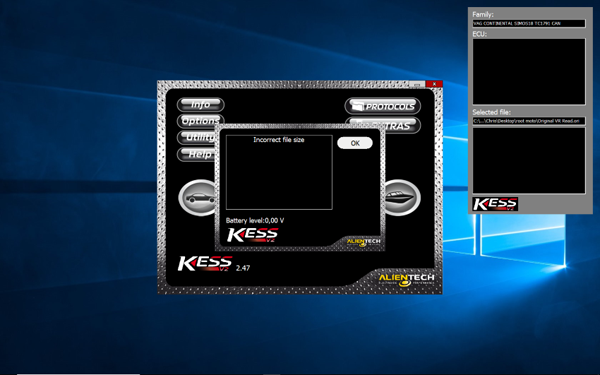
Ksuite2.47 withKtag5.028 :

kesssw2.22-2.25 and fw5.017 not support simos18 with 4.5mb file
the file support from sw2.26 and fw5.02x
http://rtqobd2.ivoire-blog.com/
Posted by: OBDexpress.co.uk at
01:55 AM
| No Comments
| Add Comment
Post contains 135 words, total size 4 kb.
June 06, 2018
Hello guys,
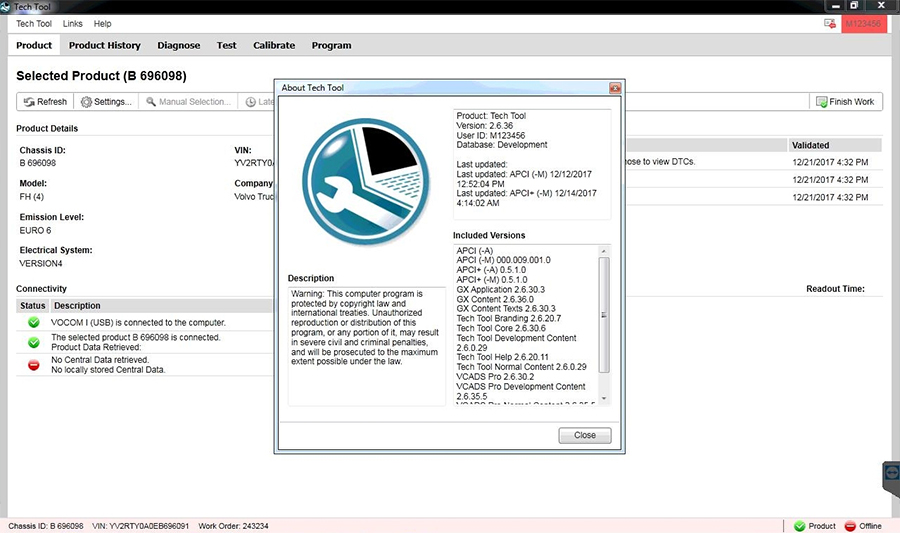
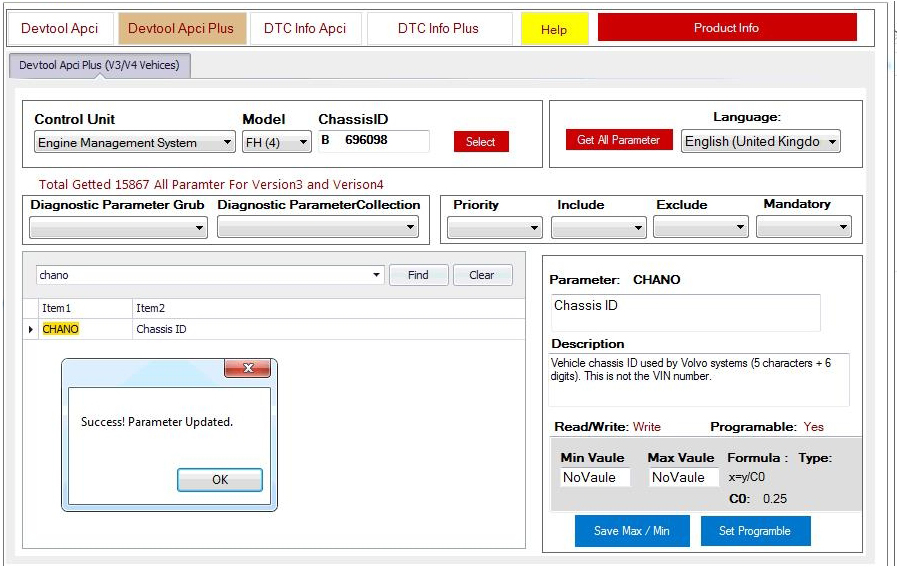
Premium Tech Tool is updated to version 2.6.60:
Volvo PTT 2.6.60
Developer Tool Plus
APCI (-M) 000.009.001.0 5/15/2018
APCI+ (-A) 0.5.1.0 4/16/2018
APCI+ (-M) 0.5.1.0 4/16/2018
VisFed 0.3.1
WithFREEVolvo Tech ToolInstallation & Activation Help
Volvo Tech Tool 2.6confirmed


Scr:
Posted by: OBDexpress.co.uk at
08:47 AM
| No Comments
| Add Comment
Post contains 54 words, total size 13 kb.
Hello guys,
Premium Tech Tool is updated to version 2.6.60:
Volvo PTT 2.6.60
Developer Tool Plus
APCI (-M) 000.009.001.0 5/15/2018
APCI+ (-A) 0.5.1.0 4/16/2018
APCI+ (-M) 0.5.1.0 4/16/2018
VisFed 0.3.1
WithFREEVolvo Tech ToolInstallation & Activation Help
Volvo Tech Tool 2.6confirmed
Scr:
Posted by: OBDexpress.co.uk at
08:47 AM
| No Comments
| Add Comment
Post contains 54 words, total size 13 kb.
Yanhua ACDPcan read and write BMW DME ISN Code, what it can cover? read the following table.
|
|
|
|
|
|
|
|
Read and write BMW ISN code (with wiring diagram) |
Read and write the engine ISN code via OBD |
Read and write N20/N13/N55 engine ISN code |
|
|
Read write MSV80/MSV85 engine ISN code |
|
|||
|
Dismantle the engine to read & write ISN code |
E Series |
DDE70_EDC17C06 |
||
|
DDE701_EDC17C50 |
||||
|
DDE71_EDC17CP02 |
||||
|
DDE721_EDC17C41 |
||||
|
DDE73_EDC17CP09 |
||||
|
DDE731_EDC17CP45 |
||||
|
MEVD17(N55) |
||||
|
MEVD1724(N20) |
||||
|
MEVD1726(N55) |
||||
|
MEVD1729(N20) |
||||
|
MSV80 |
||||
|
MSD80 |
||||
|
MSD81 |
||||
|
MSD85 |
||||
|
F Series |
DDE701A |
|||
|
DDE701P |
||||
|
DDE721B |
||||
|
DDE721P |
||||
|
DDE73A |
||||
|
DDE731A |
||||
|
DDE741A |
||||
|
DDE751A |
||||
|
MEVD172(N55) |
||||
|
MEVD1726(N55) |
||||
|
MEVD1724(N20) |
||||
|
MEVD1725(N13) |
||||
|
MEVD172G(N55) |
||||
|
MEVD172S(N55) |
||||
|
MEVD172P(N20) |
||||
|
MEVD1728(S63) |
||||
|
MEVD1729(N20) |
||||
|
MSD85 |
||||
|
MSD85HY |
||||
|
MSD87 |
||||
|
MSV90 |
||||
|
R Series |
MEV1722 |
|||
|
MED172 |
||||
|
DDE701_EDC17C50 |
||||
|
MEVD1727 |
||||
|
M Series |
BMSX |
|||
|
Repair BMW module |
FEM/BDC system |
|
|
|
|
BMW CAS4/CAS4+ |
9S12XDP512(Mask 1L15Y) |
Immobilizer |
|
|
|
Mileage correction |
|
|||
|
9S12XEP100(Mask 5M48H/1N35H) |
Immobilizer |
|
||
|
Mileage correction |
|
|||
|
BMW CAS3/CAS3+ |
via OBD |
Immobilizer |
|
|
|
Mileage correction |
|
|||
|
MC68HC9S12 Dx512(Mask 0L15Y) |
Immobilizer |
|
||
|
Mileage correction |
|
|||
|
MC68HC9S12 Dx256(Mask 0L01Y) |
Immobilizer |
|
||
|
Mileage correction |
|
|||
|
MC68HC9S12 Dx128 |
Immobilizer |
|
||
|
Mileage correction |
|
|||
|
MC68HC9S12 D64 |
Immobilizer |
|
||
|
Mileage correction |
|
|||
|
MC68HC12 Dx128 |
Immobilizer |
|
||
|
Mileage correction |
|
|||
|
MC68HC12 D60 |
Immobilizer |
|
||
|
Mileage correction |
|
Yanhua ACDP best resource:
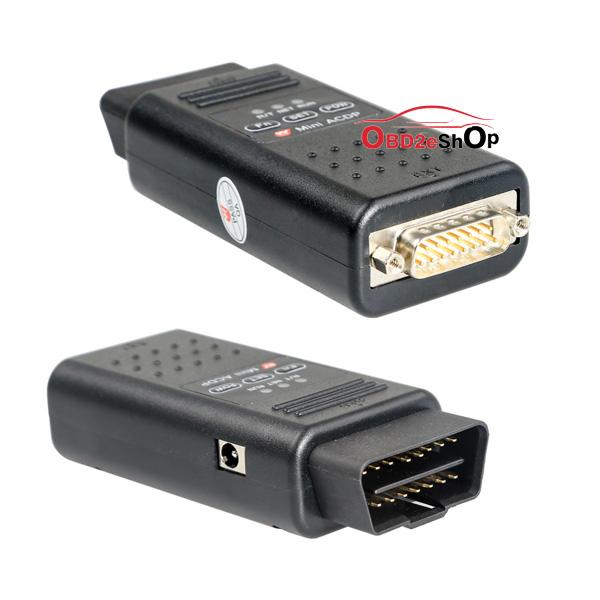
You have to purchase the main hardware and then you can add-on different modules incl. FEM/BDC module, CAS module, read DME ISN module and a couple of other modules.http://www.obd2eshop.com/wholesale/yanhua-mini-acdp-plus-full-package-5-adapters.html
Src:
http://blog.obd2eshop.com/how-many-bmw-dme-isn-codes-yanhua-acdp-can-read-and-write/
Posted by: OBDexpress.co.uk at
07:18 AM
| No Comments
| Add Comment
Post contains 208 words, total size 9 kb.
Yanhua ACDPcan read and write BMW DME ISN Code, what it can cover? read the following table.
|
|
|
|
|
|
|
|
Read and write BMW ISN code (with wiring diagram) |
Read and write the engine ISN code via OBD |
Read and write N20/N13/N55 engine ISN code |
|
|
Read write MSV80/MSV85 engine ISN code |
|
|||
|
Dismantle the engine to read & write ISN code |
E Series |
DDE70_EDC17C06 |
||
|
DDE701_EDC17C50 |
||||
|
DDE71_EDC17CP02 |
||||
|
DDE721_EDC17C41 |
||||
|
DDE73_EDC17CP09 |
||||
|
DDE731_EDC17CP45 |
||||
|
MEVD17(N55) |
||||
|
MEVD1724(N20) |
||||
|
MEVD1726(N55) |
||||
|
MEVD1729(N20) |
||||
|
MSV80 |
||||
|
MSD80 |
||||
|
MSD81 |
||||
|
MSD85 |
||||
|
F Series |
DDE701A |
|||
|
DDE701P |
||||
|
DDE721B |
||||
|
DDE721P |
||||
|
DDE73A |
||||
|
DDE731A |
||||
|
DDE741A |
||||
|
DDE751A |
||||
|
MEVD172(N55) |
||||
|
MEVD1726(N55) |
||||
|
MEVD1724(N20) |
||||
|
MEVD1725(N13) |
||||
|
MEVD172G(N55) |
||||
|
MEVD172S(N55) |
||||
|
MEVD172P(N20) |
||||
|
MEVD1728(S63) |
||||
|
MEVD1729(N20) |
||||
|
MSD85 |
||||
|
MSD85HY |
||||
|
MSD87 |
||||
|
MSV90 |
||||
|
R Series |
MEV1722 |
|||
|
MED172 |
||||
|
DDE701_EDC17C50 |
||||
|
MEVD1727 |
||||
|
M Series |
BMSX |
|||
|
Repair BMW module |
FEM/BDC system |
|
|
|
|
BMW CAS4/CAS4+ |
9S12XDP512(Mask 1L15Y) |
Immobilizer |
|
|
|
Mileage correction |
|
|||
|
9S12XEP100(Mask 5M48H/1N35H) |
Immobilizer |
|
||
|
Mileage correction |
|
|||
|
BMW CAS3/CAS3+ |
via OBD |
Immobilizer |
|
|
|
Mileage correction |
|
|||
|
MC68HC9S12 Dx512(Mask 0L15Y) |
Immobilizer |
|
||
|
Mileage correction |
|
|||
|
MC68HC9S12 Dx256(Mask 0L01Y) |
Immobilizer |
|
||
|
Mileage correction |
|
|||
|
MC68HC9S12 Dx128 |
Immobilizer |
|
||
|
Mileage correction |
|
|||
|
MC68HC9S12 D64 |
Immobilizer |
|
||
|
Mileage correction |
|
|||
|
MC68HC12 Dx128 |
Immobilizer |
|
||
|
Mileage correction |
|
|||
|
MC68HC12 D60 |
Immobilizer |
|
||
|
Mileage correction |
|
Yanhua ACDP best resource:
You have to purchase the main hardware and then you can add-on different modules incl. FEM/BDC module, CAS module, read DME ISN module and a couple of other modules.http://www.obd2eshop.com/wholesale/yanhua-mini-
Src:
http://blog.obd2eshop.com/how-many-bmw-dme-isn-codes-yanhua-acdp-can-read-and-write/
Posted by: OBDexpress.co.uk at
07:18 AM
| No Comments
| Add Comment
Post contains 209 words, total size 9 kb.
June 05, 2018
This is tech support fromobdexpress.co.ukfor those uses withLonsdorK518ISEfailed to connect the machine to any car listed in K518ISE vehicle list.
OBD test cable testing method…here you go.
Step 1
Step 2
Pay
Connector 1: connect K518ISE OBD port;
Connector 2: connect KPROG adaptor
Connector 3: connect the vehicle OBD port

Pic 1: 3 connectors on OBD cable
Step 3

Pic 2: Metal part on K518ISE OBD port
Step 4
connector (As shown in pic 3

Pic 3: 16 pins on the vehicle OBD connector
PIN 1 and 8 should have no resistance; PIN2,3,4,5,6,7,9,10,11,12,13,14,15,16
should have resistance.
If all have no resistance, then it will be DB25 cable
measurement is all as it supposed to be, and the car models(
supported models) still can’t be connected, then you will need to send back the
DB25 cable and the main unit forLonsdorto check(if so, let us @obdexpress.co.uk know, and we shall talk together about the solution and details,thanks)
Posted by: OBDexpress.co.uk at
08:55 AM
| No Comments
| Add Comment
Post contains 260 words, total size 22 kb.
32 queries taking 0.1177 seconds, 149 records returned.
Powered by Minx 1.1.6c-pink.

