



February 27, 2017
How To Use LAUNCH X431 HD Module Heavy Duty Truck Diagnostic Adapter
Launch X-431 Heavy Duty HD Truck Diagnostic
Adapterworks together with X431 V/V+/PRO/PRO 3/PAD II, turn your device to heavy duty scanner.
Here is a user manual for new arrived
LAUNCH X431 HD Module Heavy Duty Truck Diagnostic Adapter
Incl four parts:
Part 1:Knowledge of X-431 HD Module
Part 2:How to connect OBD II vehicle
Part 3:How to connect non-OBD II vehicle
Part 4: Download and Install X-431 HD Module App
Part 5:Activate X-431 HD Module
User manual download:LAUNCH X431 HD Module Adapter user manual
Part 1:Knowledge of Launch X-431 HD Module
X-431 Heavy-duty Truck Module is a new generation heavy-duty
truck fault diagnostic tooldeveloped by Launch Tech regarding internet application on the basis of Android OS. It communicates withX-431 PRO3/
X-431PAD IIthrough Bluetooth to achieve fault diagnosis for various car models and full systems. Advantages include wide car model coverage, powerful test function, more special functions and accurate test data, etc.
Features
1. Applicable to diesel vehicle of 12V & 24V voltage; no need for battery conversion when testing 24V trucks;
2. Supports a wide range of vehicle models covering Asian, American and European etc;
3. Powerful testing function enables you to diagnose all electronic control system;
4. International design to adapt to all diagnostic sockets.
1. Applicable to diesel vehicle of 12V & 24V voltage; no need for battery conversion when testing 24V trucks;
2. Supports a wide range of vehicle models covering Asian, American and European etc;
3. Powerful testing function enables you to diagnose all electronic control system;
4. International design to adapt to all diagnostic sockets.
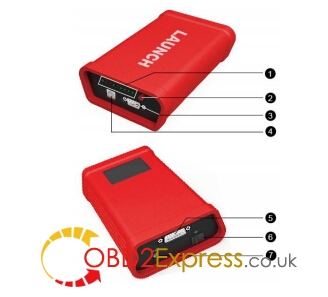
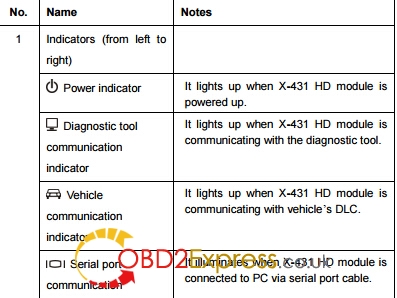
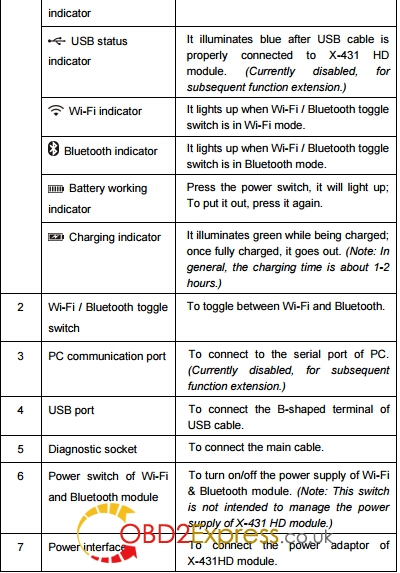
Ports and Indicators of X-431 HD Module
Technical Parameters
* Working voltage: 8~24V
* Working temperature: -15℃ ~ 60℃
* Storage temperature: -20℃ ~ 70℃
* Relative humidity: 10% ~ 80%
* Dimension: 110 mm * 178 mm * 50 mm
* Working voltage: 8~24V
* Working temperature: -15℃ ~ 60℃
* Storage temperature: -20℃ ~ 70℃
* Relative humidity: 10% ~ 80%
* Dimension: 110 mm * 178 mm * 50 mm
Part 2:How to connect OBD II vehicle
Follow the steps described below to proceed:
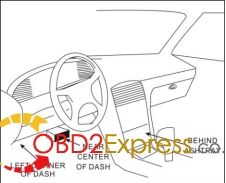
1. Locate vehicle’s DLC socket. The DLC is usually located 12 inches from the center of the instrument panel
(dash), under or around the driver’s side for most vehicles. If Data Link Connector is not located under
dashboard, a label should be there telling location. If the DLC cannot be found, refer to the vehicle’s
service manual for the location
1. Locate vehicle’s DLC socket. The DLC is usually located 12 inches from the center of the instrument panel
(dash), under or around the driver’s side for most vehicles. If Data Link Connector is not located under
dashboard, a label should be there telling location. If the DLC cannot be found, refer to the vehicle’s
service manual for the location
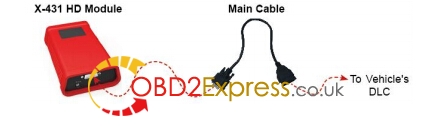
2. Connect one end of the main cable to the diagnostic socket, and then connect other end to the vehicle’s
DLC (For non-16 pin DLC, you need to choose the corresponding diagnostic connector).
DLC (For non-16 pin DLC, you need to choose the corresponding diagnostic connector).
Part 3:How to connect non-OBD II vehicle
Choose one of the following to connect non-OBD II vehicle:
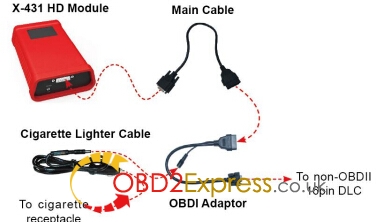
1. Via Cigarette Lighter
1. Via Cigarette Lighter
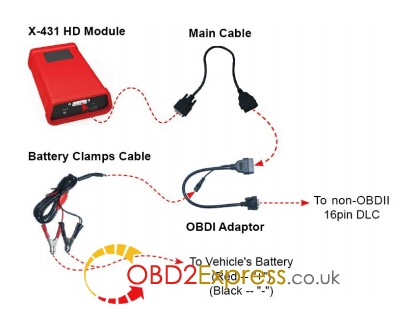
2. Via Battery Clamps Cable
Part 4: Download andInstall X-431 HDModule App
1. Visit the LAUNCH website and download the application corresponding to X-431 HD module; Note: If downloading using the diagnostic tool please make sure Wi-Fi has good or strong signals. 2. Follow the on-screen instructions to install it. Once installation is complete, an application icon will appear on the HOME screen.
Part 5:Activate X-431 HD Module
After purchasing X-431 HD module, you have to activate it before use. Follow the steps below to proceed:
1〠Launch the application, and tap to enter;
2〠Tap "Profile†from the pull-down menu, and then tap "Connector Activationâ€;
"Connector Activationâ€;3〠Input the Serial Number and Verification Code, which can be found in the included password envelope. Tap "Activateâ€.
Posted by: OBDexpress.co.uk at
03:45 AM
| No Comments
| Add Comment
Post contains 512 words, total size 7 kb.
15kb generated in CPU 0.0178, elapsed 0.0475 seconds.
34 queries taking 0.0363 seconds, 45 records returned.
Powered by Minx 1.1.6c-pink.
34 queries taking 0.0363 seconds, 45 records returned.
Powered by Minx 1.1.6c-pink.

